

Old stylesheets grow. Before you delete anything, find out what a real page actually uses. Chrome's Coverage panel does that in a minute, and it is honest about what it cannot tell you.
Step 1: record coverage
- Open the page, then open DevTools.
- Press
Ctrl+Shift+P, type "Coverage" and choose "Show Coverage". - Click the reload button in the Coverage panel. It reloads the page while recording.
- Sort by "Unused Bytes".
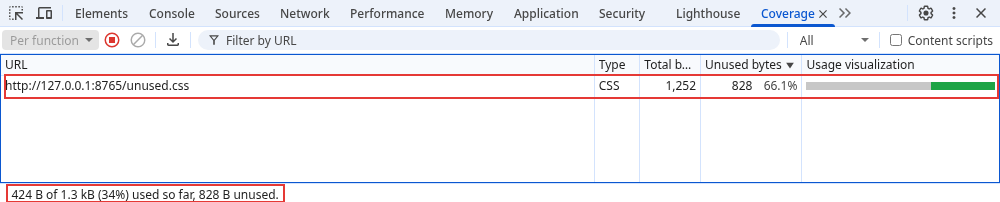
The demo stylesheet (unused.css) is 1,252 bytes. The panel reports 828 bytes unused, which is 66.1%, and says "424 B of 1.3 kB (34%) used so far". The page is a hero, two cards and a footer. The stylesheet also holds a carousel, a legacy modal, tabs, a Black Friday banner and two media queries.
Step 2: exercise the states, then read it again
The panel only counts what ran in that session. I measured the same stylesheet at two window widths with the rule-usage data that DevTools reads:
1280px wide: 1252 bytes, 424 used, 828 unused (66.1%)
390px wide: 1252 bytes, 472 used, 780 unused (62.3%)
At 390px, the max-width: 600px rules applied, so 48 more bytes counted as used. Resize, hover, open menus, trigger errors and print preview. Each action can turn "unused" into "used".
Step 3: decide what is really dead
- Used on this page: keep.
- Unused here, and you can find no template that uses the class: a candidate. Search the codebase for the class name first.
- Unused here, but for a state you did not trigger (error, empty cart, logged-in, print, dark mode): keep until you have tested the state.
- Unused everywhere you checked, but built by JavaScript (
classList.add("is-open")): search the scripts. A search of the HTML will not find it.
⚠ Warning: "Unused" in Coverage means "did not run in this session", not "dead". .banner-black-friday looks unused all year. Check your templates and campaigns before you remove it.
Step 4: remove in small steps
Delete one block at a time, reload, and look at the pages that use that block. Keep the change in version control so one commit can be reverted. After each removal, record coverage again to see the number move.
Common mistakes
- Checking one page and deleting rules the rest of the site needs.
- Forgetting responsive rules, because the window was only one width.
- Removing classes that JavaScript adds.
- Running coverage on a logged-out page, then deleting the rules for the account area.
Related course: HTML and CSS Advanced.
About
Record coverage in Chrome DevTools, test the states that hide rules, and remove dead CSS in small, reversible steps.
Reviews
Sign in to write a reviewComments (0)
Sign in to commentNo comments yet.