

fetch only rejects when there's no response at all: the network is down, the server can't be reached, the request was blocked or cancelled. A 404 or a 500 is still a response, so fetch resolves normally and your code carries on with an error page as if it were data. You have to check response.ok yourself. This page builds one small helper that handles all four ways a request can fail, and shows what each looks like.
Skip ahead: Just want the code? Skip to "The helper".
The four ways a request fails
- HTTP error: the server answered with 4xx or 5xx.
fetchresolves.response.okisfalse. - Network error: no answer at all (offline, DNS failure, connection refused, CORS blocked in the browser).
fetchrejects with aTypeError. In Node the message isfetch failed. In Chrome it'sFailed to fetch. - Timeout: the server is too slow.
fetchhas no default timeout, so without one, it can wait for a very long time. You add one with anAbortSignal. - Bad body: status 200, but the body isn't the JSON you expected.
response.json()rejects with aSyntaxError.
The 404 that doesn't throw
const response = await fetch("https://jsonplaceholder.typicode.com/users/999");
console.log(response.ok, response.status);
const user = await response.json();
console.log(user, user.name);
false 404
{} undefined
No exception. If this was a profile page, it would now say "Hello, undefined".
The helper
class HttpError extends Error {
  constructor(response, body) {
    super(`HTTP ${response.status} ${response.statusText} for ${response.url}`);
    this.name = "HttpError";
    this.status = response.status;
    this.body = body;
  }
}

async function fetchJson(url, { timeoutMs = 8000, ...options } = {}) {
  const response = await fetch(url, { ...options, signal: AbortSignal.timeout(timeoutMs) });
  if (!response.ok) {
    const body = await response.text().catch(() => "");
    throw new HttpError(response, body.slice(0, 200));
  }
  return response.json();
}

const user = await fetchJson("https://jsonplaceholder.typicode.com/users/1");
console.log("ok:", user.name);

for (const [label, url, opts] of [
  ["404", "https://jsonplaceholder.typicode.com/users/999"],
  ["timeout", "https://jsonplaceholder.typicode.com/users/1", { timeoutMs: 1 }],
  ["network", "http://127.0.0.1:9/"],
]) {
  try {
    await fetchJson(url, opts);
  } catch (error) {
    console.log(`${label}: ${error.name}: ${error.message}`);
  }
}
ok: Leanne Graham
404: HttpError: HTTP 404 Not Found for https://jsonplaceholder.typicode.com/users/999
timeout: TimeoutError: The operation was aborted due to timeout
network: TypeError: fetch failed
What each part does:
if (!response.ok)turns 4xx and 5xx into a real error, so it goes to yourcatchlike any other failure.HttpErrorkeeps the status, so the caller can treat a 404 ("not found") differently from a 401 ("log in again") or a 503 ("try again later"). It also keeps the first part of the body, which often contains the server's error message.AbortSignal.timeout(timeoutMs)cancels the request if it takes too long. It rejects with aTimeoutError. It's supported in current browsers and in Node 17.3 and later.response.json()at the end still throws aSyntaxErrorif the body isn't JSON. Let it go to the caller, because there's nothing sensible to return.
⚠ Warning: Don't retry everything. A 400 or 404 will fail again exactly the same way. Retry only network errors, timeouts, 429 (too many requests) and 5xx, a small number of times, with a growing wait between tries. And never automatically retry a request that creates something, like placing an order, unless the API supports it safely. Two retries can mean three orders.
Using it
try {
  const user = await fetchJson(`/api/users/${id}`);
  showUser(user);
} catch (error) {
  if (error.name === "HttpError" && error.status === 404) {
    showMessage("That user doesn't exist.");
  } else if (error.name === "HttpError" && error.status === 401) {
    redirectToLogin();
  } else if (error.name === "TimeoutError") {
    showMessage("The server is slow right now. Try again in a minute.");
  } else {
    showMessage("Couldn't load the user. Check your connection.");
    console.error(error);
  }
}
The user gets a message that matches what happened, and unexpected errors still reach the console.
What it looks like in DevTools
In the browser, a failed request is red in the Network tab even when your code didn't throw:
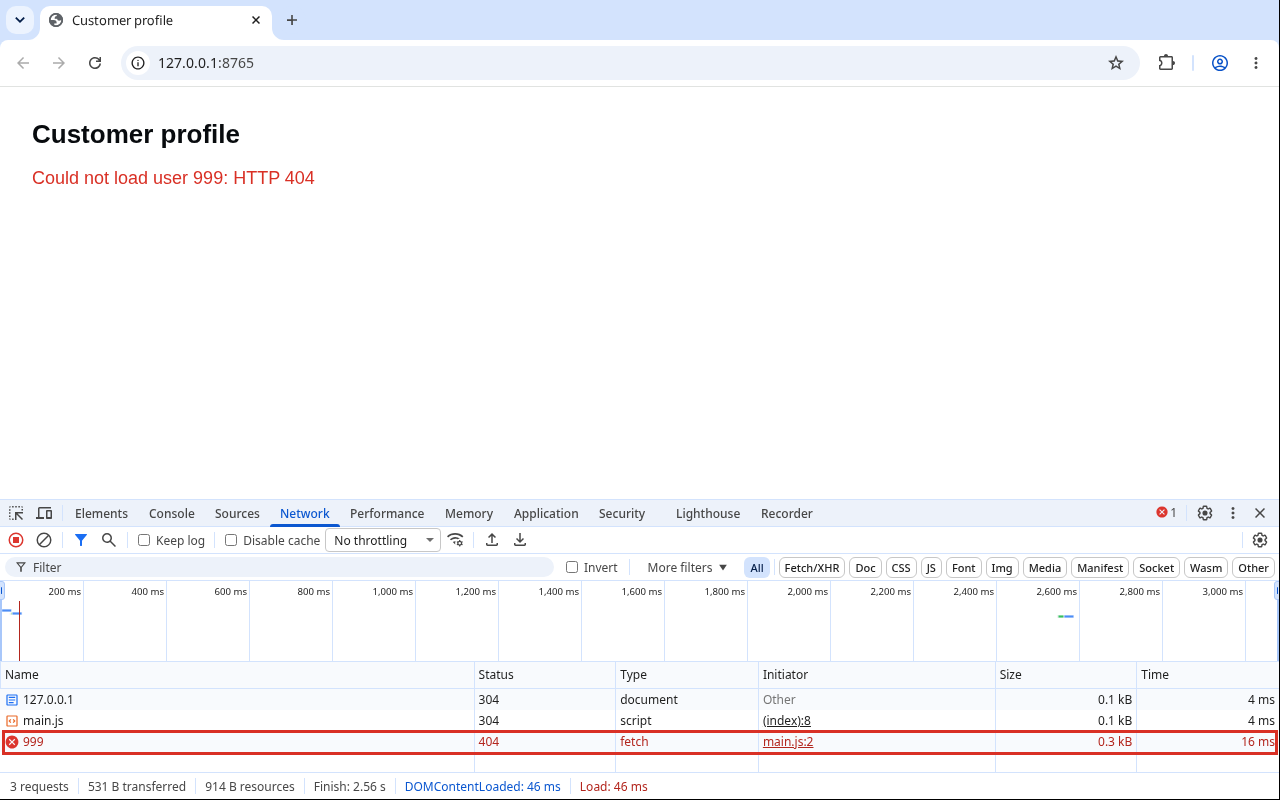
Status 404 or 500 means the server answered: use response.ok. Status shown as (failed) or (canceled) means there was no response: that's the TypeError or the timeout. If the console also says something about CORS, the server didn't allow your page's origin, and that has to be fixed on the server, not in fetch.
💡 Tip: response.status 0 with type: "opaque" means you used mode: "no-cors". That doesn't fix CORS. It just hides the response from your code. Remove it.
Checklist
- Check
response.okon every request. - Add a timeout.
- Keep the status on the error so callers can decide.
- Show the user a message that matches the failure.
- Log the unexpected ones.
Turn off your Wi-Fi and use your app. What does the user see?
About
Build a small fetchJson helper that handles HTTP errors, network errors, timeouts and bad JSON, then show the right message for each. After this, a failed request never turns into "Hello, undefined".
Reviews
Sign in to write a reviewComments (0)
Sign in to commentNo comments yet.