

"Uncaught TypeError: Cannot read properties of undefined (reading 'name')." It looks scary. It's actually one of the most helpful errors JavaScript gives you. It says exactly what was missing and which property you tried to use. Read it in order, find the line, check the value, fix the cause. That's the whole method.
Skip ahead: If you can already read the message and find the line, jump to "The four usual causes".
What it looks like
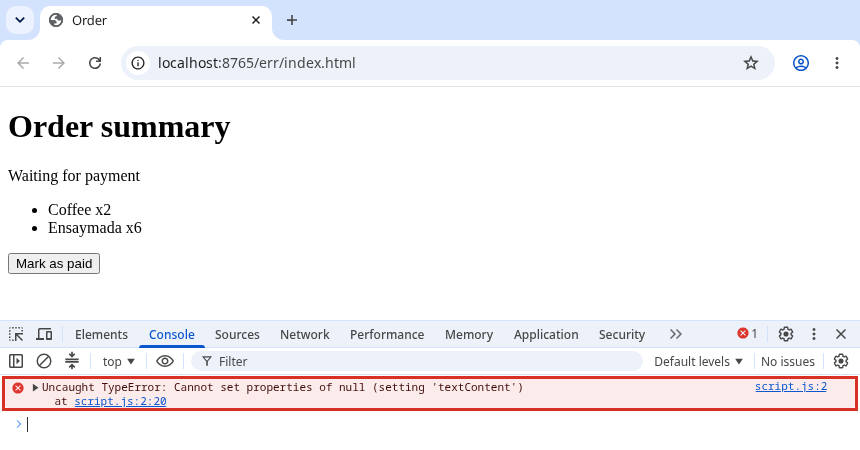
Here's a real one in Chrome, from a page where a selector has a typo:
const status = document.querySelector(".stauts");
status.textContent = "Paid";
Read it in this order
- Uncaught: nothing caught this error, so the script stopped here. Lines after it didn't run. That's why other things on the page may also be broken.
- TypeError: you used a value in a way its type doesn't allow. Here, using a property on
null. - The message:
Cannot set properties of null (setting 'textContent'). The value before.textContentisnull. If you were reading instead of setting, it saysCannot read properties of null (reading '...'). - The location:
script.js:2on the right. Click it and DevTools opens the line.
So on line 2, status is null. The question is never "why is JavaScript broken?" It's "why is this value null or undefined here?"
Check what's actually missing
On the error line, find the thing just before the dot. That's what's null or undefined. If the line has a chain like order.customer.address.city, the message tells you which property it tried to read. (reading 'city') means address was missing, not city.
Log it right before the error line:
console.log("status:", status);
Or set a breakpoint: click the line number in the Sources tab, reload, and hover over the variables.
The four usual causes
1. A selector that matched nothing (null). querySelector returns null when nothing matches. Check the spelling, # for id, . for class, and that the script runs after the element exists (script at the end of <body>, or defer).
2. An array position that doesn't exist (undefined).
const cart = [{ name: "Coffee" }];
try {
  console.log(cart[1].name);
} catch (error) {
  console.log(error.message);
}
Cannot read properties of undefined (reading 'name')
There's only one item, at position 0. cart[1] is undefined. Usually it's an off-by-one in a loop (<= instead of <) or an empty list you didn't expect.
3. find() that found nothing (undefined).
const products = [{ id: 1, price: 95 }];
const p = products.find(item => item.id === 2);
console.log(p);
undefined
p.price would crash. Check the result before using it.
4. Data that hasn't arrived yet, or has a different shape. Data from a server can be missing a field, or not loaded yet when your code runs. Log the actual data once and compare it with what your code expects. user.profile.email fails if this user has no profile.
Fix the cause, not the message
You can make the error disappear with optional chaining:
const order = {};
console.log(order.customer?.address?.city);
undefined
?. stops and gives undefined instead of throwing. That's the right tool when the value is allowed to be missing, for example an optional address. It's the wrong tool when the value should be there. Then you've hidden a bug: the page doesn't crash, it just shows nothing, and nobody knows why.
⚠ Warning: Don't wrap the line in try/catch or add ?. just to make the red text go away. First answer: should this value exist here? If yes, find out why it doesn't (typo, timing, wrong index, missing data) and fix that. If no, handle the missing case on purpose and show something sensible.
Other TypeErrors you'll meet
x is not a function: you added()to something that isn't a function. Often a typo in a method name (queryselector), or a variable with the same name as a function.Assignment to constant variable: you reassigned aconst. Useletif the change is intended.x is not iterable: you usedfor...ofon something that isn't a list, like a plain object orundefined.
💡 Tip: If the error points to a file you didn't write, like an extension's content.js, test in an Incognito or Private window first. Many browser extensions inject scripts that throw their own errors.
Next time you see a TypeError, before touching the code, answer two questions: which value was missing, and should it have been there?
About
Read the parts of an Uncaught TypeError, find the line, and fix the four most common causes. After this, the red text in the console tells you where to look.
Reviews
Sign in to write a reviewComments (0)
Sign in to commentNo comments yet.