
How to Read a Python Error Message Without Panicking
A traceback is not the problem. It's the first clue. Four questions you ask every time, tried on real tracebacks that try to mislead you: errors in one file caused by another, errors deep inside Python's own code, two tracebacks in one message, and syntax errors that point to the wrong line.
A Python error message is not the problem. It is the first clue. Most people panic because the message is long and red, and they start changing code at random. Don't. A traceback has a fixed shape, and once you know where to look, most errors take minutes, not hours.
This tutorial is not a list of error types. It is a routine: four questions you ask every time, on real tracebacks that try to mislead you.
Skip ahead: If you have never seen a traceback before, read "Reading Python Error Messages" in the Python for Beginners course first. It explains the basic shape and the common error names. Come back here for the harder cases.
The four questions
Ask them in this order. Every time. Even when you think you already know the answer.
- What happened? The last line. Error type, then the message.
- Where did it happen in my code? The last
Fileline that points to a file you wrote. Not the very lastFileline. The last one that is yours. - What value was wrong? Print it, or read it from the message.
- Where did that value come from? This is usually where the real fix is.
The fourth question is the one people skip. It's also the one that matters most.
Case 1: the error is in one file, the mistake is in another
Two files. orders.py calculates totals:
def line_total(item):
    return item["price"] * item["qty"]


def order_total(order):
    return sum(line_total(item) for item in order["items"])
report.py uses it:
from orders import order_total

orders = [
    {"id": 101, "items": [{"price": 250, "qty": 2}]},
    {"id": 102, "items": [{"price": 99, "quantity": 3}]},
]

for order in orders:
    print(order["id"], order_total(order))
Run python report.py and you get this (from Python 3.13; your paths will differ, and older versions don't show the ~~~^^^ markers):
python report.py
101 500
Traceback (most recent call last):
  File "/home/you/project/report.py", line 9, in <module>
    print(order["id"], order_total(order))
                       ~~~~~~~~~~~^^^^^^^
  File "/home/you/project/orders.py", line 6, in order_total
    return sum(line_total(item) for item in order["items"])
  File "/home/you/project/orders.py", line 6, in <genexpr>
    return sum(line_total(item) for item in order["items"])
               ~~~~~~~~~~^^^^^^
  File "/home/you/project/orders.py", line 2, in line_total
    return item["price"] * item["qty"]
                           ~~~~^^^^^^^
KeyError: 'qty'
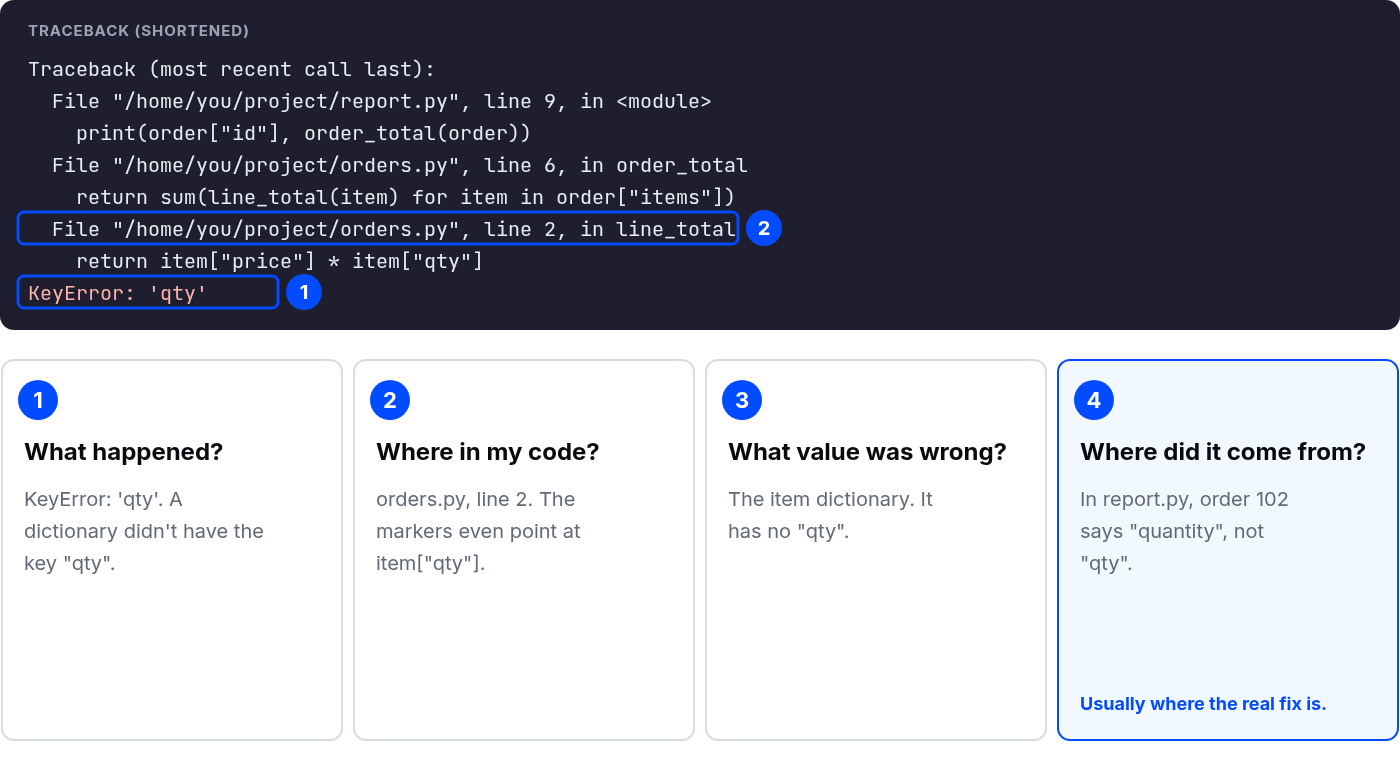
Now the four questions.
- What happened?
KeyError: 'qty'. A dictionary didn't have the key"qty". - Where in my code?
orders.py, line 2. The markers even point atitem["qty"]. - What value was wrong? The item dictionary. It has no
"qty". - Where did it come from? Order 101 printed fine, so
line_totalworks. Order 102 is the one that broke. Inreport.pyit says"quantity", not"qty".
So the fix is not in orders.py, even though that's where the error is. The data is wrong. Change "quantity" to "qty" in order 102 and it runs.
⚠ Warning: Do not "fix" this by wrapping line 2 in try/except and returning 0. The error goes away, order 102 shows a total of 0, and nobody notices until a customer complains. Hiding an error is not fixing it.
Also notice the first line of output: 101 500. The program ran fine up to the second order. Output printed before the traceback tells you how far it got. Use that.
Case 2: the traceback ends inside Python's own code
import json

text = open("settings.json").read()
settings = json.loads(text)
print(settings["theme"])
settings.json exists, but it's empty. Run it:
python settings.py
Traceback (most recent call last):
  File "/home/you/project/settings.py", line 4, in <module>
    settings = json.loads(text)
  File "/usr/lib/python3.13/json/__init__.py", line 346, in loads
    return _default_decoder.decode(s)
           ~~~~~~~~~~~~~~~~~~~~~~~^^^
  File "/usr/lib/python3.13/json/decoder.py", line 345, in decode
    obj, end = self.raw_decode(s, idx=_w(s, 0).end())
               ~~~~~~~~~~~~~~~^^^^^^^^^^^^^^^^^^^^^^^
  File "/usr/lib/python3.13/json/decoder.py", line 363, in raw_decode
    raise JSONDecodeError("Expecting value", s, err.value) from None
json.decoder.JSONDecodeError: Expecting value: line 1 column 1 (char 0)
The last three File lines are inside Python's json module. On Windows they will look like C:\...\Lib\json\decoder.py. Beginners often open that file and try to understand it. Don't. The json module is not broken. It is used by millions of people every day.
Skip the library frames and find the last line that is yours: settings.py, line 4. Then question 3: what did I give it? text. And the message says "line 1 column 1 (char 0)". Python expected a value at the very first character and found nothing. The file is empty.
In this example, the library received empty text where it expected JSON data. Check the value your code passed in and work back to where it came from before deciding what to change.
💡 Tip: If you are not sure which File lines are yours, look at the path. Anything under lib, Lib, site-packages or python3.x is someone else's code. Your files are in your project folder.
Case 3: two tracebacks in one message
prices = {"apple": 30, "bread": 65}


def price_of(name):
    try:
        return prices[name]
    except KeyError:
        raise ValueError(f"No price for {name!r}")


print(price_of("milk"))
Traceback (most recent call last):
  File "/home/you/project/chained.py", line 6, in price_of
    return prices[name]
           ~~~~~~^^^^^^
KeyError: 'milk'

During handling of the above exception, another exception occurred:

Traceback (most recent call last):
  File "/home/you/project/chained.py", line 11, in <module>
    print(price_of("milk"))
          ~~~~~~~~^^^^^^^^
  File "/home/you/project/chained.py", line 8, in price_of
    raise ValueError(f"No price for {name!r}")
ValueError: No price for 'milk'
Two tracebacks, joined by "During handling of the above exception, another exception occurred". Read it as a story. First, the KeyError: there's no "milk" in prices. Then, while handling that, the code raised a ValueError on purpose, with a clearer message.
In this case the second error is intentional and the message is good: "No price for 'milk'". The real question is whether milk should have a price. That is a business decision, not a code fix.
But it depends. If the second error is something you did not expect, like a NameError inside an except block, then you have two bugs: the original one, and a broken error handler. Fix the handler first, so it stops hiding the original error.
💡 Tip: If you write code that raises a new error inside except, use raise ValueError(...) from error. The joining line then says "The above exception was the direct cause of the following exception", which tells the reader it was on purpose.
Case 4: the line number is not where the mistake is
total = sum([250, 99, 120
print(total)
  File "/home/you/project/syntax.py", line 1
    total = sum([250, 99, 120
                ^
SyntaxError: '[' was never closed
No "Traceback" header this time. A SyntaxError happens before anything runs, because Python cannot even read the file. Newer Python versions (3.10 and up) are good at this: "'[' was never closed" points to where the bracket was opened, which is exactly the right place.
Older versions, and some other mistakes, point to the line after the real problem. So the rule for SyntaxError is simple: check the line it points to, then the line before it. Missing bracket, missing quote, missing colon. It is almost always one of those.
When the four questions are not enough
Most likely causes first:
- The values are not what you think. Print them with their type:
print(repr(value), type(value)).reprshows hidden spaces and the quotes around text, so"5"and5stop looking the same. - You are running a different file than you are editing. Compare the path in the traceback with the file open in your editor. Check the command you ran and the folder you ran it from.
- The error changed after your fix. That is progress, not failure. Read the new last line and start again from question 1.
- Still stuck. Search the error type and message only, like
JSONDecodeError Expecting value line 1 column 1. Leave out your file paths and variable names.
Common mistakes
- Reading from the top. The top is where the program started, not where it broke.
- Opening library files to fix them. Find your last frame instead.
- Fixing the line instead of the value. The line is where it hurt. The value is what caused it.
- Silencing the error with
try/except. You'll pay for it later, usually at the worst time.
What happens if you skip this
You guess. Sometimes the guess works, and you learn nothing. Sometimes it doesn't, and you change three more things. Then you have the original bug plus three new ones. Reading the message takes a minute. Guessing can take the whole afternoon. I know which one I would rather do.
About
Four questions for every Python traceback, used on four real cases that mislead beginners. After this, you can find the line that is yours and the value that caused the error, instead of guessing.
Reviews
Sign in to write a reviewComments (0)
Sign in to commentNo comments yet.