

A list is an ordered collection of values. That's it. You need four moves on day one: make one, add to it, remove from it, and loop over it. Everything else, like slicing tricks, sorting with keys and comprehensions, can wait until you have a real reason to learn it.
Skip ahead: If you already use append, remove, pop and for loops without thinking, you don't need this. Go to "Python Dictionary Comprehensions: When They Help and When They Hurt" instead.
Make a list
Square brackets, values separated by commas:
groceries = ["rice", "eggs", "milk"]
empty = []

print(groceries)
print(len(groceries))
print(groceries[0])
print(groceries[-1])
['rice', 'eggs', 'milk']
3
rice
milk
Positions start at 0, not 1. groceries[0] is the first item, groceries[-1] is the last. You will get this wrong at least once. Everybody does. Ask for a position that doesn't exist, like groceries[3] here, and you get IndexError: list index out of range.
Add: append and insert
groceries = ["rice", "eggs", "milk"]

groceries.append("bread")
print(groceries)

groceries.insert(0, "coffee")
print(groceries)
['rice', 'eggs', 'milk', 'bread']
['coffee', 'rice', 'eggs', 'milk', 'bread']
append adds to the end. That's what you want 90% of the time. insert(position, value) puts the value at that position and moves everything after it one step to the right.
⚠ Warning: append changes the list and returns None. Writing groceries = groceries.append("bread") replaces your list with None, and the next line that uses it fails with an error about NoneType. Just call groceries.append("bread") on its own line.
Remove: remove, pop and del
Three ways, for three different situations:
groceries = ["coffee", "rice", "eggs", "milk", "bread"]

groceries.remove("eggs")
print(groceries)

last = groceries.pop()
print(last, groceries)

first = groceries.pop(0)
print(first, groceries)

del groceries[0]
print(groceries)
['coffee', 'rice', 'milk', 'bread']
bread ['coffee', 'rice', 'milk']
coffee ['rice', 'milk']
['milk']
remove(value): you know what to remove. Only the first match is removed. If the value isn't there, you getValueError: list.remove(x): x not in list.pop()orpop(position): you know where, and you want the removed value back.del list[position]: you know where, and you don't need the value.
If you're not sure the value is in the list, check first:
groceries = ["rice", "milk"]

if "eggs" in groceries:
    groceries.remove("eggs")
else:
    print("No eggs on the list")
No eggs on the list
Loop: for
prices = [45.0, 120.0, 89.5]

for price in prices:
    print(price)

total = 0
for price in prices:
    total += price
print("Total:", total)

for number, price in enumerate(prices, start=1):
    print(number, price)
45.0
120.0
89.5
Total: 254.5
1 45.0
2 120.0
3 89.5
Loop over the items directly: for price in prices. Don't write for i in range(len(prices)) and then prices[i]. It works, but it's harder to read and easier to get wrong. If you need the position too, use enumerate. And for a plain total, sum(prices) does the same as that loop in one line.
The one mistake that really hurts: removing while looping
This looks right. It isn't:
scores = [90, 40, 35, 80, 20]

for score in scores:
    if score < 50:
        scores.remove(score)

print(scores)
[90, 35, 80]
35 should be gone, and it's still there. When you remove 40, everything after it moves one step left. 35 moves into the spot the loop just checked, so the loop skips it. No error. Just a wrong result. That's the dangerous kind.
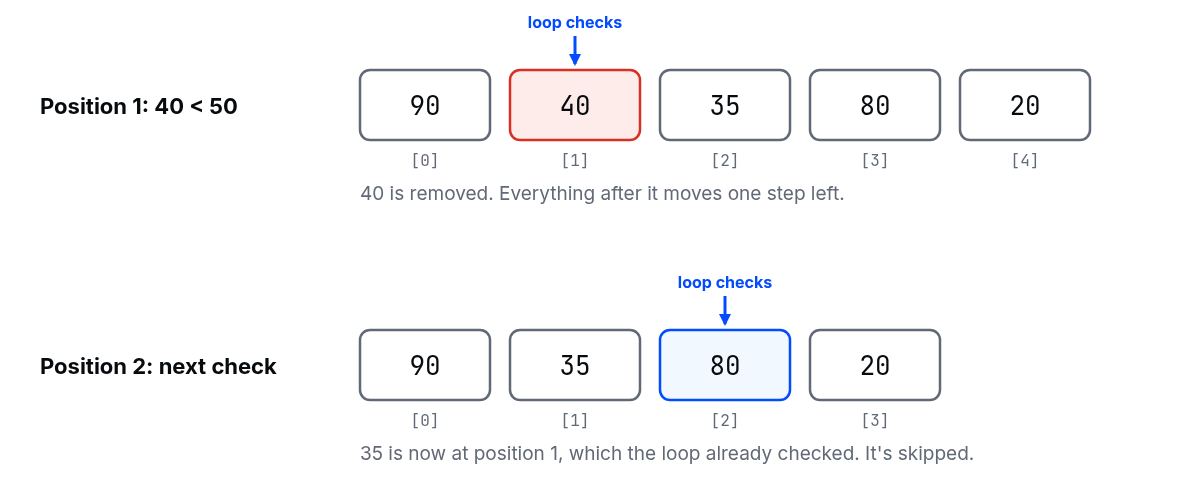
The fix: build a new list with only what you want to keep.
scores = [90, 40, 35, 80, 20]

passed = []
for score in scores:
    if score >= 50:
        passed.append(score)

print(passed)
[90, 80]
💡 Tip: Treat the original list as read-only while you loop over it. Changing a list you're looping over is asking for trouble. Make a new one, or loop over a copy with for score in scores[:].
Common mistakes
- Counting from 1. The first item is
[0]. x = x.append(...). You just lost your list.- Removing inside a
forloop over the same list. Items get skipped silently. - Using a list to look things up by name. If you keep searching a list for "the item called X", you probably want a dictionary.
What happens if you skip this
You'll still write programs, but you'll fight your data instead of using it. Lists are in almost everything: rows from a file, items in an order, results from a database. Learn these four moves properly and the rest of Python gets easier. Skip them, and every bug about "missing" or "extra" items will look like magic.
About
Making lists, append and insert, remove, pop and del, and for loops, plus why removing items while looping skips some of them. After this, you can work with lists without fighting them.
Reviews
Sign in to write a reviewComments (0)
Sign in to commentNo comments yet.