
Skip ahead: If you already know why a plain INSERT fails on a duplicate and only need the syntax, skip to "Step 3: update the row that is there", then continue.
You import a file every night. Some rows are new, and some already exist with a new quantity or a new name. A plain INSERT fails on the first one that exists. A check-then-insert in your code is a race: two imports can both see "not there" and both insert. PostgreSQL has a single statement for this, INSERT ... ON CONFLICT, usually called an upsert. This page shows its three forms and the two errors you will hit.
Step 1: a table with a unique key
CREATE TABLE stock (
  sku  text PRIMARY KEY,
  name text NOT NULL,
  qty  integer NOT NULL
);
INSERT INTO stock VALUES ('PEN-01', 'Gel Pen', 10), ('MUG-01', 'Mug', 4);
CREATE TABLE
INSERT 0 2
Step 2: the plain INSERT fails
INSERT INTO stock VALUES ('PEN-01', 'Gel Pen', 25);
ERROR:  duplicate key value violates unique constraint "stock_pkey"
DETAIL:  Key (sku)=(PEN-01) already exists.
The key already exists, so the whole statement is refused. If that statement had been a batch of a thousand rows, none of them would have been inserted.
Step 3: update the row that is there
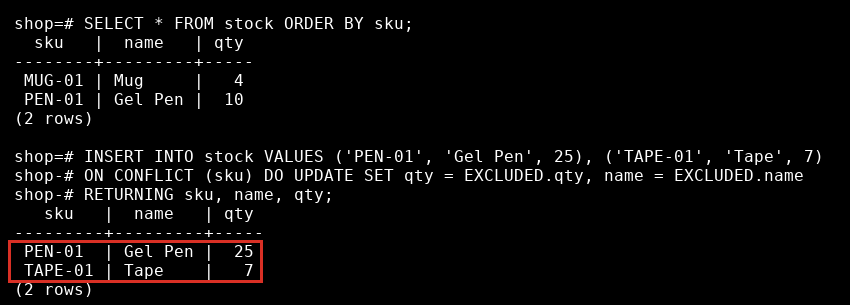
ON CONFLICT (sku) names the unique rule to check. DO UPDATE says what to do when it fires. EXCLUDED is the row you tried to insert.
INSERT INTO stock VALUES ('PEN-01', 'Gel Pen', 25), ('TAPE-01', 'Tape', 7)
ON CONFLICT (sku) DO UPDATE SET qty = EXCLUDED.qty, name = EXCLUDED.name
RETURNING sku, name, qty;
   sku   |  name   | qty
---------+---------+-----
 PEN-01  | Gel Pen |  25
 TAPE-01 | Tape    |   7
(2 rows)

INSERT 0 2
PEN-01 was updated to 25. TAPE-01 was new and was inserted. RETURNING shows both rows, and it does not say which was which. The count after the statement is the total of both: INSERT 0 2.
If you want to add to the existing quantity and not replace it, use the table name on the left side of the sum. A bare qty is the old value, and EXCLUDED.qty is the new one.
INSERT INTO stock VALUES ('MUG-01', 'Mug', 6)
ON CONFLICT (sku) DO UPDATE SET qty = stock.qty + EXCLUDED.qty
RETURNING sku, qty;
  sku   | qty
--------+-----
 MUG-01 |  10
(1 row)

INSERT 0 1
The mug had 4 and the import brought 6, so there are 10.
Step 4: skip the rows that exist
DO NOTHING keeps the existing row and ignores the new one. The count tells you how many were inserted.
INSERT INTO stock VALUES ('PEN-01', 'Different name', 99), ('CLIP-01', 'Clips', 50)
ON CONFLICT (sku) DO NOTHING;
INSERT 0 1
INSERT 0 1: one new row went in, and PEN-01 was left alone.
Step 5: only update when something changed
Updating a row with the same values still writes a new version of the row. Add a WHERE to DO UPDATE to skip those.
INSERT INTO stock VALUES ('CLIP-01', 'Clips', 50), ('MUG-01', 'Mug', 12)
ON CONFLICT (sku) DO UPDATE SET qty = EXCLUDED.qty
WHERE stock.qty IS DISTINCT FROM EXCLUDED.qty;
INSERT 0 1
Only the mug was updated. CLIP-01 already had 50, so it was skipped.
The two errors
If the same key appears twice in one statement, DO UPDATE cannot decide which wins.
INSERT INTO stock VALUES ('NEW-01', 'New one', 1), ('NEW-01', 'New one', 2)
ON CONFLICT (sku) DO UPDATE SET qty = EXCLUDED.qty;
ERROR:  ON CONFLICT DO UPDATE command cannot affect row a second time
HINT:  Ensure that no rows proposed for insertion within the same command have duplicate constrained values.
Remove the repeats from the batch first, for example with DISTINCT ON. And the conflict target must match a unique rule that exists.
INSERT INTO stock VALUES ('PEN-01', 'Gel Pen', 1)
ON CONFLICT (name) DO NOTHING;
ERROR: there is no unique or exclusion constraint matching the ON CONFLICT specification
There is no unique rule on name, so PostgreSQL has nothing to check against.
⚠ Warning: ON CONFLICT is PostgreSQL syntax. The SQL standard way is MERGE, which PostgreSQL has had since version 15, and other databases have their own forms. Test a statement like this before you move it to another system.
Related course: SQL Intermediate.
About
Insert a row or update the one that is already there in a single statement, using the conflict target, DO NOTHING, DO UPDATE and the EXCLUDED row. After this, a repeated import updates rows instead of failing or duplicating them.
Reviews
Sign in to write a reviewComments (0)
Sign in to commentNo comments yet.