

Callbacks to Promises: Why the Code Runs Out of Order
Why JavaScript doesn't wait, how callbacks and promises handle results that arrive later, and the three promise states. After this, "undefined, then the data" stops being a mystery.
Skip ahead: If you already know why a setTimeout(..., 0) runs after the line below it, skip to "Promises: a value that arrives later".
You write three lines: fetch the order, show the order, done. The page shows "undefined". The data arrives a second later, after the line that needed it already ran. This isn't a bug in JavaScript. It's how JavaScript handles waiting, and once you see it, half of the "random" bugs in async code stop being random.
JavaScript doesn't stop and wait
JavaScript runs one thing at a time. If it waited for every network call or timer, the whole page would freeze while it waited. So slow work is started, handed off, and JavaScript keeps going with the next line. When the slow work finishes, its result is queued, and your code gets it only after the current code is done.
console.log("1. start");
setTimeout(() => console.log("3. timer done"), 0);
console.log("2. end");
1. start
2. end
3. timer done
Even with a delay of 0, the timer callback runs after everything else in the current script. "0 milliseconds" means "as soon as you're free", not "now".
Callbacks: the old way
A callback is a function you hand over and say "call this when you're done". It works:
function loadOrder(id, callback) {
  setTimeout(() => callback(null, { id, total: 425 }), 100);
}

loadOrder(1042, (error, order) => {
  if (error) return console.log("failed:", error.message);
  console.log("loaded", order.id, order.total);
});
console.log("this line runs first");
this line runs first
loaded 1042 425
The trouble starts when one step depends on another: load the order, then the customer, then their address. Each step goes inside the previous callback, the code drifts to the right, and every level needs its own error check. People call it "callback hell". You'll still see callbacks in event listeners and older Node code, so you need to read them.
Promises: a value that arrives later
A promise is an object that stands for a result that isn't ready yet. It's always in one of three states:
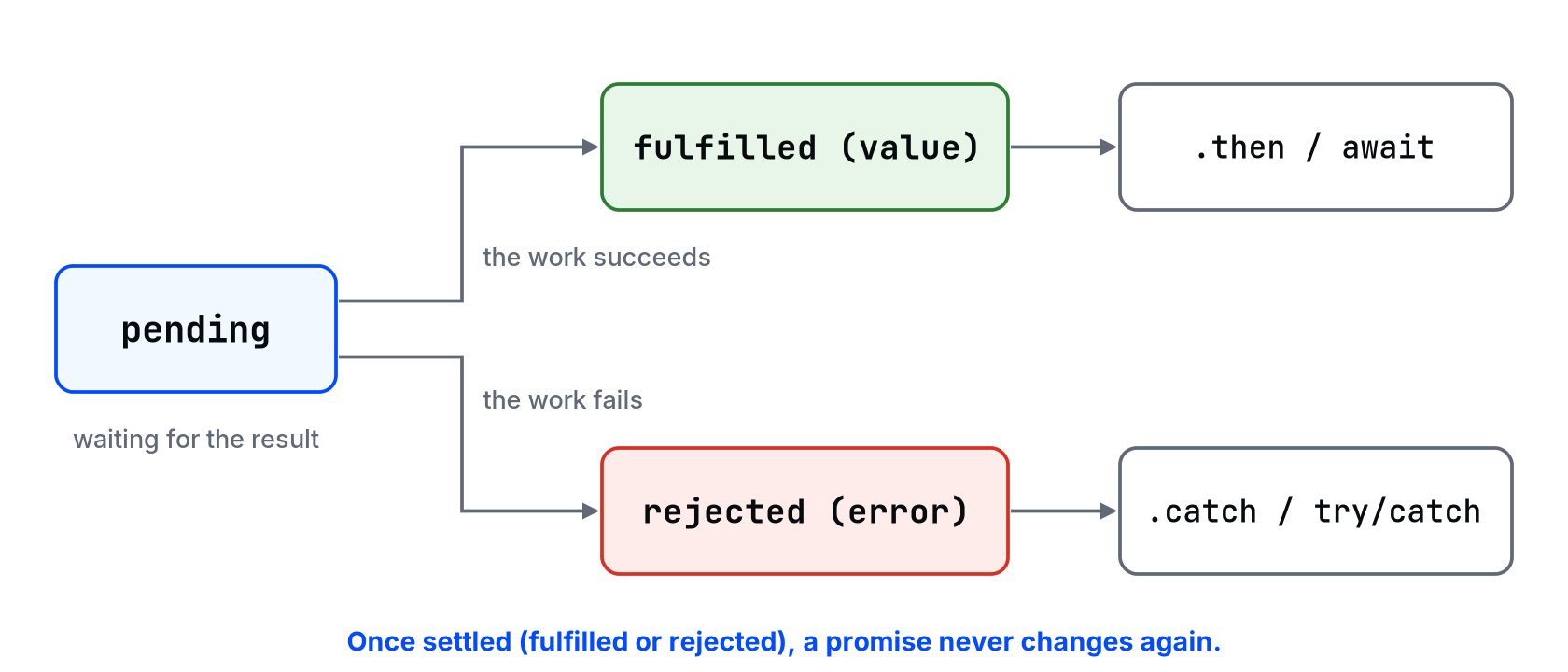
- pending: still waiting.
- fulfilled: done, with a value.
- rejected: failed, with an error.
Once it's fulfilled or rejected (settled), it stays that way. Here's the same order loader with a promise:
function loadOrder(id) {
  return new Promise((resolve, reject) => {
    setTimeout(() => {
      if (id < 0) reject(new Error(`Invalid order id ${id}`));
      else resolve({ id, total: 425 });
    }, 100);
  });
}

loadOrder(1042)
  .then(order => console.log("loaded", order.id))
  .catch(error => console.log("failed:", error.message));

loadOrder(-1)
  .then(order => console.log("loaded", order.id))
  .catch(error => console.log("failed:", error.message));
loaded 1042
failed: Invalid order id -1
.then gets the value, .catch gets the error. Steps that depend on each other become a flat chain instead of a staircase, and one .catch at the end handles a failure in any step.
⚠ Warning: Return the promise from a .then if the next step depends on it. .then(order => { loadCustomer(order.customerId); }) starts loading the customer but doesn't wait for it, so the next .then gets undefined. Write .then(order => loadCustomer(order.customerId)), or use await (next lesson).
Why the code "runs out of order"
Back to the bug from the start:
function loadOrder(id) {
  return new Promise(resolve => setTimeout(() => resolve({ id, total: 425 }), 100));
}

let order;
loadOrder(1042).then(result => {
  order = result;
});
console.log(order);
undefined
The console.log ran while the promise was still pending. The fix isn't a longer setTimeout or a global variable. It's to put the code that needs the value after the value arrives: inside .then, or after an await.
💡 Tip: If a value is undefined and you're sure it gets set, log it with a label and log something inside the callback too. If the outside log prints first, you're reading the value before it arrived.
Common mistakes
- Reading a value outside
.thenand expecting it to be there. - Forgetting to return a promise inside
.then. - No
.catchat the end. An unhandled rejection in Node 15 and later stops the program with an error. - Wrapping something that's already a promise in
new Promise(...). Just return it. - Using
setTimeoutto "wait long enough" for data.
What happens if you skip this
You'll fix async bugs by adding delays until they go away on your machine. Then a slow connection makes the data arrive after your delay, and the bug comes back for real users only.
In the "start / end / timer done" example, what would print if you changed the delay from 0 to 1000? What wouldn't change?
About
Why JavaScript doesn't wait, how callbacks and promises handle results that arrive later, and the three promise states. After this, "undefined, then the data" stops being a mystery.
Comments (0)
Sign in to commentNo comments yet.