

async/await and fetch: Calling a Real API
Call a real API with async/await and fetch, check response.ok because a 404 doesn't throw, and run independent requests together. After this, your API calls fail loudly instead of showing undefined.
Skip ahead: If you already use await fetch() and check response.ok, skip to "Running requests at the same time".
async and await are promises with nicer syntax. Nothing new happens underneath. You write code that looks like it runs top to bottom, and JavaScript pauses that one function at each await until the promise settles, while the rest of the page keeps running. Combined with fetch, it's how you call an API. This lesson calls a real one.
async and await in five lines
function wait(ms) {
  return new Promise(resolve => setTimeout(resolve, ms));
}

async function main() {
  console.log("before");
  await wait(100);
  console.log("after 100 ms");
}

main();
console.log("main() returned, still waiting inside it");
before
main() returned, still waiting inside it
after 100 ms
asyncin front of a function means it always returns a promise.awaitcan only be used inside anasyncfunction, or at the top level of an ES module (.mjs, or"type": "module").awaitpauses that function, not the program. Notice the last line printed before "after 100 ms".
Calling a real API with fetch
fetch is built into browsers and into Node 18 and later. This uses JSONPlaceholder, a free fake API for practice. Save it as user.mjs and run node user.mjs:
const response = await fetch("https://jsonplaceholder.typicode.com/users/1");
console.log(response.status, response.ok);
const user = await response.json();
console.log(user.name, "-", user.email);
200 true
Leanne Graham - Sincere@april.biz
Two awaits, because there are two waits: first for the response headers, then for the body to arrive and be parsed. Forget the second await and user is a pending promise, so user.name is undefined.
fetch doesn't throw on 404
This is the one that gets everybody. Ask for a user that doesn't exist:
const response = await fetch("https://jsonplaceholder.typicode.com/users/999");
console.log(response.status, response.ok);
const user = await response.json();
console.log(user.name);
404 false
undefined
No error. fetch only throws (rejects) when it can't get a response at all: no network, DNS failure, the request was blocked. A 404 or 500 is still a response, so fetch resolves normally, and your code happily reads undefined from an empty object. You must check response.ok (true for status 200 to 299) yourself:
async function getUser(id) {
  const response = await fetch(`https://jsonplaceholder.typicode.com/users/${id}`);
  if (!response.ok) {
    throw new Error(`Could not load user ${id}: HTTP ${response.status}`);
  }
  return response.json();
}

try {
  const user = await getUser(999);
  console.log(user.name);
} catch (error) {
  console.log(error.message);
}
Could not load user 999: HTTP 404
In the browser, the 404 still shows up in red in DevTools, in the Network tab, even though your code didn't throw:
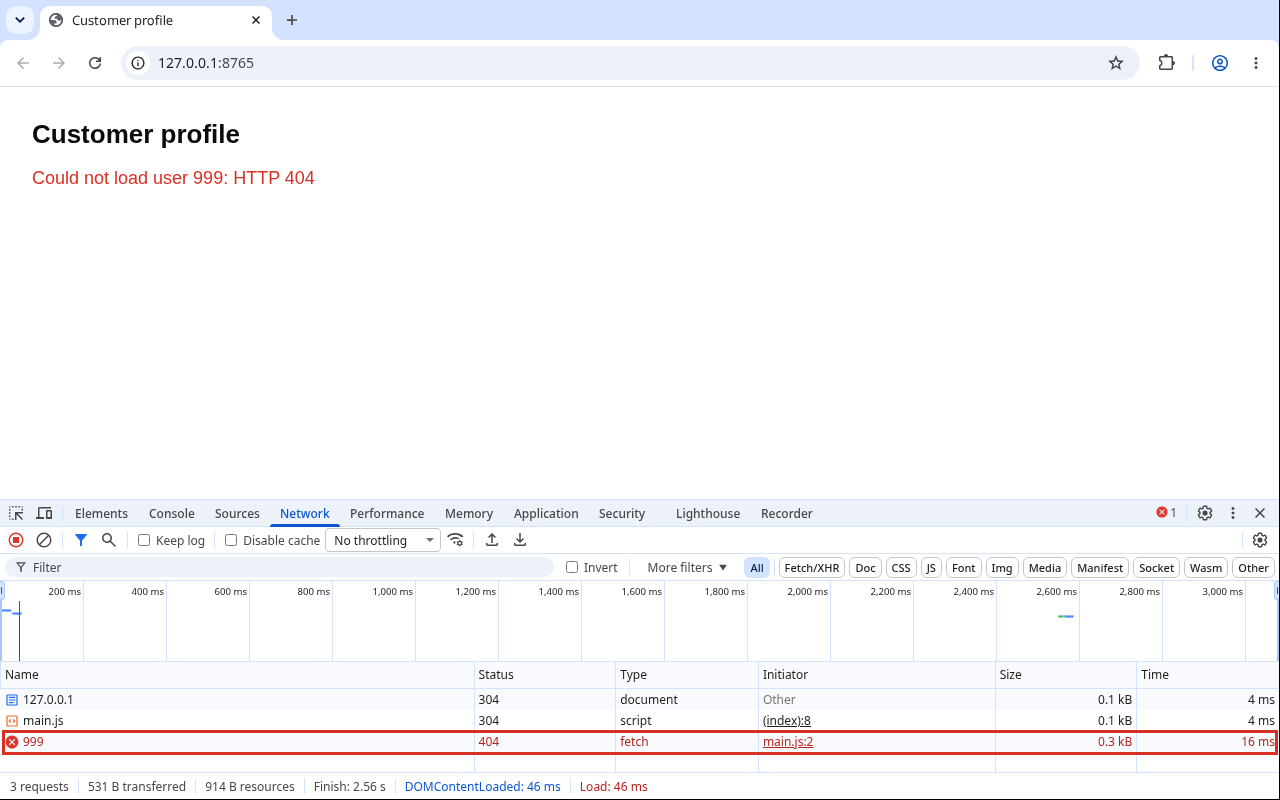
The tutorial fetch With Proper Error Handling adds timeouts and the network-error case.
⚠ Warning: Never put an API key or password in browser code that calls fetch, even in a header. Anyone can open the Network tab and copy it. Keys that must stay secret belong on your server, and the browser calls your server.
Running requests at the same time
await in a loop waits for each request before starting the next:
for (const id of [1, 2, 3]) {
  const user = await getUser(id); // one at a time
}
If the requests don't depend on each other, start them all and wait once:
async function getUser(id) {
  const response = await fetch(`https://jsonplaceholder.typicode.com/users/${id}`);
  if (!response.ok) throw new Error(`HTTP ${response.status} for user ${id}`);
  return response.json();
}

const users = await Promise.all([1, 2, 3].map(id => getUser(id)));
console.log(users.map(user => user.name));
[ 'Leanne Graham', 'Ervin Howell', 'Clementine Bauch' ]
Promise.all fails as soon as any one fails. That's what you want when you need all of them. When you'd rather keep the ones that worked, there's Promise.allSettled, which is covered in JavaScript Advanced.
💡 Tip: Don't fire 500 requests at once with Promise.all against someone else's API. You'll get rate-limited (HTTP 429) or blocked. Send them in small batches.
Common mistakes
- Forgetting
awaitbeforeresponse.json(). - Not checking
response.ok. - Using
awaitin a normal function and gettingSyntaxError: await is only valid in async functions and the top level bodies of modules. - Calling an
asyncfunction withoutawaitor.catch, so its errors disappear or crash Node. - Awaiting in a loop when the requests could run together.
What happens if you skip this
Your page will work every day the API works. The first time it returns a 404 or a 500, your code reads undefined, shows a blank card or "Hello, undefined", and no error gets logged anywhere, because as far as JavaScript knows, nothing failed.
What does your code do today when an API returns 500? If you don't know, that's your answer.
About
Call a real API with async/await and fetch, check response.ok because a 404 doesn't throw, and run independent requests together. After this, your API calls fail loudly instead of showing undefined.
Comments (0)
Sign in to commentNo comments yet.