

Branded Types So IDs Don't Mix
Tag a string or a number with a brand, create it in one parse function and see what a brand does not survive. After this, a swapped userId and orderId is an error in the editor, not a bug in production.
Skip ahead: If you already know what a branded type is and why string & { __brand } works, skip to "Make the brand with a check", then continue.
Look at this function signature: shipOrder(userId: string, orderId: string). Both arguments are strings, both look like "a1b2c3", and swapping them compiles. The bug shows up later as an order that "does not exist" or, worse, an order that belongs to somebody else. TypeScript is structural: two types with the same shape are the same type, whatever you call them. A branded type is the usual way to say "these two strings are not interchangeable".
The bug, with plain strings
type UserId = string;
type OrderId = string;

function shipOrder(userId: UserId, orderId: OrderId): string {
  return `ship ${orderId} for ${userId}`;
}

const user: UserId = "u_100";
const order: OrderId = "o_555";

console.log(shipOrder(order, user));
This compiles. The aliases only give the strings names, and an alias is not a new type. You swapped two arguments and nothing in the editor changed colour.
A brand is a tag that exists only in the type
You intersect the primitive with an object type that carries a tag. At run time the value is still a plain string, because the tag never exists.
declare const brand: unique symbol;
type Brand<T, Name extends string> = T & { readonly [brand]: Name };

type UserId = Brand<string, "UserId">;
type OrderId = Brand<string, "OrderId">;

function shipOrder(userId: UserId, orderId: OrderId): string {
  return `ship ${orderId} for ${userId}`;
}

declare const user: UserId;
declare const order: OrderId;

shipOrder(order, user);
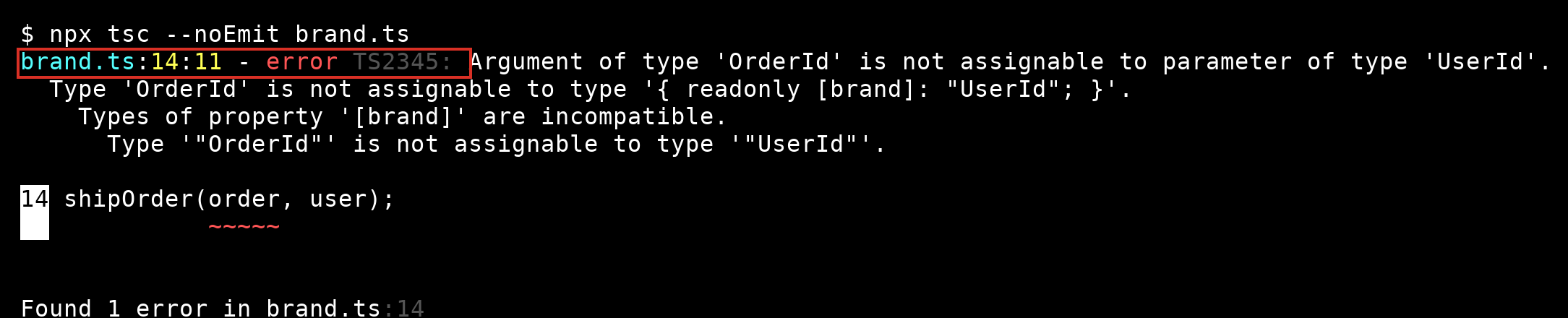
brand.ts(14,11): error TS2345: Argument of type 'OrderId' is not assignable to parameter of type 'UserId'.
  Type 'OrderId' is not assignable to type '{ readonly [brand]: "UserId"; }'.
    Types of property '[brand]' are incompatible.
      Type '"OrderId"' is not assignable to type '"UserId"'.
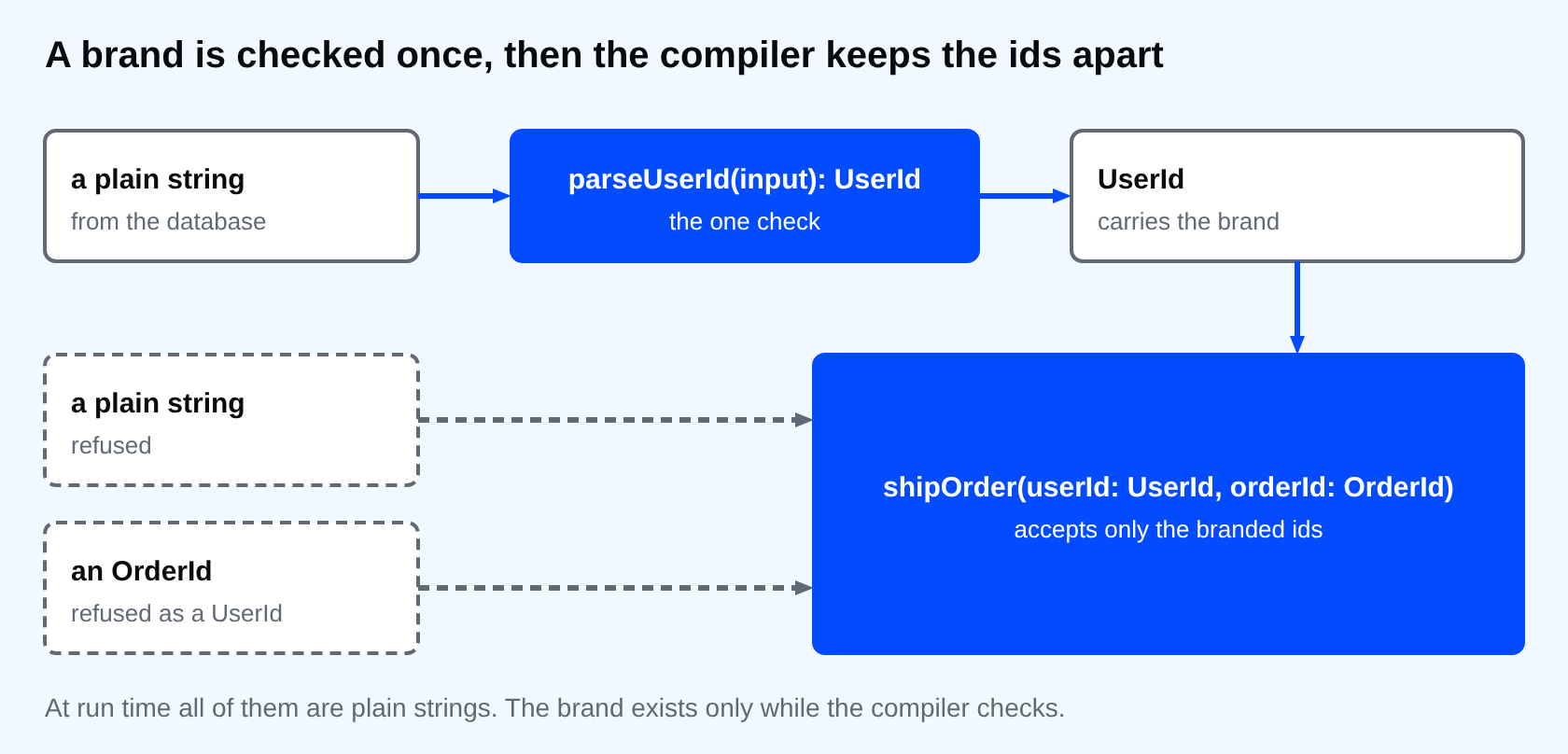
The error reads in the way you want: an OrderId is not a UserId. declare const brand: unique symbol creates a key that nobody can type by accident, and declare means nothing is emitted for it. The brand is a type-level fact only. A branded value still works as a string, so userId.toUpperCase(), template strings and === behave as before.
This is the same error in a real terminal. The red box marks the position and the code you read first. The lines below it walk down from the argument to the one property that differs, the brand.
Make the brand with a check
Now you need a way to get a UserId. Do not cast at every call site. Write one function that checks the text and returns the branded type, and use it where data enters your program: the request, the database row, the environment.
declare const brand: unique symbol;
type Brand<T, Name extends string> = T & { readonly [brand]: Name };

type UserId = Brand<string, "UserId">;
type OrderId = Brand<string, "OrderId">;

function parseUserId(input: string): UserId {
  if (!/^u_\d+$/.test(input)) {
    throw new Error(`Not a user id: ${input}`);
  }
  return input as UserId;
}

function parseOrderId(input: string): OrderId {
  if (!/^o_\d+$/.test(input)) {
    throw new Error(`Not an order id: ${input}`);
  }
  return input as OrderId;
}

function shipOrder(userId: UserId, orderId: OrderId): string {
  return `ship ${orderId} for ${userId}`;
}

console.log(shipOrder(parseUserId("u_100"), parseOrderId("o_555")));

try {
  parseOrderId("u_100");
} catch (error) {
  console.log(String(error));
}
ship o_555 for u_100
Error: Not an order id: u_100
There is exactly one as in each parser, right after the test that justifies it. That is the whole trick: the cast is the promise "this was checked", and it appears in one place you can review. If a branded type is easy to cast from anywhere, it is decoration.
⚠ Warning: A brand does not validate anything by itself. "anything" as UserId compiles. The protection only holds as long as the casts live in the parse functions and nowhere else. A lint rule or a code review habit that bans as UserId outside that file is part of the design.
Numbers too
Brands are not only for ids. Amounts in two units are a classic mix-up: pesos in one function, centavos in the other.
declare const brand: unique symbol;
type Brand<T, Name extends string> = T & { readonly [brand]: Name };

type Pesos = Brand<number, "Pesos">;
type Centavos = Brand<number, "Centavos">;

const toCentavos = (value: Pesos): Centavos => Math.round(value * 100) as Centavos;

declare const price: Pesos;
declare const stored: Centavos;

toCentavos(price);
toCentavos(stored);
money.ts(13,12): error TS2345: Argument of type 'Centavos' is not assignable to parameter of type 'Pesos'.
  Type 'Centavos' is not assignable to type '{ readonly [brand]: "Pesos"; }'.
    Types of property '[brand]' are incompatible.
      Type '"Centavos"' is not assignable to type '"Pesos"'.
The second call is the bug that usually costs money: a value that was already in centavos gets multiplied by a hundred again. With the brand, it does not compile.
What a brand does not survive
- Arithmetic returns the plain type.
price * 2is anumber, so you have to brand the result again, in a small function that says what the unit is. - JSON.
JSON.parsegives you plain strings and numbers. Brand them with the parse function after you parse.
Common mistakes
- Branding everything. A brand pays off for values that get mixed up in calls: ids, units, validated text such as an email. A brand on a loop counter is noise.
- Casting
as UserIdin tests and fixtures all over the place. Give the tests a helper that builds one. - Reusing a brand name. Two types branded with
"Id"are the same type to the compiler, so be specific:"UserId", not"Id".
💡 Tip: If you want the check to run in only one place, make the branded type's parser the only exported way to create one, and keep Brand itself private to that module.
If you skip this, the compiler will keep accepting any string for any id, and you will find out the first time a swapped argument reaches production. Which two functions in your code take two arguments of the same primitive type, and in what order do you hope people call them?
About
Tag a string or a number with a brand, create it in one parse function and see what a brand does not survive. After this, a swapped userId and orderId is an error in the editor, not a bug in production.
Comments (0)
Sign in to commentNo comments yet.