

Project References and Solution-Style tsconfig
Split a repository into projects that build in order, with a root config that lists them and builds nothing itself. After this, a change in a library is checked against every project that uses it, and only what changed is rebuilt.
Skip ahead: If you already run tsc -b and know what composite does, skip to "Solution-style root", then continue.
One tsconfig.json for the whole repository works until the repository has parts. A shared library, an app that uses it, maybe a second app. Then three problems show up together. Every change rebuilds everything. The app can import anything in the library, including files that were never meant to be public. And the editor loads all of it to answer one question. Project references split the repository into projects that build in order, see each other only through their declarations, and rebuild only what changed.
The layout
This is a repository with two packages, shared and app, managed with npm workspaces so that the app can import @acme/shared by name. The base config holds the options both share.
{
  "name": "acme",
  "private": true,
  "type": "module",
  "workspaces": ["packages/*"],
  "devDependencies": { "typescript": "7.0.2" }
}
{
  "compilerOptions": {
    "target": "es2022",
    "module": "nodenext",
    "strict": true,
    "composite": true,
    "declaration": true,
    "declarationMap": true,
    "sourceMap": true
  }
}
composite is the switch that makes a project referenceable. It turns on declaration, requires every source file to match include, and makes the compiler write a .tsbuildinfo file that records what it built. The declarationMap and sourceMap lines let your editor jump from the app straight into the library's source rather than its .d.ts.
The library project
{
  "name": "@acme/shared",
  "version": "1.0.0",
  "type": "module",
  "main": "dist/index.js",
  "types": "dist/index.d.ts"
}
{
  "extends": "../../tsconfig.base.json",
  "compilerOptions": { "rootDir": "src", "outDir": "dist" },
  "include": ["src"]
}
export interface User {
  id: number;
  name: string;
}

export function greet(user: User): string {
  return `Hello, ${user.name}`;
}
Note main and types in the package. The app imports @acme/shared and Node and the compiler both resolve it to dist/, the output. The app never reads the library's src. That is the boundary.
The app project and its reference
{
  "name": "@acme/app",
  "version": "1.0.0",
  "type": "module",
  "dependencies": { "@acme/shared": "1.0.0" }
}
{
  "extends": "../../tsconfig.base.json",
  "compilerOptions": { "rootDir": "src", "outDir": "dist" },
  "include": ["src"],
  "references": [{ "path": "../shared" }]
}
import { greet } from "@acme/shared";

console.log(greet({ id: 1, name: "Ana" }));
The references line says: before you build me, build ../shared, and read its declarations instead of its source. Link the workspaces first.
npm install --no-audit --no-fund --loglevel=error
Solution-style root
The tsconfig at the root builds nothing itself. It only lists the projects.
{
  "files": [],
  "references": [
    { "path": "./packages/shared" },
    { "path": "./packages/app" }
  ]
}
"files": [] is the important part. Without it, the root would also try to compile the whole tree as one program, and you would be back to the problem you started with. This shape is called solution-style, and it is what editors and tsc -b look for at the top of a repository.
Build in order
Use -b (build) at the root. The sed here removes the clock times from the log so the output is the same every run.
npx tsc -b --verbose | sed -E 's/^[0-9:]+ [AP]M - //'
node packages/app/dist/main.js
Projects in this build:
    * packages/shared/tsconfig.json
    * packages/app/tsconfig.json
    * tsconfig.json

Project 'packages/shared/tsconfig.json' is out of date because output file 'packages/shared/tsconfig.tsbuildinfo' does not exist

Building project 'packages/shared/tsconfig.json'...

Project 'packages/app/tsconfig.json' is out of date because output file 'packages/app/tsconfig.tsbuildinfo' does not exist

Building project 'packages/app/tsconfig.json'...

Hello, Ana
This is the same build in a real terminal, with the clock times left in. The red boxes mark the two projects in the order they were built.

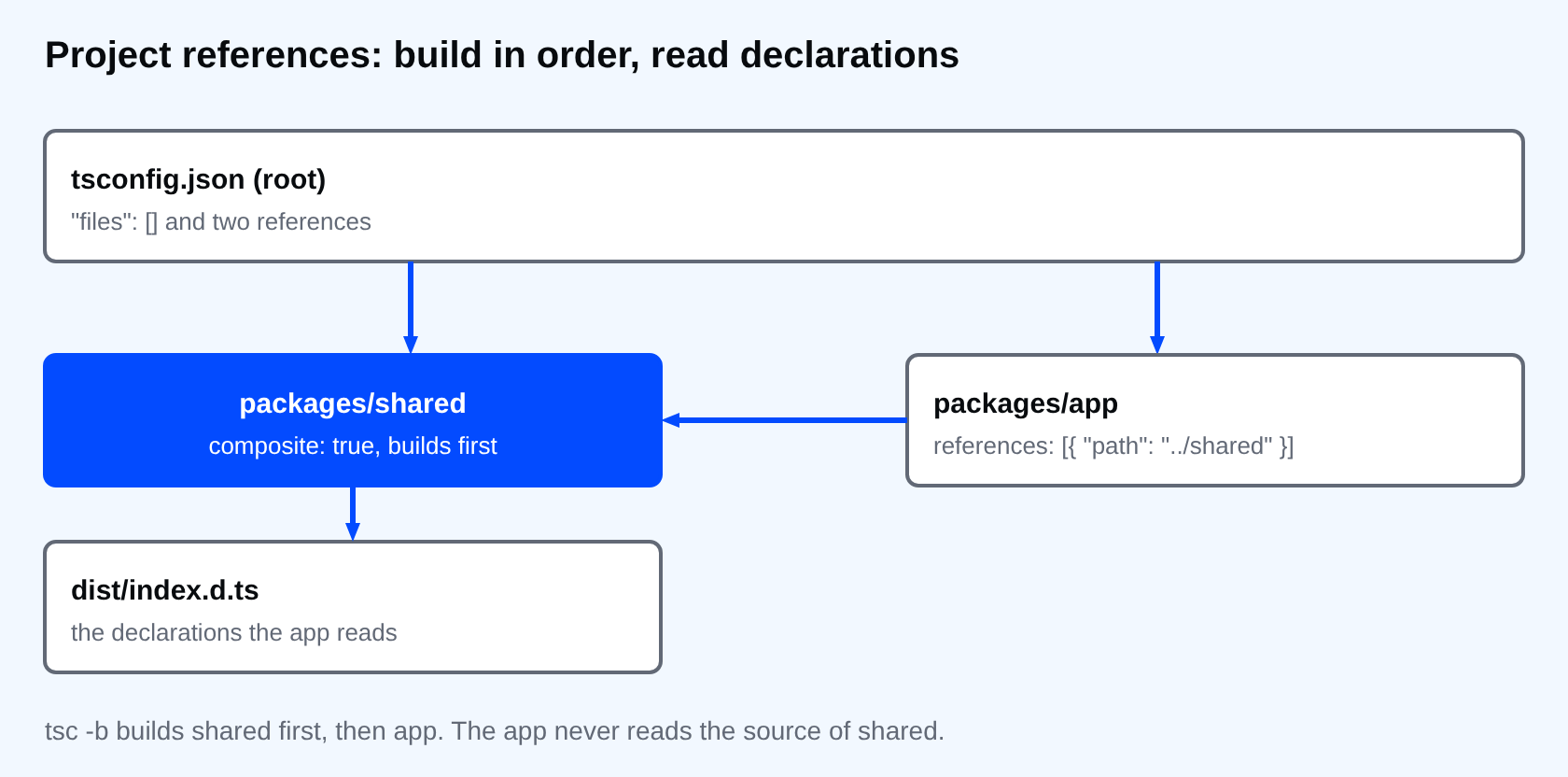
The order came from the references, not from the order in the root file. shared built first, then app, which read shared's dist/index.d.ts. Run the same command again and neither project is rebuilt, since each one's inputs are older than its .tsbuildinfo.
Change the library and see the app break
Rename a property in shared and build again.
export interface User {
  id: number;
  fullName: string;
}

export function greet(user: User): string {
  return `Hello, ${user.fullName}`;
}
npx tsc -b
packages/app/src/main.ts(3,28): error TS2353: Object literal may only specify known properties, and 'name' does not exist in type 'User'.
shared rebuilt, and its new declarations were used to check app. The error is in the app's main.ts, where the call still passes name. This is the behaviour you want in a repository with several parts: a change in the library cannot reach the app without the compiler checking every use.
What goes wrong
If you reference a project that is not composite, the compiler tells you.
sed -i 's/"composite": true,//' tsconfig.base.json
npx tsc -b
packages/app/tsconfig.json(5,18): error TS6306: Referenced project '/path/to/project/packages/shared' must have setting "composite": true.
The message says what to do. Put composite back. A few more things to watch:
- Running
tsc -p packages/appbeforesharedhas been built fails with "cannot find module", becausedist/does not exist yet. That is why you use-band not-p. - Each project needs its own
outDirandrootDir. If two projects write to the same folder, their outputs mix and the build records stop matching what is on disk. .tsbuildinfoanddistbelong in.gitignore. Both are build output.tsc -b --cleanremoves the output of every project in the graph, so a build starts from nothing when you suspect stale output.
⚠ Warning: Do not point a reference at a project and also import its source files by a relative path such as ../../shared/src/index.ts. The compiler then treats them as part of your project, and you get errors about files that are not in the project list. Import by package name, and let the declarations do the work.
💡 Tip: TypeScript 7 builds independent projects in parallel. If you have many projects on a small CI machine, the --builders flag sets how many run at once, and it multiplies with --checkers. Start with the defaults and change them only after you have measured.
If you skip this, one tsconfig will keep growing until the build takes minutes and nobody remembers why a utility file can import the whole app. What is the one folder in your repository that nothing else should import from?
About
Split a repository into projects that build in order, with a root config that lists them and builds nothing itself. After this, a change in a library is checked against every project that uses it, and only what changed is rebuilt.
Comments (0)
Sign in to commentNo comments yet.