

Utility Types: Partial, Pick, Omit and Record
Build variations of one type with Partial, Pick, Omit and Record, and see where Partial lets undefined through. After this, a rename in the original type reaches every variation.
Skip ahead: If you already use Partial, Pick, Omit and Record without looking them up, skip to "Partial lets undefined through", then continue.
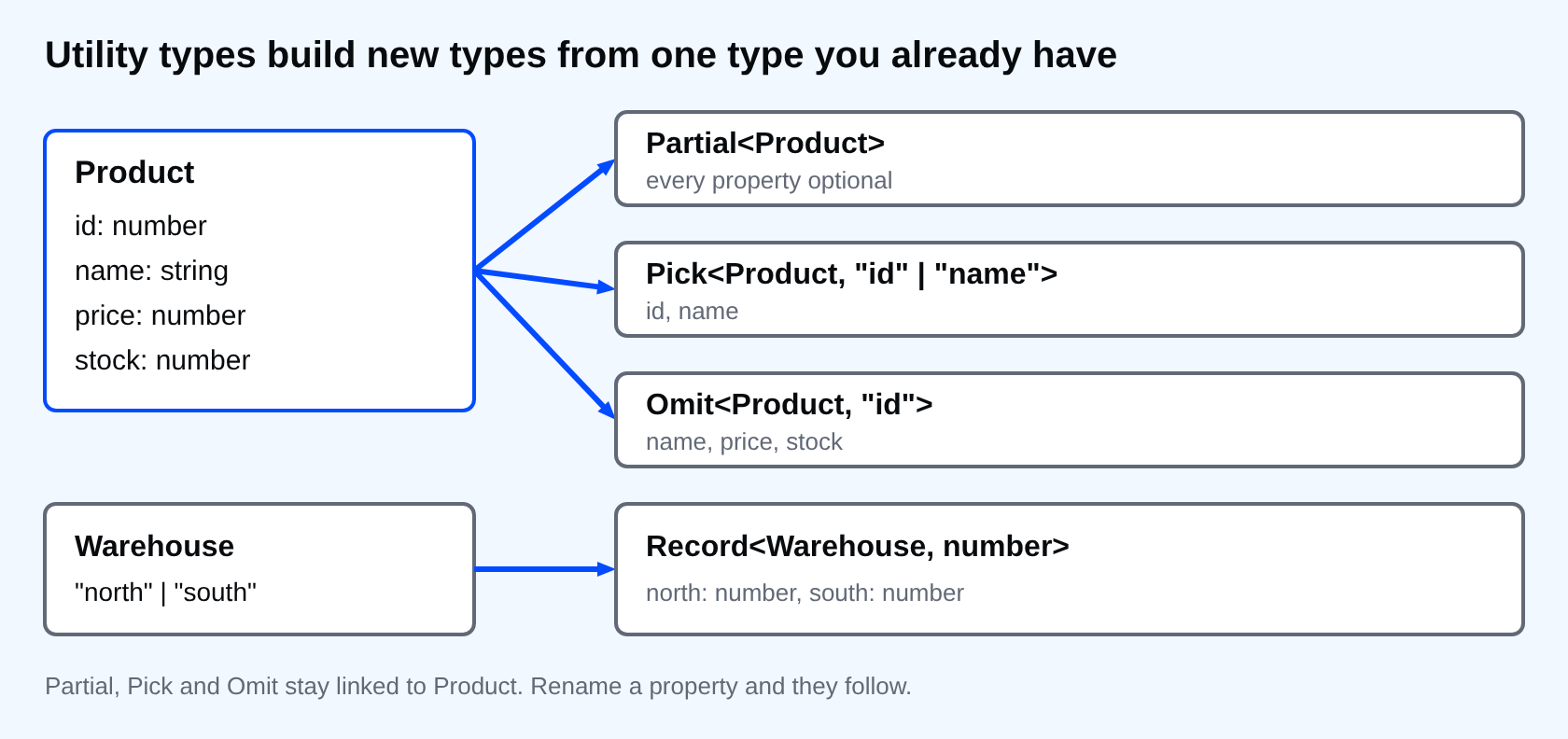
Most types in a real project are variations of one that already exists. A form draft is the product with every field optional. A list row is the product with three fields. A create request is the product without the id the server assigns. If you write each of those by hand, you have four copies of the same property names, and the next rename misses one. TypeScript ships small tools that build the variations from the original. They are called utility types, and these four cover most of what you need.
All four examples use this type.
interface Product {
  id: number;
  name: string;
  price: number;
  stock: number;
}
Partial: every property optional
interface Product {
  id: number;
  name: string;
  price: number;
  stock: number;
}

function update(product: Product, changes: Partial<Product>): Product {
  return { ...product, ...changes };
}

const pen: Product = { id: 1, name: "Pen", price: 12, stock: 5 };
console.log(update(pen, { price: 15 }));
update(pen, { prise: 15 });
partial.ts(14,15): error TS2561: Object literal may only specify known properties, but 'prise' does not exist in type 'Partial<Product>'. Did you mean to write 'price'?
Partial<Product> is the same shape with a question mark on every property. The caller passes only what changed, and a typo is still caught. The first call prints the full product with the new price.
interface Product {
  id: number;
  name: string;
  price: number;
  stock: number;
}

function update(product: Product, changes: Partial<Product>): Product {
  return { ...product, ...changes };
}

const pen: Product = { id: 1, name: "Pen", price: 12, stock: 5 };
console.log(update(pen, { price: 15 }));
{ id: 1, name: 'Pen', price: 15, stock: 5 }
Pick: keep only some properties
interface Product {
  id: number;
  name: string;
  price: number;
  stock: number;
}

type ListRow = Pick<Product, "id" | "name">;

const row: ListRow = { id: 1, name: "Pen", price: 12 };
pick.ts(10,44): error TS2353: Object literal may only specify known properties, and 'price' does not exist in type 'ListRow'.
Pick<Product, "id" | "name"> keeps those two properties and drops the rest. The second argument is a union of property names, and a name that does not exist on Product is itself an error.
Omit: drop some properties
interface Product {
  id: number;
  name: string;
  price: number;
  stock: number;
}

type NewProduct = Omit<Product, "id">;

const draft: NewProduct = { name: "Pen", price: 12 };
omit.ts(10,7): error TS2741: Property 'stock' is missing in type '{ name: string; price: number; }' but required in type 'NewProduct'.
Omit is the opposite of Pick. Use it when you want almost everything. If Product gets a new field next month, NewProduct gets it too, and the error above tells you where to fill it in.
Use Pick when the result is a short list. Use Omit when it is a long list with one or two exceptions. A list of one or two is easier to read than a list of ten.
Record: one value type for every key
type Warehouse = "north" | "south";

const stock: Record<Warehouse, number> = {
  north: 40,
};
record.ts(3,7): error TS2741: Property 'south' is missing in type '{ north: number; }' but required in type 'Record<Warehouse, number>'.
Record<Warehouse, number> says every warehouse has a number. Leave one out, and the compiler tells you which. Add "east" to the union later, and every Record<Warehouse, ...> in the project asks for a value for it.
Partial lets undefined through
This one catches people. An optional property accepts undefined as a value.
interface Product {
  id: number;
  name: string;
  price: number;
  stock: number;
}

function update(product: Product, changes: Partial<Product>): Product {
  return { ...product, ...changes };
}

const pen: Product = { id: 1, name: "Pen", price: 12, stock: 5 };
const changed = update(pen, { price: undefined });
console.log(changed.price);
undefined
It compiles, and the price is now undefined even though the type says number. The spread copied the key. If your data can hold that, filter out undefined values before you spread, or turn on exactOptionalPropertyTypes in tsconfig, which refuses undefined for an optional property unless you write it in the type.
⚠ Warning: Partial<T> on the arguments of an update function looks harmless. It also accepts an empty object, and it accepts a property set to undefined. If a change must contain at least one real value, check that at run time.
Two more you will meet
Required<T>makes every property required, the reverse ofPartial.Readonly<T>makes every property read-only, soro.price = 1is a compile error.
Common mistakes
- Writing a second interface by hand "just for the form" and forgetting it when the first one changes.
- Using
Omitwith a property name you misspelled. PlainOmittakes any string, soOmit<Product, "idd">compiles and removes nothing. - Using
Partialfor something that is always complete after the first step. A draft is optional. The saved record is not.
💡 Tip: Hover over a type built from a utility type in your editor. It shows the result, which is faster than working it out in your head.
If you skip this, every new variation of a type is another copy to maintain, and one of the copies will be wrong for months. Where in your project is there a second type that is really the first one with a field missing?
About
Build variations of one type with Partial, Pick, Omit and Record, and see where Partial lets undefined through. After this, a rename in the original type reaches every variation.
Comments (0)
Sign in to commentNo comments yet.