

MVCC, VACUUM and Table Bloat
Look at row versions inside a table, watch dead rows pile up, and see what VACUUM can and cannot remove. After this, you know why a table grows and which sessions stop it from being cleaned.
Skip ahead: If you already know that an UPDATE writes a new row version, skip to "Dead rows pile up", then continue.
PostgreSQL never changes a row in place. An UPDATE writes a new version of the row and marks the old one as replaced. A DELETE only marks the row. This is called MVCC, multiversion concurrency control, and it is why a reader never waits for a writer: each transaction sees the versions that were current when it started. The price is that the old versions stay in the table until something cleans them up. That something is VACUUM. If it cannot keep up, or is stopped from working, the table grows, and queries read pages that hold nothing useful. This lesson makes the row versions visible, then shows what vacuum does and what stops it.
Two extensions are used to look inside: pageinspect shows the raw rows on a page, and pgstattuple counts live and dead rows exactly. Both ship with PostgreSQL. The tables have autovacuum switched off with autovacuum_enabled = false, so you can see the dead rows before anything cleans them up. Do not do that on a real table. The lesson shows two psql sessions, A and B, in the order the commands ran.
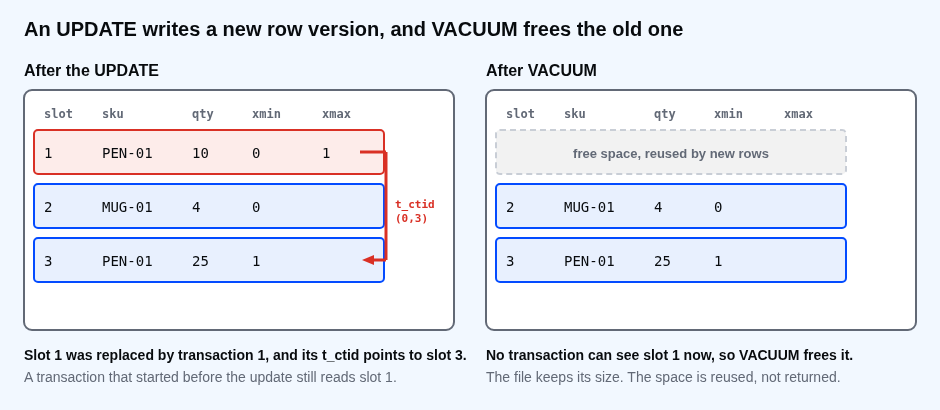
An UPDATE writes a new row version
Session A
CREATE EXTENSION pageinspect;
CREATE EXTENSION pgstattuple;
CREATE TABLE stock (sku text PRIMARY KEY, qty integer NOT NULL);
ALTER TABLE stock SET (autovacuum_enabled = false);
INSERT INTO stock VALUES ('PEN-01', 10), ('MUG-01', 4);
SELECT ctid, sku, qty FROM stock ORDER BY sku;
CREATE EXTENSION
CREATE EXTENSION
CREATE TABLE
ALTER TABLE
INSERT 0 2
 ctid  |  sku   | qty
-------+--------+-----
 (0,2) | MUG-01 |   4
 (0,1) | PEN-01 |  10
(2 rows)
ctid is the physical address of a row version: page 0, slot 2 for the mug, slot 1 for the pen. Now update the pen.
UPDATE stock SET qty = 25 WHERE sku = 'PEN-01';
SELECT ctid, sku, qty FROM stock ORDER BY sku;
UPDATE 1
 ctid  |  sku   | qty
-------+--------+-----
 (0,2) | MUG-01 |   4
 (0,3) | PEN-01 |  25
(2 rows)
The pen moved from (0,1) to (0,3). The old version is still on the page. Each row version records the transaction that created it, xmin, and the one that replaced it, xmax. These are big numbers, so the next query subtracts the first transaction's number to keep them readable. Your own numbers will be different, and the differences will be the same.
SELECT min(xmin::text::int) AS base FROM stock \gset
SELECT lp AS slot, t_xmin::text::int - :base AS xmin, nullif(t_xmax::text::int, 0) - :base AS xmax, t_ctid
FROM heap_page_items(get_raw_page('stock', 0))
ORDER BY lp;
 slot | xmin | xmax | t_ctid
------+------+------+--------
    1 |    0 |    1 | (0,3)
    2 |    0 |      | (0,2)
    3 |    1 |      | (0,3)
(3 rows)
There are three row versions in a table with two rows. On this scale the insert is transaction 0 and the update is transaction 1. Slot 1 was created by the insert and replaced by the update, and its t_ctid points to the new version in slot 3. A transaction that started before the update still reads slot 1. Everyone else reads slot 3.
Dead rows pile up
An old version that no running transaction can see any more is a dead row. A bigger table shows what that costs. This one has 20,000 rows. VACUUM FULL first packs it tightly, so the starting size is honest.
CREATE TABLE big_stock AS SELECT g AS item_id, 100 AS qty FROM generate_series(1, 20000) AS g;
ALTER TABLE big_stock ADD PRIMARY KEY (item_id);
ALTER TABLE big_stock SET (autovacuum_enabled = false);
VACUUM FULL big_stock;
SELECT pg_relation_size('big_stock') / 8192 AS pages, dead_tuple_count AS dead, tuple_count AS live
FROM pgstattuple('big_stock');
SELECT 20000
ALTER TABLE
ALTER TABLE
VACUUM
 pages | dead | live
-------+------+-------
    89 |    0 | 20000
(1 row)
UPDATE big_stock SET qty = qty - 1;
SELECT pg_relation_size('big_stock') / 8192 AS pages, dead_tuple_count AS dead, tuple_count AS live
FROM pgstattuple('big_stock');
UPDATE 20000
 pages | dead  | live
-------+-------+-------
   177 | 20000 | 20000
(1 row)
One UPDATE of every row left 20,000 dead versions, and the table grew from 89 pages to 177. The live data did not change. This is table bloat. A sequential scan now reads about twice the pages for the same 20,000 rows.
What VACUUM does
VACUUM finds the dead versions that nobody can see and marks their space as free for new rows. It does not give the space back to the operating system, and it does not take a lock that blocks reads and writes.
VACUUM big_stock;
SELECT pg_relation_size('big_stock') / 8192 AS pages, dead_tuple_count AS dead, tuple_count AS live
FROM pgstattuple('big_stock');
UPDATE big_stock SET qty = qty - 1;
SELECT pg_relation_size('big_stock') / 8192 AS pages, dead_tuple_count AS dead, tuple_count AS live
FROM pgstattuple('big_stock');
VACUUM
 pages | dead | live
-------+------+-------
   177 |    0 | 20000
(1 row)

UPDATE 20000
 pages | dead  | live
-------+-------+-------
   177 | 20000 | 20000
(1 row)
After VACUUM the dead rows are gone but the table is still 177 pages. The second UPDATE reused that free space, so the table did not grow again. This is the healthy pattern: the table settles at a size that fits its update rate. To shrink it, VACUUM FULL rewrites the whole table into a new file. It takes an exclusive lock for the whole run, so reads and writes wait. Use it for a one-time clean-up in a quiet window, not as routine care.
What stops VACUUM
Vacuum can remove a dead version only if no transaction can still see it. One old transaction, even one that is only waiting, keeps every version that was current when it began. Session B starts a transaction and runs one query, then does nothing.
Session B
BEGIN ISOLATION LEVEL REPEATABLE READ;
SELECT count(*) AS rows_seen FROM big_stock;
BEGIN
 rows_seen
-----------
     20000
(1 row)
Session A updates every row again and vacuums.
UPDATE big_stock SET qty = qty - 1;
VACUUM big_stock;
SELECT dead_tuple_count AS dead FROM pgstattuple('big_stock');
UPDATE 20000
VACUUM
 dead
-------
 20000
(1 row)
VACUUM ran, and 20,000 dead rows are still there. Session B's snapshot can still see them, so they are not yet removable. Now B finishes.
Session B
COMMIT;
COMMIT
Session A
VACUUM big_stock;
SELECT dead_tuple_count AS dead FROM pgstattuple('big_stock');
VACUUM
 dead
------
    0
(1 row)
⚠ Warning: A session that opens a transaction and sits idle ("idle in transaction") is the most common reason for a bloated table. Find them in pg_stat_activity where state = 'idle in transaction', and set idle_in_transaction_session_timeout so the server ends them.
Autovacuum does this for you
Autovacuum starts a vacuum on a table when the number of dead rows passes a threshold. Here are the defaults that decide it.
SELECT name, setting
FROM pg_settings
WHERE name IN ('autovacuum', 'autovacuum_vacuum_threshold', 'autovacuum_vacuum_scale_factor')
ORDER BY name;
              name              | setting
--------------------------------+---------
 autovacuum                     | on
 autovacuum_vacuum_scale_factor | 0.2
 autovacuum_vacuum_threshold    | 50
(3 rows)
The rule is 50 dead rows plus 20% of the table. A table of 20,000 rows is vacuumed at about 4,050 dead rows. A table of 100 million rows waits for 20 million, which is a lot of bloat, so large, busy tables usually get a smaller scale factor set on that table alone.
Common mistakes
- Turning autovacuum off because it "uses resources". The dead rows still have to be cleaned.
- Leaving transactions open, from a script, a notebook or a forgotten psql window.
- Judging bloat by the size of the table instead of the live and dead row counts.
- Running
VACUUM FULLon a busy table during working hours. - Updating every row of a big table in one statement. It leaves as many dead rows as live ones.
💡 Tip: Update in batches of a few thousand rows and let vacuum run between them. The same total work leaves much less bloat at any moment.
If you skip this, a table that holds 20,000 rows will quietly grow to several times its size and read like it, and nobody changed a query. Which of your sessions has been sitting in "idle in transaction" the longest?
About
Look at row versions inside a table, watch dead rows pile up, and see what VACUUM can and cannot remove. After this, you know why a table grows and which sessions stop it from being cleaned.
Comments (0)
Sign in to commentNo comments yet.