
Partitioning Large Tables
Split a table by month, see partition pruning in the plan, and remove old data with DETACH and DROP. After this, you know when partitioning helps and which keys and queries it needs.
Skip ahead: If you already know range partitioning and only want to know what it does not fix, skip to "What partitioning does not do", then continue.
A table with a few hundred million rows has two problems that a bigger server does not remove. Every index is one big structure that no longer fits in memory, and getting rid of old rows means a DELETE that writes millions of dead rows and keeps vacuum busy for hours. Partitioning splits one logical table into many physical ones, usually by date. Queries that mention the date touch only the pieces they need, and old data goes away by dropping a piece, which takes no time. It also has a price, and it does nothing for a query that ignores the partition key. This lesson builds a small partitioned table and shows both sides.
A table split by month
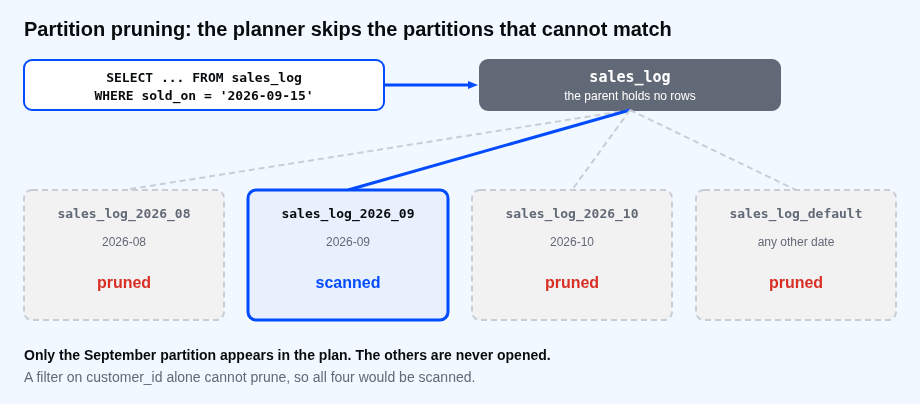
The parent table holds no rows. The partitions do. Each one declares the range it accepts, and the upper bound is not included.
CREATE TABLE sales_log (
  sale_id     bigint NOT NULL,
  sold_on     date NOT NULL,
  customer_id integer NOT NULL,
  amount      numeric(8,2) NOT NULL
) PARTITION BY RANGE (sold_on);
CREATE TABLE sales_log_2026_08 PARTITION OF sales_log FOR VALUES FROM ('2026-08-01') TO ('2026-09-01');
CREATE TABLE sales_log_2026_09 PARTITION OF sales_log FOR VALUES FROM ('2026-09-01') TO ('2026-10-01');
CREATE TABLE sales_log_2026_10 PARTITION OF sales_log FOR VALUES FROM ('2026-10-01') TO ('2026-11-01');
CREATE TABLE sales_log_default PARTITION OF sales_log DEFAULT;
INSERT INTO sales_log
SELECT g, DATE '2026-08-01' + (g % 92), (g % 8) + 1, ((g % 97) + 0.5)::numeric(8,2)
FROM generate_series(1, 24000) AS g;
ANALYZE sales_log;
SET max_parallel_workers_per_gather = 0;
SELECT tableoid::regclass AS partition, count(*) AS rows
FROM sales_log GROUP BY 1 ORDER BY 1;
CREATE TABLE
CREATE TABLE
CREATE TABLE
CREATE TABLE
CREATE TABLE
INSERT 0 24000
ANALYZE
SET
     partition     | rows
-------------------+------
 sales_log_2026_08 | 8090
 sales_log_2026_09 | 7830
 sales_log_2026_10 | 8080
(3 rows)
You insert into sales_log as usual, and PostgreSQL routes each row to the right partition. tableoid::regclass shows which one a row lives in. The default partition is empty, and its job comes up in a moment.
Partition pruning
When a query's WHERE compares the partition key to values, the planner leaves out the partitions that cannot contain a match. This is called pruning.
EXPLAIN (ANALYZE, BUFFERS OFF, COSTS OFF, TIMING OFF, SUMMARY OFF)
SELECT count(*) FROM sales_log WHERE sold_on = DATE '2026-09-15';
EXPLAIN (ANALYZE, BUFFERS OFF, COSTS OFF, TIMING OFF, SUMMARY OFF)
SELECT count(*) FROM sales_log WHERE sold_on >= DATE '2026-09-20' AND sold_on < DATE '2026-10-05';
                                 QUERY PLAN
----------------------------------------------------------------------------
 Aggregate (actual rows=1.00 loops=1)
   ->  Seq Scan on sales_log_2026_09 sales_log (actual rows=261.00 loops=1)
         Filter: (sold_on = '2026-09-15'::date)
         Rows Removed by Filter: 7569
(4 rows)

                                         QUERY PLAN
--------------------------------------------------------------------------------------------
 Aggregate (actual rows=1.00 loops=1)
   ->  Append (actual rows=3915.00 loops=1)
         ->  Seq Scan on sales_log_2026_09 sales_log_1 (actual rows=2871.00 loops=1)
               Filter: ((sold_on >= '2026-09-20'::date) AND (sold_on < '2026-10-05'::date))
               Rows Removed by Filter: 4959
         ->  Seq Scan on sales_log_2026_10 sales_log_2 (actual rows=1044.00 loops=1)
               Filter: ((sold_on >= '2026-09-20'::date) AND (sold_on < '2026-10-05'::date))
               Rows Removed by Filter: 7036
(8 rows)
The first query reads only sales_log_2026_09. The August and October partitions and the default one do not appear in the plan at all. The second range crosses a month, so the plan has an Append node with two partitions and the other two are pruned. Part of the saving is that the other partitions are never opened. The rest is that each partition has its own smaller indexes.
What partitioning does not do
EXPLAIN (ANALYZE, BUFFERS OFF, COSTS OFF, TIMING OFF, SUMMARY OFF)
SELECT count(*) FROM sales_log WHERE customer_id = 3;
EXPLAIN (ANALYZE, BUFFERS OFF, COSTS OFF, TIMING OFF, SUMMARY OFF)
SELECT count(*) FROM sales_log WHERE extract(month FROM sold_on) = 9;
                                     QUERY PLAN
-------------------------------------------------------------------------------------
 Aggregate (actual rows=1.00 loops=1)
   ->  Append (actual rows=3000.00 loops=1)
         ->  Seq Scan on sales_log_2026_08 sales_log_1 (actual rows=1044.00 loops=1)
               Filter: (customer_id = 3)
               Rows Removed by Filter: 7046
         ->  Seq Scan on sales_log_2026_09 sales_log_2 (actual rows=914.00 loops=1)
               Filter: (customer_id = 3)
               Rows Removed by Filter: 6916
         ->  Seq Scan on sales_log_2026_10 sales_log_3 (actual rows=1042.00 loops=1)
               Filter: (customer_id = 3)
               Rows Removed by Filter: 7038
         ->  Seq Scan on sales_log_default sales_log_4 (actual rows=0.00 loops=1)
               Filter: (customer_id = 3)
(13 rows)

                                     QUERY PLAN
-------------------------------------------------------------------------------------
 Aggregate (actual rows=1.00 loops=1)
   ->  Append (actual rows=7830.00 loops=1)
         ->  Seq Scan on sales_log_2026_08 sales_log_1 (actual rows=0.00 loops=1)
               Filter: (EXTRACT(month FROM sold_on) = '9'::numeric)
               Rows Removed by Filter: 8090
         ->  Seq Scan on sales_log_2026_09 sales_log_2 (actual rows=7830.00 loops=1)
               Filter: (EXTRACT(month FROM sold_on) = '9'::numeric)
         ->  Seq Scan on sales_log_2026_10 sales_log_3 (actual rows=0.00 loops=1)
               Filter: (EXTRACT(month FROM sold_on) = '9'::numeric)
               Rows Removed by Filter: 8080
         ->  Seq Scan on sales_log_default sales_log_4 (actual rows=0.00 loops=1)
               Filter: (EXTRACT(month FROM sold_on) = '9'::numeric)
(12 rows)
A filter on customer_id cannot prune, so all four partitions are scanned. That is no faster than one table, and the plan has four nodes to set up instead of one. A filter on a calculation of sold_on, such as extract(month ...), does not prune either. The planner can reason about sold_on compared to dates, and not about a function of it. Write the condition as a range on the key.
Keys and indexes
A unique constraint on a partitioned table has to include the partition key. Each partition has its own index, and PostgreSQL can only enforce uniqueness inside one partition, so it needs the key in the constraint to be sure the same value cannot appear in two partitions.
ALTER TABLE sales_log ADD PRIMARY KEY (sale_id);
ALTER TABLE sales_log ADD PRIMARY KEY (sale_id, sold_on);
CREATE INDEX ON sales_log (customer_id);
SELECT relid::regclass AS table_name, level, isleaf
FROM pg_partition_tree('sales_log') ORDER BY level, relid::text;
ERROR:  unique constraint on partitioned table must include all partitioning columns
DETAIL:  PRIMARY KEY constraint on table "sales_log" lacks column "sold_on" which is part of the partition key.
ALTER TABLE
CREATE INDEX
    table_name     | level | isleaf
-------------------+-------+--------
 sales_log         |     0 | f
 sales_log_2026_08 |     1 | t
 sales_log_2026_09 |     1 | t
 sales_log_2026_10 |     1 | t
 sales_log_default |     1 | t
(5 rows)
An index created on the parent is created on every partition, including partitions added later. The cost of the composite key is that sale_id alone is no longer unique across the table. If another table needs a foreign key to the sales, it has to reference both columns.
The default partition
A row that fits no range goes to the default partition, if there is one. Without it, the insert fails.
INSERT INTO sales_log VALUES (999999, DATE '2027-01-05', 1, 10.00);
SELECT tableoid::regclass AS partition, count(*) AS rows
FROM sales_log WHERE sold_on >= DATE '2026-11-01' GROUP BY 1;
INSERT 0 1
     partition     | rows
-------------------+------
 sales_log_default |    1
(1 row)
The January 2027 sale was accepted and landed in the default partition. That is the safety net, and also the trap: a default partition that quietly fills up defeats pruning for those rows, and it stops you from creating the missing partition later until the rows are moved. Create partitions ahead of time with a scheduled job, and watch the default one for rows.
Removing old data
This is the reason most tables are partitioned. Taking August out of the live table is a metadata change.
ALTER TABLE sales_log DETACH PARTITION sales_log_2026_08;
SELECT count(*) AS live_rows FROM sales_log;
SELECT count(*) AS detached_rows FROM sales_log_2026_08;
DROP TABLE sales_log_2026_08;
ALTER TABLE
 live_rows
-----------
     15911
(1 row)

 detached_rows
---------------
          8090
(1 row)

DROP TABLE
DETACH PARTITION turned the August partition into an ordinary table. It can be dumped, kept, or dropped. Dropping a partition does not leave dead rows for vacuum, which is the difference from DELETE FROM sales_log WHERE sold_on < .... There is a DETACH PARTITION ... CONCURRENTLY form that takes a weaker lock, and it cannot be used while the table has a default partition.
Common mistakes
- Partitioning a table of a few million rows. One table with the right index is faster and simpler.
- Choosing a key that queries do not filter on, so nothing is ever pruned.
- Filtering on a function of the key, such as
extract(month ...)orsold_on::text. - Forgetting to create next month's partition, then finding the rows in the default one.
- Expecting a primary key on the id alone to work.
⚠ Warning: Partitioning an existing big table is a migration, not a command. You create the new table, copy the rows, and swap the names in a short window, and you test the restore first.
💡 Tip: Keep the number of partitions in the tens or hundreds, not tens of thousands. Every extra partition adds planning time to every query.
If you skip this, you will either partition a table that never needed it, or keep deleting old rows with a statement that runs all night. Which of your biggest tables has a date column that every query already filters on?
About
Split a table by month, see partition pruning in the plan, and remove old data with DETACH and DROP. After this, you know when partitioning helps and which keys and queries it needs.
Comments (0)
Sign in to commentNo comments yet.