
Prepare your application
- Open Careers and choose the role you want to apply for.
- Read the job description and requirements before choosing its application action.
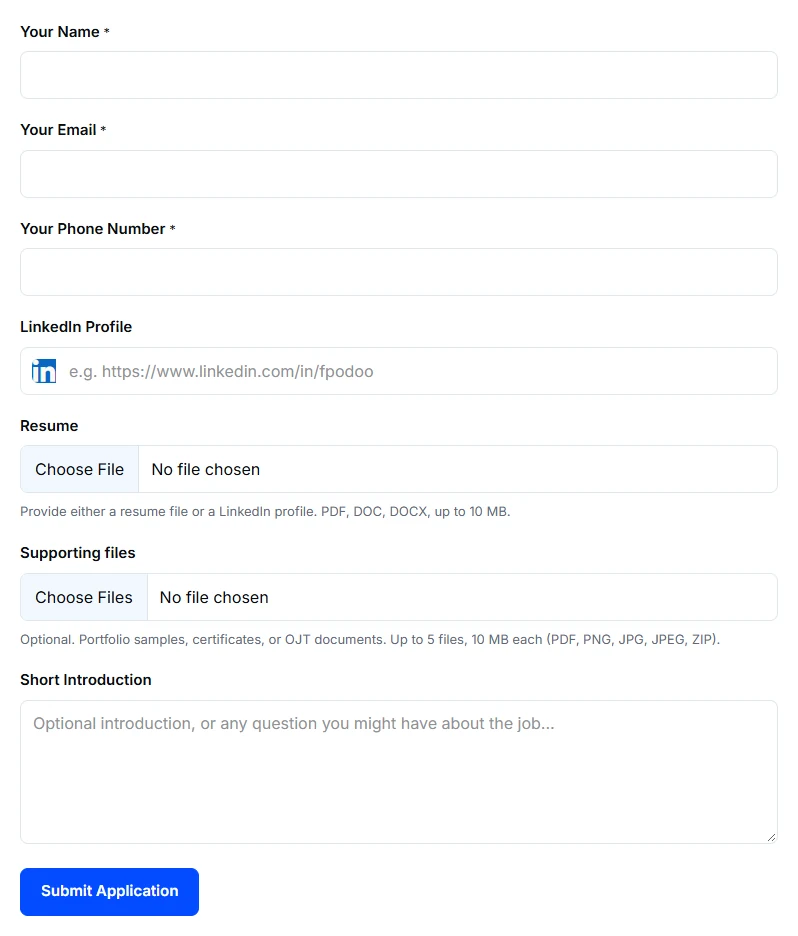
- On the application form, check your name and email and enter the required phone number. Signing in may prefill some information; check it before submitting.
- Provide a resume or a LinkedIn profile, as the form requests. Add relevant supporting files or a short introduction when useful.
- Choose Submit Application and wait for the confirmation.
What to include
Explain the work you contributed to and what you can show. A relevant example is more useful than a long list of skills without context. Use the introduction for details the form or resume does not already cover.
If submission fails
Check required fields and the messages beside the upload controls. Use the file guide for rejected uploads. If you are unsure whether submission succeeded, contact us with the role title and the time you submitted before sending another application.