
BuildKit: Cache Mounts and Why Rebuilds Are Slow
Read a build log, find the first step that is not cached, fix the line order and add a BuildKit cache mount for pip. After this, you can make code edits rebuild in seconds and new dependencies download only what is new.
Skip ahead: If your rebuilds already skip the dependency install when only code changes, and a new dependency does not download everything again, skip to "Cache mounts outside the image" and then go to the next lesson.
Putting COPY . . before the dependency install can invalidate that install layer when application files change. Copy the dependency files and install them first, then copy the application code. A BuildKit cache mount can also reuse downloaded packages when the install step needs to run again. This lesson shows both on a small Python project, with build logs so you can check what was reused. Measure rebuild times on your own project under the same conditions; the gain depends on its dependencies and available cache.
Everything here was run on Docker Desktop 4.85.0 with Engine 29.6.2 on Windows 11 and WSL 2. BuildKit is the default builder in this version, so there is nothing to switch on. I ran the examples on a fresh, empty builder so the first build really starts cold. On your machine, the first build may already show some CACHED lines if you built something similar before.
How the layer cache decides
Every instruction in a Dockerfile produces a layer. Before running a step, the builder checks if it has a layer from the same parent with the same instruction. For COPY and ADD it also checks the content of the copied files. If everything matches, the step is CACHED and nothing runs. If one step misses, every step after it runs again, even if those steps did not change.
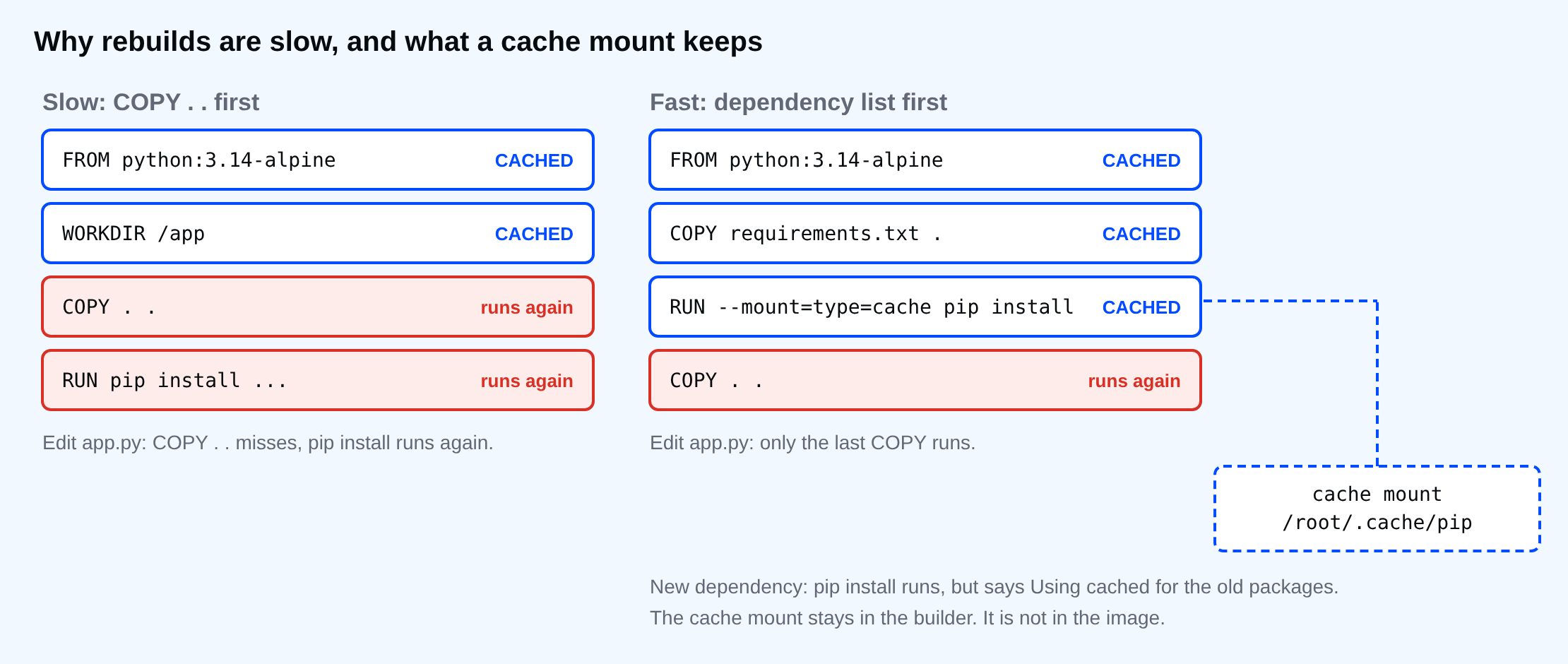
So the order of your lines is a decision about what you expect to change. Code changes many times a day. Dependencies change once in a while. The base image changes rarely. Put them in that order from the bottom up.
The slow version
Here is a small project: one dependency and one script.
requests==2.32.5
import requests
print("app version 1, requests", requests.__version__)
FROM python:3.14-alpine
WORKDIR /app
COPY . .
RUN pip install --root-user-action=ignore -r requirements.txt
CMD ["python", "app.py"]
To keep the log readable, I use a small PowerShell function. It builds with the plain progress output, then prints one line per Dockerfile step after FROM, marked CACHED if BuildKit reused it or ran if it did the work, plus the line where pip downloaded or reused the requests package.
Set-Location cache-demo
function Show-Build($file) {
  $log = docker build --progress=plain -f $file -t cache-demo . 2>&1 | ForEach-Object { "$_" }
  $steps = [ordered]@{}
  foreach ($l in $log) { if ($l -match '^#(\d+) \[(?:[\w-]+ )?(\d/\d)\] (?!FROM)(.*)$') { $steps[$matches[1]] = "[$($matches[2])] " + ($matches[3] -replace '\s+', ' ') } }
  foreach ($k in ($steps.Keys | Sort-Object { $steps[$_] })) { "{0,-7}{1}" -f $(if ($log -contains "#$k CACHED") { "CACHED" } else { "ran" }), $steps[$k] }
  $log | Select-String '(Downloading|Using cached) requests-2\.32\.5-py3-none-any\.whl \(' | ForEach-Object { "pip:   " + ($_.Line -replace '^#\d+ [\d.]+ +', '') }
}
Show-Build Dockerfile.slow
ran    [2/4] WORKDIR /app
ran    [3/4] COPY . .
ran    [4/4] RUN pip install --root-user-action=ignore -r requirements.txt
pip:   Downloading requests-2.32.5-py3-none-any.whl (64 kB)
The first build has to download everything. That is normal. Now change one line of code, the kind of change you make fifty times a day, and build again.
(Get-Content app.py) -replace 'version 1', 'version 2' | Set-Content app.py
Show-Build Dockerfile.slow
CACHED [2/4] WORKDIR /app
ran    [3/4] COPY . .
ran    [4/4] RUN pip install --root-user-action=ignore -r requirements.txt
pip:   Downloading requests-2.32.5-py3-none-any.whl (64 kB)
The base image and WORKDIR steps were reused. COPY . . was not, because app.py changed, and so pip install ran again and downloaded requests again. On this project that is a few seconds. On a real project with a hundred packages, it is minutes, every single time you touch a file.
Copy the dependency list first
The fix is to copy only the file that lists dependencies, install them, and copy the rest of the code after that. I also add a cache mount on the install step, which I explain in the next section.
FROM python:3.14-alpine
WORKDIR /app
COPY requirements.txt .
RUN --mount=type=cache,id=pip-cache,target=/root/.cache/pip \
    pip install --root-user-action=ignore -r requirements.txt
COPY . .
CMD ["python", "app.py"]
Show-Build Dockerfile
(Get-Content app.py) -replace 'version 2', 'version 3' | Set-Content app.py
"--- after editing app.py ---"
Show-Build Dockerfile
CACHED [2/5] WORKDIR /app
ran    [3/5] COPY requirements.txt .
ran    [4/5] RUN --mount=type=cache,id=pip-cache,target=/root/.cache/pip pip install --root-user-action=ignore -r requirements.txt
ran    [5/5] COPY . .
pip:   Downloading requests-2.32.5-py3-none-any.whl (64 kB)
--- after editing app.py ---
CACHED [2/5] WORKDIR /app
CACHED [3/5] COPY requirements.txt .
CACHED [4/5] RUN --mount=type=cache,id=pip-cache,target=/root/.cache/pip pip install --root-user-action=ignore -r requirements.txt
ran    [5/5] COPY . .
The first build downloaded, because this cache mount was empty. After the code edit, the install step is CACHED, and only the last COPY ran. That is the whole fix for the daily case.
Cache mounts for the day a dependency changes
Layer order cannot help when requirements.txt itself changes. The install step must run again, and without a cache mount pip starts from nothing, because its download cache from the last build was thrown away with the old layer. A cache mount is a folder the builder keeps between builds and mounts only while that one RUN step runs. Pip finds its old downloads there.
Add a second dependency and build:
Add-Content requirements.txt "six==1.17.0"
Show-Build Dockerfile
CACHED [2/5] WORKDIR /app
ran    [3/5] COPY requirements.txt .
ran    [4/5] RUN --mount=type=cache,id=pip-cache,target=/root/.cache/pip pip install --root-user-action=ignore -r requirements.txt
ran    [5/5] COPY . .
pip:   Using cached requests-2.32.5-py3-none-any.whl (64 kB)
The install step ran, as it must, but pip says Using cached for requests and downloads only what is new. The id=pip-cache part names the cache, so other Dockerfiles that use the same id on this builder share it.
⚠ Warning: A cache mount is not a place for anything your program needs at run time. It is not in the image. If you install into the cache folder instead of from it, the image will be missing files and the build will still look fine.
Cache mounts outside the image
You can check that the cache did not end up in the image:
docker run --rm cache-demo
docker run --rm cache-demo ls /root/.cache/pip
app version 3, requests 2.32.5
ls: /root/.cache/pip: No such file or directory
The program works and the pip cache folder does not exist in the image. That is better than the old trick of pip install --no-cache-dir, which keeps the image small but makes every install download again. With a cache mount, you get a small image and a warm cache.
The same pattern works for other package managers. Point target at their cache folder: /root/.npm for npm, /go/pkg/mod and /root/.cache/go-build for Go, /var/cache/apk for Alpine's apk (with --mount=type=cache,target=/var/cache/apk,sharing=locked). I ran only the pip version here.
Common mistakes
COPY . .near the top. Every code edit reinstalls everything. Copy the dependency files first.- No
.dockerignore. A changed log file or.gitfolder in the context breaks theCOPY . .cache even when no code changed. The Intermediate course covers this. - Expecting the cache on a fresh CI runner. A new runner has an empty builder, so cache mounts and layers start empty. For CI, look at
--cache-toand--cache-fromwith a registry or your CI's cache. I did not run those here. - Using
--no-cacheout of habit. It throws away every layer and every reason for this lesson.
💡 Tip: If a build is slow and you don't know why, run it with --progress=plain and look for the first step that is not CACHED. Everything after it is the price of that one step.
If you edit one line of code right now and rebuild, which step in your Dockerfile is the first one that is not CACHED, and should it be?
About
Read a build log, find the first step that is not cached, fix the line order and add a BuildKit cache mount for pip. After this, you can make code edits rebuild in seconds and new dependencies download only what is new.
Comments (0)
Sign in to commentNo comments yet.