
Rolling a Service Forward on One Host
Measure the failed requests of a normal Compose deployment, then deploy with blue and green copies and a proxy reload. After this, you can release a new version on one host without dropping requests.
Skip ahead: If you already deploy with a health-checked new copy, a proxy switch and only then stop the old copy, skip to "Common mistakes" and compare.
Not every service needs Kubernetes. A lot of real systems run on one server with Compose, and that is fine. What is not fine is the usual deployment on that server: pull the new image, docker compose up -d, and hope nobody was clicking during the few seconds when the old container was gone and the new one was not ready. This lesson measures that gap, then removes it with a pattern that needs nothing but Compose and nginx: start the new version next to the old one, wait until it is healthy, switch the proxy, then stop the old one.
Run on Docker Desktop 4.85.0, Engine 29.6.2 and Compose v5.3.1. The "app" is nginx serving one line with its version, so the result is easy to read.
Two versions of the app
FROM nginx:1.30-alpine
ARG VERSION=1
RUN echo "version $VERSION" > /usr/share/nginx/html/index.html
HEALTHCHECK --interval=1s --timeout=2s --retries=3 CMD wget -qO- http://127.0.0.1/ > /dev/null || exit 1
docker build -q -t roll-app:1 --build-arg VERSION=1 roll-app | Out-Null
docker build -q -t roll-app:2 --build-arg VERSION=2 roll-app | Out-Null
docker run --rm roll-app:2 cat /usr/share/nginx/html/index.html
version 2
The usual way, measured
A proxy in front of one app service. The proxy looks up the name app through Docker's DNS on every request (that is what the resolver line and the variable do), so it always finds the current container.
server {
    listen 80;
    resolver 127.0.0.11 valid=1s ipv6=off;
    location / {
        set $upstream http://app;
        proxy_pass $upstream;
    }
}
services:
  app:
    image: roll-app:${APP_VERSION:-1}
  proxy:
    image: nginx:1.30-alpine
    volumes:
      - ./proxy.conf:/etc/nginx/conf.d/default.conf:ro
    depends_on: [app]
networks:
  default:
    name: roll-naive-net
To measure, a small client container asks the proxy for the page 150 times, about 20 times a second, and counts the answers. While it runs, I deploy version 2 the usual way.
Set-Location roll-naive
docker compose up -d --wait 2>$null
docker run -d --name roll-client --network roll-naive-net alpine:3.24 sh -c 'for i in $(seq 1 150); do wget -qO- -T 1 http://proxy/ 2>/dev/null || echo failed; sleep 0.04; done | sort | uniq -c' | Out-Null
Start-Sleep -Seconds 2
$env:APP_VERSION = "2"
docker compose up -d 2>$null
docker wait roll-client | Out-Null
docker logs roll-client
docker rm roll-client | Out-Null
docker compose down 2>$null
Remove-Item Env:APP_VERSION
Set-Location ..
      4 failed
     56 version 1
     90 version 2
Every "failed" line is a user who got an error page. Your numbers will be different, because they depend on how fast the container stops and starts, but on my run the gap was real and visible. Compose stops the old container first, then creates the new one. In between, nothing answers.
Blue and green
Now two app services, one per version, and a proxy whose target comes from a small file. The file is mounted from a folder, so we can change it without rebuilding anything.
server {
    listen 80;
    resolver 127.0.0.11 valid=1s ipv6=off;
    include /etc/nginx/active/upstream.conf;
    location / {
        proxy_pass $upstream;
    }
}
set $upstream http://app-blue;
services:
  app-blue:
    image: roll-app:1
  app-green:
    image: roll-app:2
  proxy:
    image: nginx:1.30-alpine
    volumes:
      - ./proxy.conf:/etc/nginx/conf.d/default.conf:ro
      - ./active:/etc/nginx/active:ro
networks:
  default:
    name: roll-bg-net
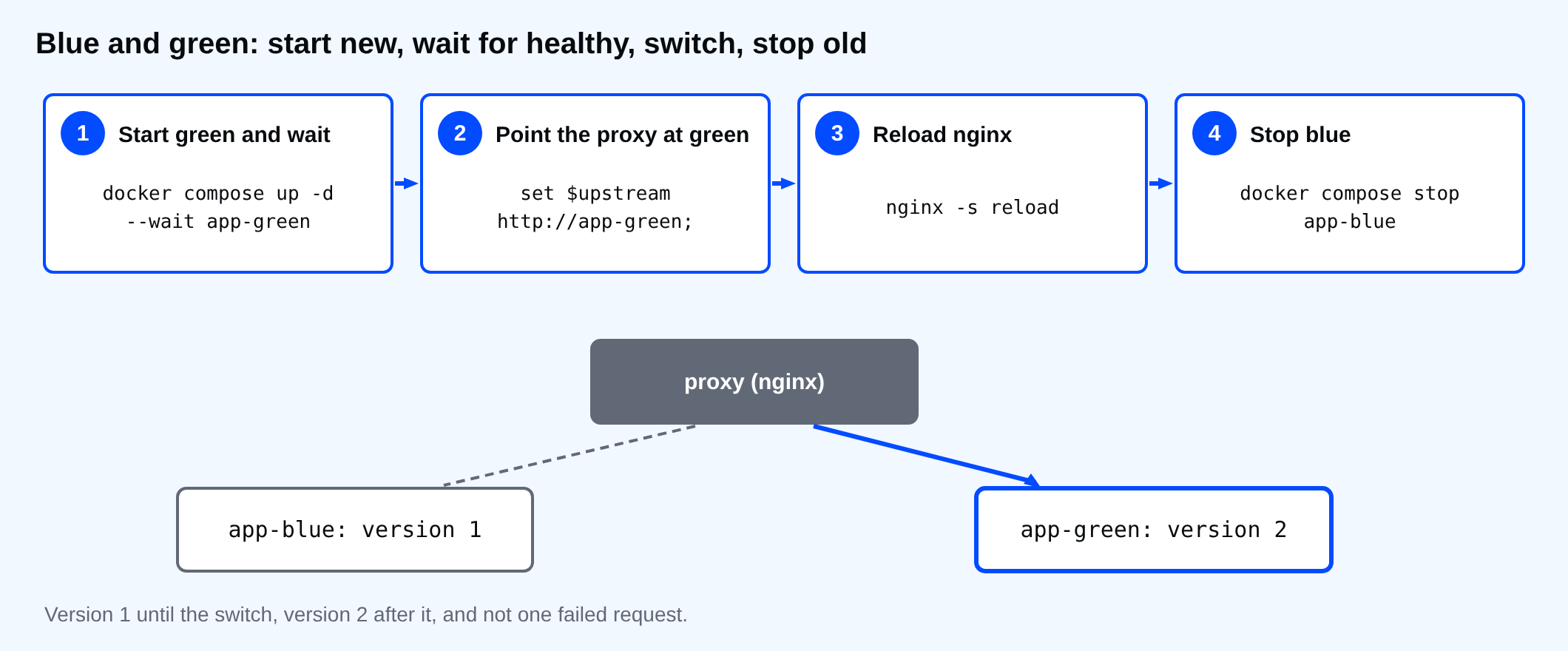
The deployment is four steps, and the client is counting the whole time:
- Start green and wait until its health check passes (
--wait). - Point the proxy at green.
- Reload nginx. A reload starts new workers with the new config and lets the old ones finish their requests, so no request is dropped.
- Stop blue.
Set-Location roll-bg
docker compose up -d --wait app-blue proxy 2>$null
docker run -d --name roll-client --network roll-bg-net alpine:3.24 sh -c 'for i in $(seq 1 150); do wget -qO- -T 1 http://proxy/ 2>/dev/null || echo failed; sleep 0.04; done | sort | uniq -c' | Out-Null
Start-Sleep -Seconds 1
docker compose up -d --wait app-green 2>$null
Set-Content -Encoding ascii active\upstream.conf 'set $upstream http://app-green;'
docker compose exec proxy nginx -s reload 2>$null
docker compose stop app-blue 2>$null
docker wait roll-client | Out-Null
docker logs roll-client
docker rm roll-client | Out-Null
docker compose down 2>$null
     81 version 1
     69 version 2
Version 1 until the switch, version 2 after it, and not one failed request. For a rollback, you do the same steps the other way: start blue, switch, reload, stop green.
⚠ Warning: Step 2 to 3 only works if the new version is really ready. That is why the image has a health check and why step 1 uses --wait. Without them, you switch traffic to a container that is still starting, and you are back to failed requests.
What this does not solve
- Database changes. If version 2 changes the database schema in a way version 1 cannot read, both versions cannot run side by side. Make schema changes in steps that both versions can live with, for example add a column first, use it in the next release, remove the old one later.
- Long requests and open connections. A reload lets running requests finish, but WebSockets and long downloads to the old container end when you stop it.
docker compose stop -t 30gives them time. - State in the container. If sessions live in the app's memory, users on blue lose them. Keep sessions in a database or cache that both versions use.
There is also a third-party Compose plugin, docker rollout, that automates a similar scale-up and scale-down for one service. I did not test it for this lesson.
Common mistakes
- Doing
docker compose pullandup -dand calling it "zero downtime" because nobody complained yet. - A proxy that resolves the app's address once at start. Plain
proxy_pass http://app;does that in nginx, so after the container is recreated with a new IP address it keeps sending traffic to the old one. Theresolverline and the variable avoid it. - No health check, so
--waitreturns as soon as the container is running, not when the app is ready.
💡 Tip: Keep the switch as a script in the repository, with the four steps in order and a check after each one. A deployment that someone does by hand at night is where the steps get skipped.
If you deployed right now while a customer was paying, how many of their requests would land in the gap?
About
Measure the failed requests of a normal Compose deployment, then deploy with blue and green copies and a proxy reload. After this, you can release a new version on one host without dropping requests.
Comments (0)
Sign in to commentNo comments yet.