
Multi-Stage Builds Without Shipping the Compiler
Build a Go service in one stage and ship only the binary from scratch, and see why CGO_ENABLED=0 matters. After this, you can cut an image from hundreds of megabytes to a few and keep compilers out of production.
Skip ahead: If your images already build in one stage and run from a small runtime stage, skip to "Common mistakes" and check your Dockerfile against that list.
A compiler belongs in the build, not in the image you run. If your production image still has Go, gcc, npm or a full Debian inside, you are shipping hundreds of megabytes that do nothing except download slowly and give an attacker more tools to work with. A multi-stage build fixes that with a few extra lines. You build in one stage and copy only the result into a clean stage.
This lesson uses a tiny Go web server, because Go makes the difference easy to see. I used the official golang:1.26-bookworm image (Go 1.26.9) on Docker Desktop 4.85.0 with Engine 29.6.2. The idea is the same for Node, Java, .NET or Rust.
The program
Twenty lines of Go, standard library only, so the build needs no downloads apart from the base image.
package main

import (
	"fmt"
	"net/http"
	"os"
)

func main() {
	if len(os.Args) > 1 && os.Args[1] == "version" {
		fmt.Println("hello-server 1.0")
		return
	}
	http.HandleFunc("/", func(w http.ResponseWriter, r *http.Request) {
		fmt.Fprintln(w, "hello from a small image")
	})
	fmt.Println("listening on :8080")
	http.ListenAndServe(":8080", nil)
}
module example.com/hello

go 1.26
One stage: the compiler ships too
The obvious Dockerfile builds and runs in the same image.
FROM golang:1.26-bookworm
WORKDIR /src
COPY . .
RUN go build -o /usr/local/bin/hello-server .
CMD ["hello-server"]
Two stages: build here, run there
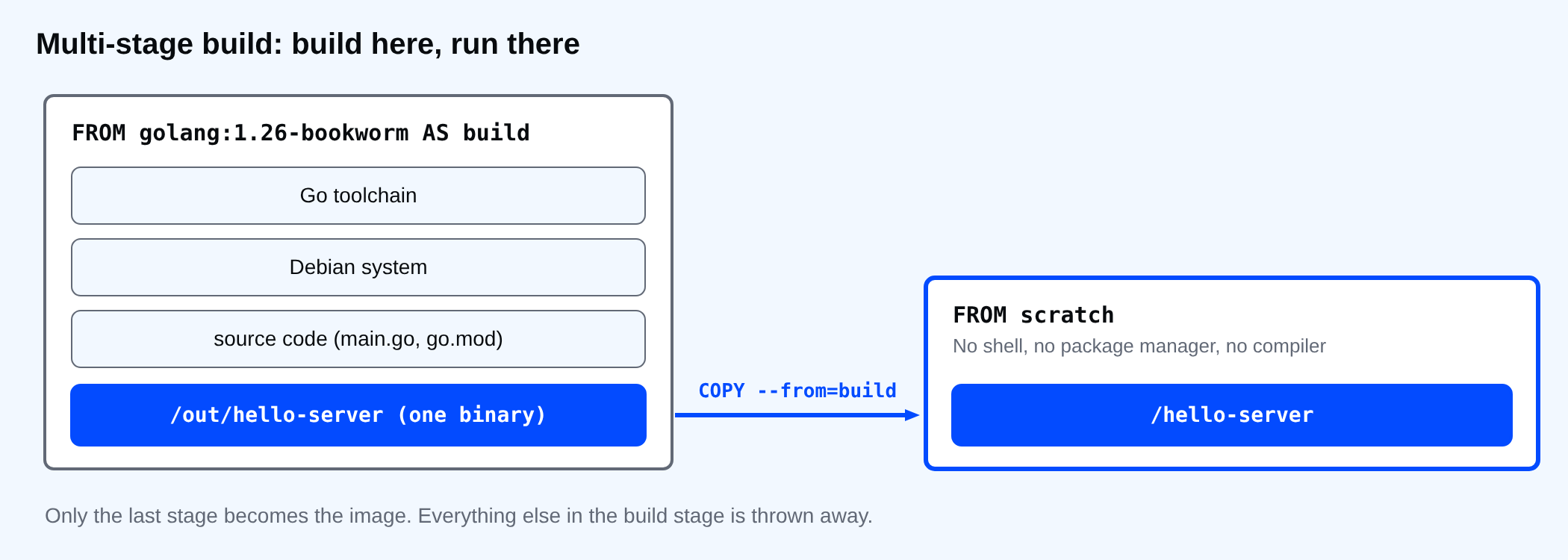
The multi-stage version has two FROM lines. The first stage is named build and does the same work. The second starts from nothing (scratch, an empty image) and copies only the binary from the first. Only the last stage becomes the image. Everything else in the build stage is thrown away.
FROM golang:1.26-bookworm AS build
WORKDIR /src
COPY go.mod main.go ./
RUN CGO_ENABLED=0 go build -trimpath -ldflags="-s -w" -o /out/hello-server .

FROM scratch
COPY --from=build /out/hello-server /hello-server
USER 65532:65532
EXPOSE 8080
ENTRYPOINT ["/hello-server"]
Build both and compare sizes. docker image inspect gives the size in bytes, and the last line turns it into megabytes.
Set-Location multi-demo
docker build -q -f Dockerfile.single -t hello-single . | Out-Null
docker build -q -t hello-multi . | Out-Null
foreach ($i in "hello-single", "hello-multi") {
  "{0,-13} {1,8:N1} MB" -f $i, ((docker image inspect $i --format "{{.Size}}") / 1MB)
}
hello-single    310.2 MB
hello-multi      2.4 MB
Same program, same output, and the single-stage image is more than a hundred times bigger. The difference is the Go toolchain and the Debian system under it. None of it is needed to run a compiled binary.
Both images really run the same program:
docker run --rm hello-single hello-server version
docker run --rm hello-multi version
hello-server 1.0
hello-server 1.0
What is not in the small image
The final stage has the binary and nothing else. No shell, no package manager, no compiler. Try to run a shell in it:
docker run --rm --entrypoint sh hello-multi
exec: "sh": executable file not found in $PATH
That error is a feature. If someone finds a hole in your program, there is no shell to drop into and no apt to install tools with. It also means you cannot docker exec into it to look around. For debugging, build the build stage on its own with --target build, or docker debug, which I did not use here.
Why CGO_ENABLED=0
The CGO_ENABLED=0 line matters more than it looks. Without it, Go on Debian links the network code against the C library, and the binary needs that library at run time. scratch has no C library. The build succeeds and the container fails to start, with an error that does not mention the library at all. This is the version without the flag:
FROM golang:1.26-bookworm AS build
WORKDIR /src
COPY go.mod main.go ./
RUN go build -o /out/hello-server .

FROM scratch
COPY --from=build /out/hello-server /hello-server
ENTRYPOINT ["/hello-server"]
docker build -q -f Dockerfile.cgo -t hello-cgo . | Out-Null
docker run --rm hello-cgo version
no such file or directory
"No such file or directory" for a file that is clearly there. The missing file is the dynamic loader the binary asks for, not the binary itself. If you see this error after moving to a small base image, check how the program was linked before anything else.
⚠ Warning: If your program really needs the C library (some database drivers and image libraries do), do not force CGO_ENABLED=0. Use a small runtime stage that has it, such as debian:bookworm-slim or a distroless base, instead of scratch.
Build only one stage
--target stops the build at a named stage. It is useful for tests, which need the compiler, and for debugging.
docker build -q --target build -t hello-buildstage . | Out-Null
docker run --rm hello-buildstage go version
go version go1.26.9 linux/amd64
The same idea for Node and others
For Node, the build stage runs npm ci and the build script, and the final stage starts from a smaller Node image and copies only the built files plus production dependencies (npm ci --omit=dev). You still ship the Node runtime, so the final image will not be as small as a Go binary on scratch. For Java, build with a JDK image and run on a JRE image. I ran only the Go version for this lesson.
Common mistakes
- Copying the whole build stage folder with
COPY --from=build /src /src. You are back to shipping the source and the junk. Copy the output only. - Forgetting the user.
scratchhas no users file, so use a number, as inUSER 65532:65532. - No CA certificates. A
scratchimage cannot make HTTPS calls without them. Copy/etc/ssl/certs/ca-certificates.crtfrom the build stage if your program calls HTTPS services. - Building the final stage
FROMthe build image "to be safe". That is a single-stage build with extra steps.
💡 Tip: Name every stage (AS build, AS test, AS runtime). COPY --from=0 works, but numbers break the day someone adds a stage at the top.
If someone got a shell inside your production container today, what tools would they find there that your program never uses?
About
Build a Go service in one stage and ship only the binary from scratch, and see why CGO_ENABLED=0 matters. After this, you can cut an image from hundreds of megabytes to a few and keep compilers out of production.
Comments (0)
Sign in to commentNo comments yet.