

Services, depends_on and Healthchecks
Show why depends_on alone does not wait for readiness, add a health check, and wait for a job to finish. After this, you can start a stack in the right order and make a failed dependency stop it loudly.
Skip ahead: If you already use condition: service_healthy, skip to "Wait for a job to finish", then go on to the next lesson.
In the first course you wrote a Compose file with two services. Real apps have services that take time to be ready: a database that is still starting, an API that loads data first. Compose starts containers in the order you describe, and it does not know whether the program inside is ready. That gap causes the most common Compose complaint: "it works the second time I run it". This lesson shows the gap, closes it with a health check, and then waits for a one-time job.
Start order is not readiness
The service api below is nginx that waits six seconds before it starts, to stand in for anything slow. The client service asks it for a page the moment it starts. depends_on says api first.
services:
  api:
    image: nginx:1.30-alpine
    command: sh -c "sleep 6 && exec nginx -g 'daemon off;'"
  client:
    image: alpine:3.24
    command: wget -qO /dev/null http://api/
    depends_on:
      - api
Set-Location ready-stack
docker compose up -d 2>&1 | Out-Null
Start-Sleep -Seconds 3
docker compose logs --no-log-prefix client
docker compose ps --all --format "table {{.Service}}\t{{.Status}}"
wget: can't connect to remote host (172.28.0.2): Connection refused
SERVICE   STATUS
api       Up 4 seconds
client    Exited (1) 3 seconds ago
The client started right after the api container did, found nobody listening and exited with an error. In the short form, depends_on waits for the container to be *started*. It does not wait for the program in it to be ready. That is correct behaviour, because Compose cannot know what "ready" means for your program. You have to tell it.
docker compose down
Describe "ready" with a health check
A health check is a command that Docker runs inside the container, again and again. If it exits with 0 the container is healthy. While it has not passed yet the status is starting, and after too many failures it is unhealthy. Then you ask depends_on to wait for healthy.
services:
  api:
    image: nginx:1.30-alpine
    command: sh -c "sleep 6 && exec nginx -g 'daemon off;'"
    healthcheck:
      test: ["CMD", "wget", "-qO", "/dev/null", "http://127.0.0.1/"]
      interval: 2s
      timeout: 2s
      retries: 5
  client:
    image: alpine:3.24
    command: wget -qO /dev/null http://api/ && echo "client got the page"
    depends_on:
      api:
        condition: service_healthy
docker compose -f compose.healthy.yaml up -d 2>&1 | Select-String "api-1 (Waiting|Healthy)|client-1 Started" | ForEach-Object { $_.ToString().Trim() }
Start-Sleep -Seconds 2
docker compose -f compose.healthy.yaml logs --no-log-prefix client
Container ready-stack-api-1 Waiting
Container ready-stack-api-1 Healthy
Container ready-stack-client-1 Started
api was started, Compose waited while it was starting, and only once it was healthy did it start client. The page was there this time. Read the pieces of the check:
testis the command.CMDruns it directly, andCMD-SHELLruns it through a shell.intervalis the time between runs,timeoutis how long one run may take, andretriesis how many failures in a row make the containerunhealthy.start_periodis not used here. It gives a slow program time before failures count.
The command has to exist inside the image. This image has wget and no curl, so I used wget. A health check that calls a missing program fails forever, and the container becomes unhealthy for a reason that has nothing to do with your app.
docker inspect --format "{{.State.Health.Status}}" ready-stack-api-1
healthy
💡 Tip: Write the check so it tests what the other service needs, such as "the web server answers", not "the process exists". A running process can still be unable to serve anything.
What a failing check looks like
Change the test to a command that always fails and ask Compose to start the stack.
docker compose -f compose.healthy.yaml down 2>&1 | Out-Null
(Get-Content compose.healthy.yaml) -replace '"CMD", "wget", "-qO", "/dev/null", "http://127.0.0.1/"', '"CMD", "false"' -replace 'retries: 5', 'retries: 2' -replace 'interval: 2s', 'interval: 1s' | Set-Content compose.failing.yaml
docker compose -f compose.failing.yaml up -d 2>&1 | Select-String "unhealthy" | ForEach-Object { $_.ToString().Trim() }
"exit code $LASTEXITCODE"
dependency failed to start: container ready-stack-api-1 is unhealthy
exit code 1
Compose stopped and reported that a dependency failed, so client never ran. That is the behaviour you want: an unready service stops the stack loudly, and the client does not start against something that is not there.
docker compose -f compose.failing.yaml down
Wait for a job to finish
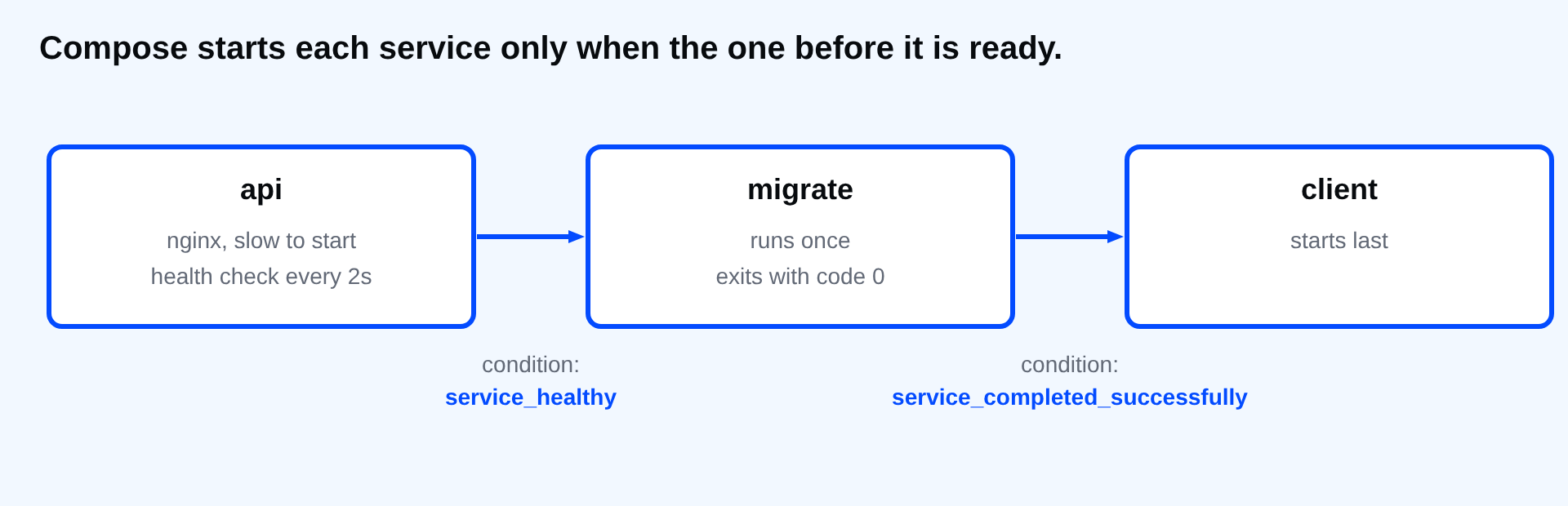
Some dependencies are not services that stay up. A database migration runs once and exits. condition: service_completed_successfully waits for such a container to exit with code 0. Here migrate waits for api to be healthy, and client waits for both.
services:
  api:
    image: nginx:1.30-alpine
    healthcheck:
      test: ["CMD", "wget", "-qO", "/dev/null", "http://127.0.0.1/"]
      interval: 2s
      timeout: 2s
      retries: 5
  migrate:
    image: alpine:3.24
    command: echo "migrations finished"
    depends_on:
      api:
        condition: service_healthy
  client:
    image: alpine:3.24
    command: echo "client started after the migration"
    depends_on:
      migrate:
        condition: service_completed_successfully
docker compose -f compose.jobs.yaml up -d 2>&1 | Out-Null
Start-Sleep -Seconds 3
docker compose -f compose.jobs.yaml logs --no-log-prefix migrate client
client started after the migration
migrations finished
If migrate exits with an error, client never starts, and the failure is on the screen. That is much better than an app that starts against a half-migrated database.
A health check in the image
The same check can live in the Dockerfile with HEALTHCHECK, so every container from the image reports its health, not only those started from your Compose file.
FROM nginx:1.30-alpine
HEALTHCHECK --interval=2s --timeout=2s --retries=3 CMD wget -qO /dev/null http://127.0.0.1/ || exit 1
docker build -q -t health-demo:1 . | Out-Null
docker run -d --name health-one health-demo:1 | Out-Null
Start-Sleep -Seconds 5
docker ps --filter name=health-one --format "table {{.Names}}\t{{.Status}}"
NAMES        STATUS
health-one   Up 5 seconds (healthy)
docker ps shows (healthy) next to the status. A check in the Compose file overrides the one in the image when both exist.
⚠ Warning: A health check that is slow, heavy or has a short timeout makes your service flap between healthy and unhealthy. Keep the command cheap, and give a slow starter a start_period.
docker compose -f compose.jobs.yaml down
docker rm -f health-one
Think about your own stack. Which service does another one need, and what exact command would prove that it is ready?
About
Show why depends_on alone does not wait for readiness, add a health check, and wait for a job to finish. After this, you can start a stack in the right order and make a failed dependency stop it loudly.
Comments (0)
Sign in to commentNo comments yet.