
.dockerignore and What Belongs in the Build Context
See what the builder receives, what ends up in the image and how a .dockerignore file controls both. After this, you can keep secrets, .git folders and large files out of your images and out of your build time.
Skip ahead: If you already keep a .dockerignore file in every project, skip to "Patterns that trip people up", then go on to the next lesson.
Every docker build starts by sending a folder to the builder. That folder is the build context, and the dot at the end of docker build . is its path. Most Dockerfiles then do COPY . ., which copies the whole context into the image. If the folder has a secret, a .git history or a 2 GB test file in it, all of it goes along. This lesson shows what the builder receives, what ends up in the image, and how a .dockerignore file controls both.
What the builder receives
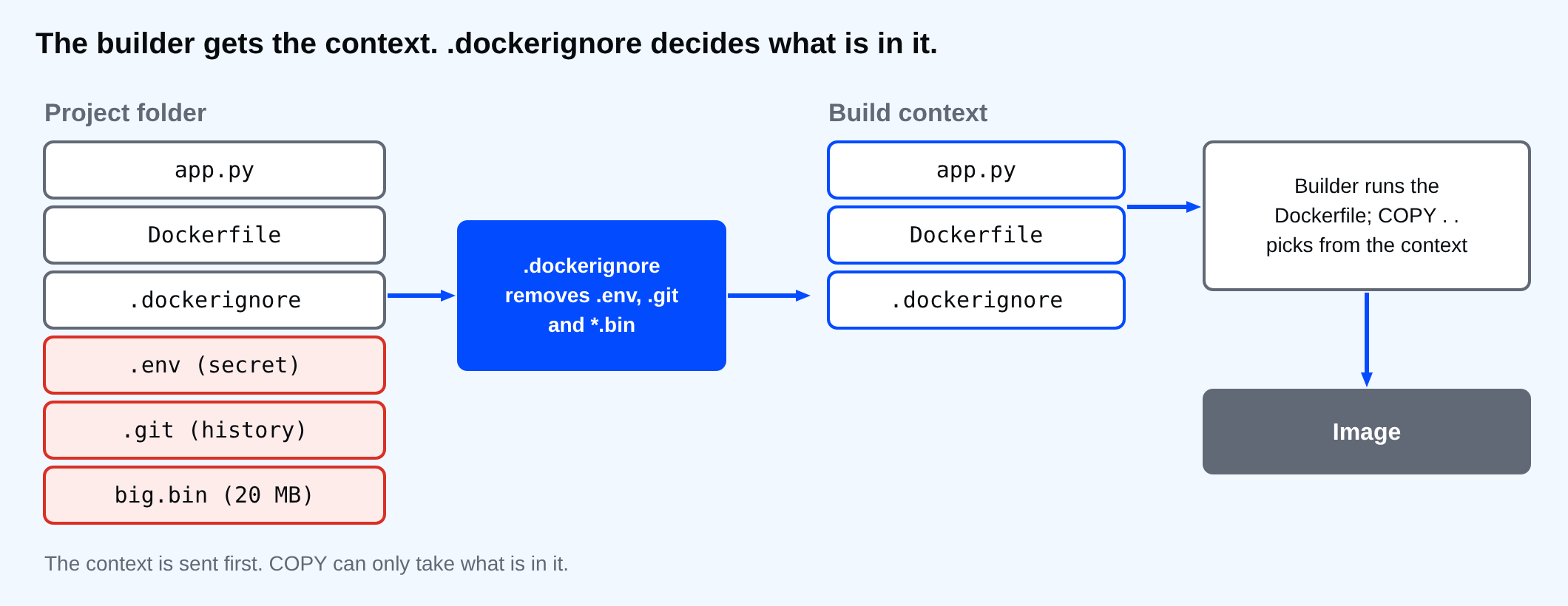
The context is everything under the folder you name, minus what .dockerignore excludes. The Dockerfile does not decide this. Two different things happen: the context is sent first, and COPY picks from it afterwards.
See it with a small project
Create a project with a tiny app, a Dockerfile that copies everything, and three things that should never be in an image: a secret, a Git folder and a large file. The values are made up.
print("app is running")
FROM python:3.14-alpine
WORKDIR /app
COPY . .
CMD ["python", "app.py"]
Set-Location ctx-demo
Set-Content .env "SECRET_KEY=not-a-real-secret"
New-Item -ItemType Directory .git | Out-Null
Set-Content .git\HEAD "ref: refs/heads/main"
[IO.File]::WriteAllBytes("$PWD\big.bin", (New-Object byte[] 20MB))
Get-ChildItem -Force -Name
.git
.env
app.py
big.bin
Dockerfile
Build it with plain progress output and keep only the lines that report a context size.
docker build --progress=plain -t ctx-demo:1 . 2>&1 | Select-String "transferring context"
#3 transferring context: 2B done
#5 transferring context: 20.98MB 1.3s done
The first line is the .dockerignore file, which does not exist yet, so it is 2 bytes. The second is the real context: about 21 MB went to the builder for a program that is one line long. Now look inside the image.
docker run --rm ctx-demo:1 ls -A /app
docker run --rm ctx-demo:1 cat /app/.env
.env
.git
Dockerfile
app.py
big.bin
SECRET_KEY=not-a-real-secret
The secret is in the image. Anyone who can pull the image can read it, and it stays there even if you delete the file in a later step, because layers are never edited. The .git folder and the 20 MB file came along too.
⚠ Warning: A .env file copied into an image is a leaked secret. Pushing that image to a registry shares it with everyone who can pull. If it already happened, rotate the secret. Deleting the image later does not undo it.
Add a .dockerignore
Put a file named .dockerignore next to the Dockerfile. Each line is a pattern, relative to the context folder.
Set-Content .dockerignore @"
.env
.git
*.bin
__pycache__
"@
docker build --progress=plain -t ctx-demo:2 . 2>&1 | Select-String "transferring context"
docker run --rm ctx-demo:2 ls -A /app
#3 transferring context: 69B done
#4 transferring context: 123B done
.dockerignore
Dockerfile
app.py
The context dropped from megabytes to a few bytes, and /app holds only what the program needs. Builds are also faster, because Docker has less to send and fewer files to compare when it decides whether a step can be reused.
The .dockerignore file itself is in the image, as the listing shows, and so is the Dockerfile. Add both to the list if you want them out. They are still sent to the builder, which needs them, but COPY skips them.
Add-Content .dockerignore "Dockerfile`n.dockerignore"
docker build -q -t ctx-demo:3 . 2>$null | Out-Null
docker run --rm ctx-demo:3 ls -A /app
app.py
Patterns that trip people up
The rules look like .gitignore rules, but they are not the same. Build a second project that copies into /ctx, so you can list exactly what arrives.
FROM alpine:3.24
COPY . /ctx
Set-Location ..\pattern-demo
New-Item -ItemType Directory notes, src\__pycache__, cache\__pycache__ | Out-Null
"a" | Set-Content a.txt
"keep" | Set-Content keep.txt
"todo" | Set-Content notes\todo.txt
"x" | Set-Content src\app.py
"x" | Set-Content src\__pycache__\app.pyc
"x" | Set-Content cache\__pycache__\x.pyc
Set-Content .dockerignore @"
*.txt
!keep.txt
**/__pycache__
"@
docker build -q -t pattern-demo:1 . | Out-Null
docker run --rm pattern-demo:1 sh -c "find /ctx -type f | sort"
/ctx/.dockerignore
/ctx/Dockerfile
/ctx/keep.txt
/ctx/notes/todo.txt
/ctx/src/app.py
Three things to read in that list:
*.txtremoveda.txtin the top folder but notnotes/todo.txt. A*does not cross folders, and the pattern is matched from the context root. Use**/*.txtto match at any depth.!keep.txtis an exception. The last line that matches a file wins, so put exceptions after the rule they cancel.**/__pycache__matched the folder at every depth. Without the**/, only a__pycache__in the root would go.
If your Dockerfile has another name, BuildKit looks for a matching ignore file first. For -f Dockerfile.dev that is Dockerfile.dev.dockerignore, which lets one project keep a different list for each Dockerfile.
💡 Tip: Start every project with a .dockerignore that lists .git, .env, build output, dependency folders and editor files. Writing it on day one is much easier than discovering the leak from a security scan.
Windows adds one more trap. Write patterns with forward slashes, src/cache, because the file is read the same way on every system. A backslash is not a path separator in it.
If you skip this file, nothing fails. Builds work, images run, and the problems arrive later as slow builds, huge images or a secret in the wrong place. If you opened your own project's .dockerignore right now, what would you find in the image that you did not put there on purpose?
About
See what the builder receives, what ends up in the image and how a .dockerignore file controls both. After this, you can keep secrets, .git folders and large files out of your images and out of your build time.
Comments (0)
Sign in to commentNo comments yet.