
Semantic HTML: Stop Wrapping Everything in a Div
Use header, main, nav, footer, section and article for the right job, and keep div for when no better tag exists. After this, your page structure says what each block is.
Skip ahead: If you already use header, nav, main and footer for those jobs and reach for div only when no better tag fits, skip to "When div is still right", then continue.
<div> means division. It has no meaning. Beginners wrap everything in divs because tutorials do it and because CSS needs a hook. That habit hides the structure of the page.
Semantic tags name the job:
<header>…</header>
<nav>…</nav>
<main>…</main>
<footer>…</footer>
<section>…</section>
<article>…</article>
Screen readers can jump by these landmarks. Maintainers can find the footer without guessing which of twelve divs it is.
A simple page layout
<body>
  <header>
    <p class="brand">Corner Store</p>
    <nav aria-label="Primary">
      <a href="index.html">Home</a>
      <a href="products.html">Products</a>
      <a href="contact.html">Contact</a>
    </nav>
  </header>

  <main>
    <h1>This week's prices</h1>
    <section>
      <h2>Rice</h2>
      <p>Jasmine, 5 kg — ₱420.</p>
    </section>
  </main>

  <footer>
    <p>Open 9am to 6pm. Closed Sunday.</p>
  </footer>
</body>
- header: intro content for the page or a section (brand, title area).
- nav: block of navigation links.
- main: the unique main content of this page. One per page.
- footer: end matter (hours, contact, legal links).
- section: a themed group with its own heading.
- article: a self-contained piece (a blog post, a product card you could syndicate).
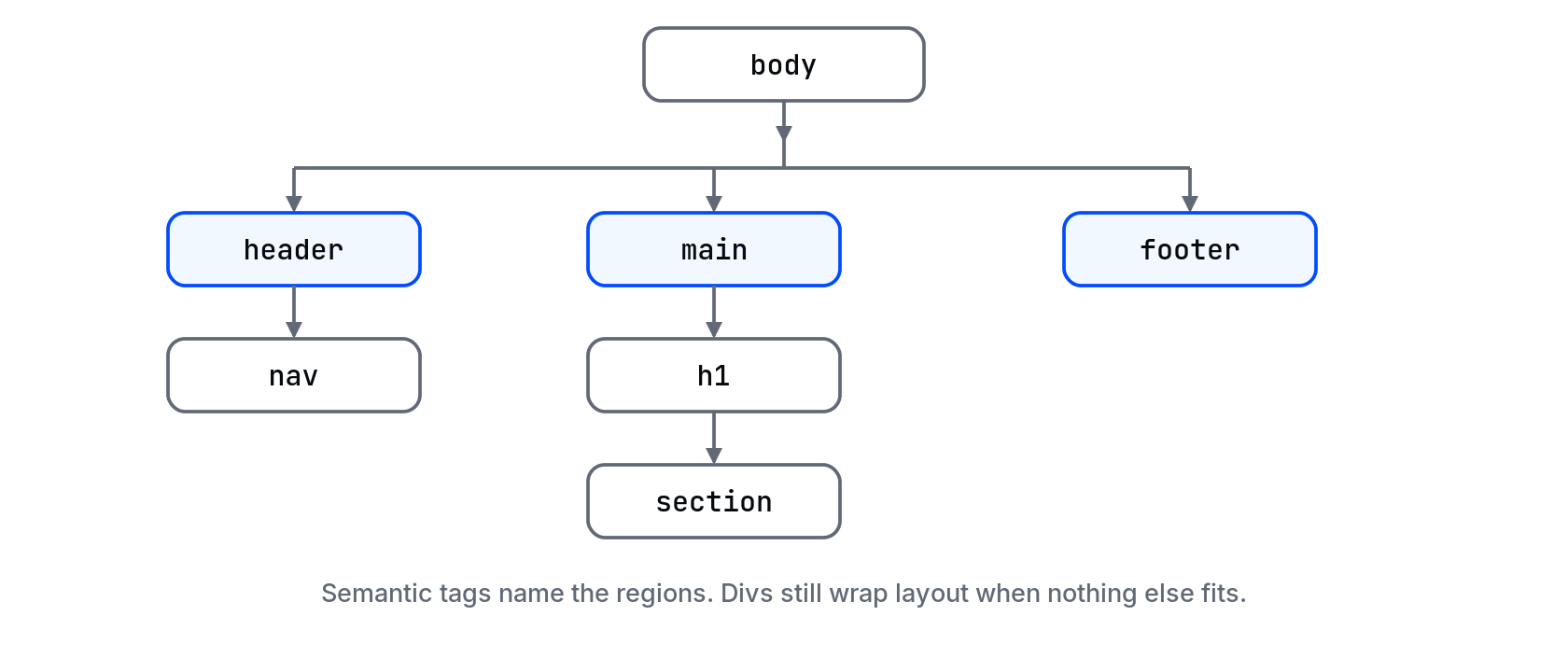
Document tree (what the browser builds)
The browser turns that markup into a tree. CSS and JavaScript walk the same tree. Clear names make the tree readable in DevTools.
When div is still right
Use <div> when you need a box only for layout or styling and no semantic tag fits.
<div class="card-row">
  <article class="card">…</article>
  <article class="card">…</article>
</div>
The row is a layout wrapper. The cards are articles. That split is honest.
Also prefer specific tags when they exist: <ul> for lists, <table> for tables, <button> for actions, <form> for forms. A clickable <div> with a click handler is a last resort, not a starting point.
Common mistakes
- Multiple
<main>elements. One page, one main. - Putting all links in the header without
<nav>. You can still style them. The landmark is what you lose. - Using
<section>for every div. If there is no heading, it is probably still a div.
💡 Tip: In Chrome, open DevTools → Accessibility (or the Accessibility pane in Elements). Check the landmarks list. You should see banner, navigation, main, contentinfo for a normal page that uses header/nav/main/footer.
What happens if you skip this
Your CSS will still work. Your accessibility and your future self will not. Finding "the top bar" in a 400-line file of divs is slower every month the site grows.
Rewrite your practice page with header, nav, main and footer. View it in the browser. Does it look the same? Good. The gain was structure, not decoration.
Section and article without overdoing it
<main>
  <h1>Blog</h1>
  <article>
    <h2>Why we still hand-count the till</h2>
    <p>…</p>
  </article>
  <article>
    <h2>New branch hours</h2>
    <p>…</p>
  </article>
</main>
Each article could stand alone. A section would group them under a shared heading if you need an extra layer. If you cannot name the section in an h2, you probably wanted a div.
About
Use header, main, nav, footer, section and article for the right job, and keep div for when no better tag exists. After this, your page structure says what each block is.
Comments (0)
Sign in to commentNo comments yet.