

The Box Model: Margin, Border, Padding, Content
How every element is a box, what margin, border, padding and content do, and how box-sizing changes the math. After this, spacing stops being a guessing game.
Skip ahead: If you already know content + padding + border (+ margin) and you use box-sizing: border-box, skip to "Margin collapse in one sentence", then continue.
Every element is a box. Layout bugs are usually box bugs. Learn the four layers and the width math stops being mystical.
The four layers
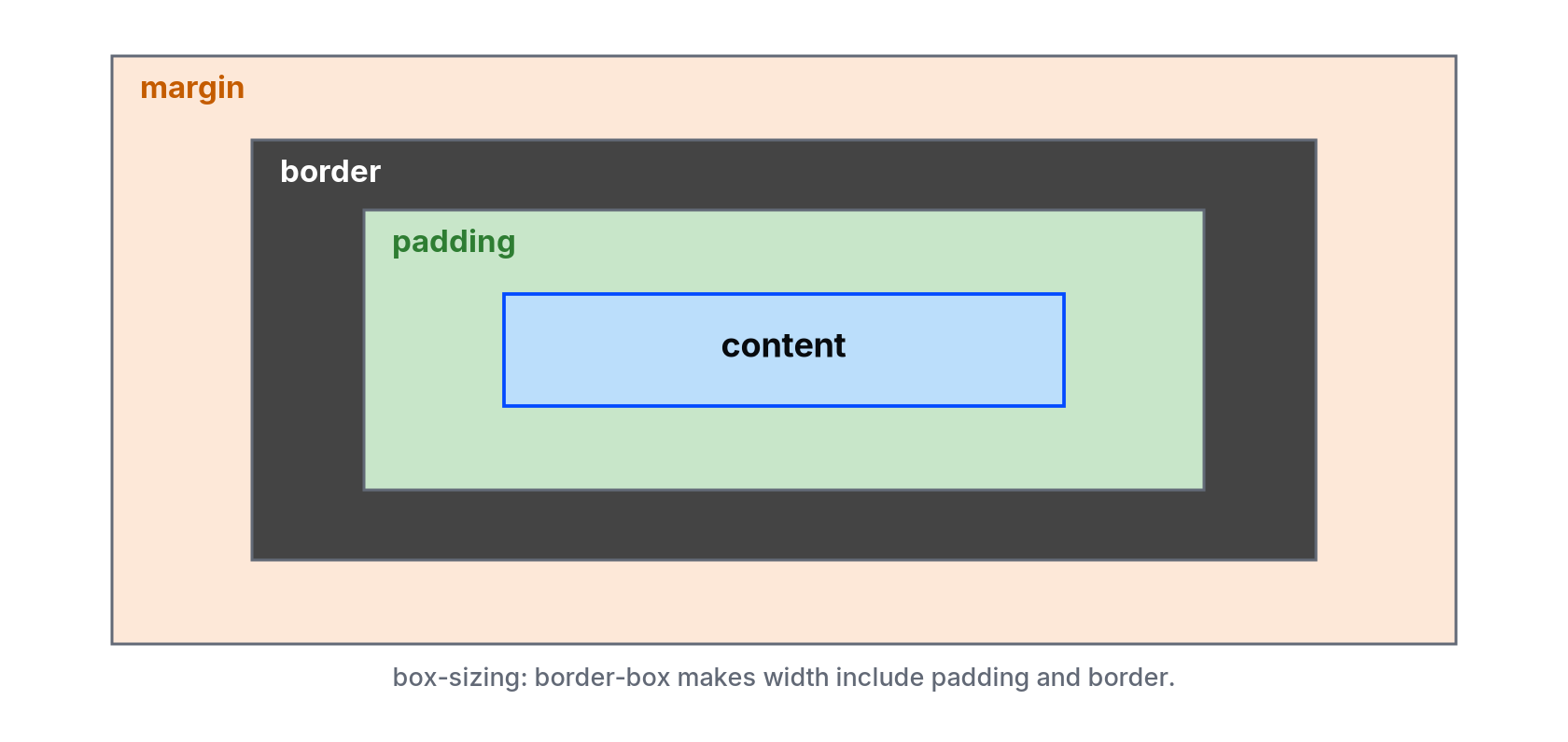
From inside out:
- Content — text or child elements.
- Padding — space inside the border, around the content.
- Border — the line around the padding.
- Margin — space outside the border, between this box and others.
.card {
  width: 300px;
  padding: 16px;
  border: 2px solid #626976;
  margin: 24px;
}
Default width math (content-box)
With the default box-sizing: content-box, width sets the content width only. Padding and border add extra.
For the card above, total outer width of the border box is:
300 + 16 + 16 + 2 + 2 = 336px
(plus margins outside that).
That is why width: 100% plus padding often causes horizontal scroll.
border-box: the sane default
*,
*::before,
*::after {
  box-sizing: border-box;
}

.card {
  width: 300px;
  padding: 16px;
  border: 2px solid #626976;
}
Now width: 300px includes padding and border. Content shrinks to fit. Most modern projects start with this rule.
Margin collapse in one sentence
Vertical margins of adjacent block elements can collapse into one margin (the larger one wins) instead of adding. That is why margin-top: 20px on a child and margin-bottom: 20px on the previous sibling may not equal 40px of gap. Padding or a border on the parent often changes the behaviour. Use DevTools to measure the final gap rather than arguing with the math in your head.
Shorthand
margin: 8px;               /* all sides */
margin: 8px 16px;          /* top/bottom, left/right */
margin: 8px 16px 24px;     /* top, left/right, bottom */
margin: 8px 16px 24px 32px; /* top, right, bottom, left */
padding: 1rem 1.5rem;
border: 1px solid #626976;
Common mistakes
- Using margin to pad inside a bordered box. Padding keeps the background; margin does not.
- Setting width and height and wondering why text spills. Overflow is a separate property (
overflow: autowhen you need a scroll area). - Fighting collapse with random negative margins. Measure first.
💡 Tip: In Chrome DevTools, select an element and open the box model graphic in the Computed panel. It shows margin (orange), border (dark), padding (green) and content (blue) for that element.
What happens if you skip this
You will set width: 100% on padded columns and get a page that scrolls sideways by 30 pixels. You will blame the browser.
Add the global border-box rule to styles.css. Give a card width: 300px; padding: 40px; border: 10px solid #034bff;. Measure it in DevTools. Is the border box 300px wide?
Padding vs margin: backgrounds tell the truth
.alert {
  background: #f2f8ff;
  padding: 1rem;
  margin: 1.5rem 0;
  border-left: 5px solid #034bff;
}
The blue surface includes the padding. The gap above and below is margin, so the page background shows through. If you wanted the coloured area taller, increase padding, not margin.
Inline vs block boxes
Paragraphs and divs are block boxes (they start on a new line and stretch). Spans and links are inline (they sit in the text flow). Horizontal margin/padding on inline elements behave differently from blocks. If you need a padded chip, make it inline-block or a flex child:
.chip {
  display: inline-block;
  padding: 0.25rem 0.5rem;
  background: #f2f8ff;
}
Measure before you tweak
Change one property at a time. Read the box model graphic after each change. Randomly editing margin and padding together hides which one fixed the gap.
About
How every element is a box, what margin, border, padding and content do, and how box-sizing changes the math. After this, spacing stops being a guessing game.
Comments (0)
Sign in to commentNo comments yet.