
JavaScript == vs ===: Comparing Values Without Surprises
What == and === do differently, why == gives strange results, and the simple rule for which to use. After this, your if statements compare what you meant them to compare.
Skip ahead: If you already use === everywhere and know why NaN === NaN is false, skip to "Comparing objects".
Use ===. That's the rule, and it covers almost every comparison you'll write. == converts both sides to the same type before comparing, and the conversion rules give results that look like bugs. You don't have to memorise them. You just have to stop using ==.
What the two operators do
===(strict equality): same type and same value. No conversion.==(loose equality): if the types differ, convert one or both, then compare.
!== and != are the "not equal" versions, with the same difference.
console.log(5 === 5);
console.log(5 === "5");
console.log(5 == "5");
true
false
true
5 == "5" is true because == turned the string into a number first. Sometimes that's what you want. Most of the time it hides a bug, for example a value from a form that you forgot to convert.
The results that trip people up
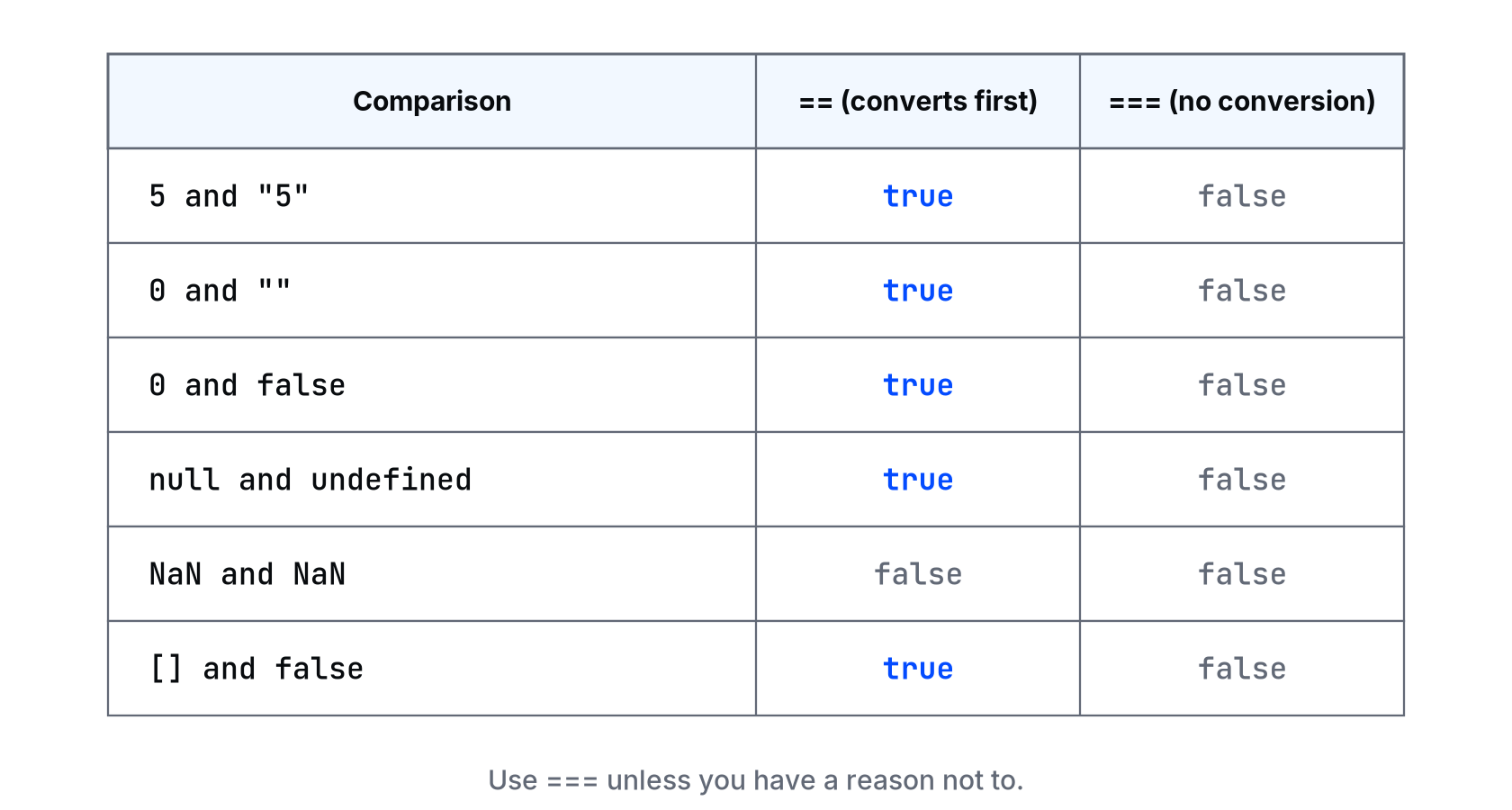
Run them yourself:
console.log(0 == "");
console.log(0 == false);
console.log(null == undefined);
console.log([] == false);
console.log(0 === "");
console.log(null === undefined);
true
true
true
true
false
false
An empty string equals zero, and an empty array equals false. Nobody writes that on purpose. If your if depends on one of these, it can take the wrong branch without any error.
NaN is not equal to anything
NaN is the only value that isn't equal to itself, with either operator:
const qty = Number("abc");
console.log(qty === NaN);
console.log(Number.isNaN(qty));
false
true
So if (qty === NaN) never runs. Use Number.isNaN(qty).
Comparing objects
=== on two objects or arrays doesn't compare what's inside them. It checks if both names point to the same object.
const a = ["rice"];
const b = ["rice"];
const c = a;
console.log(a === b);
console.log(a === c);
false
true
a and b look the same but are two different arrays. To compare contents, compare the parts you care about, for example a.length === b.length and each item, or for simple data, JSON.stringify(a) === JSON.stringify(b). That last one is a shortcut with limits (key order matters), so don't use it for anything important.
The one == people use on purpose
value == null is true for both null and undefined, and nothing else. Some experienced developers use it as a short "is this missing?" check. It's fine if your team agrees on it. As a beginner, write it out, value === null || value === undefined, so the next reader doesn't wonder whether you meant it.
⚠ Warning: Don't fix a comparison that "doesn't work with ===" by switching to ==. If === says false, the types are different. Find out why (usually a string from an input or a URL) and convert on purpose with Number() or String(). Switching to == makes the symptom go away and leaves the cause in your code.
💡 Tip: Most code editors and linters can flag == for you. When you set up a project in JavaScript Intermediate, turn that rule on and stop thinking about it.
Common mistakes
- Writing
=(assignment) instead of===inside anif.if (status = "paid")sets status and is always true. - Comparing a number from your code with a string from the page using
===and assuming JavaScript is broken. - Checking
=== NaN. - Expecting two arrays with the same items to be
===.
What happens if you skip this
You'll keep using == because it "works", and it will, until a 0, an empty string or an empty field makes a condition pass that shouldn't. Those bugs show up in production, with real data, not in your test.
What does "0" == false give? Guess first, then check it in the console. Did your guess match?
About
What == and === do differently, why == gives strange results, and the simple rule for which to use. After this, your if statements compare what you meant them to compare.
Comments (0)
Sign in to commentNo comments yet.