

Three-Table Joins Without Double Counting
Join customers, orders and items, see how a total on the one side is counted once per row on the many side, and fix it by aggregating first. After this, a three-table report adds up to a number you can prove.
Skip ahead: If you already aggregate the many side before you join it, skip to "The fix: aggregate first, then join", then continue.
The Beginner join lesson ended on a habit: count the rows before and after every join. This lesson is where that habit pays off. A report that joins three or four tables is easy to write and easy to get wrong, and the wrong version does not fail. It returns a number. Nobody questions a number.
The shop has a chain: a customer has many orders, and an order has many items. When you join down that chain, a value that belongs to the order is repeated once for every item. Add it up and you have counted it several times.
A three-table join that is correct
Start with a join where nothing goes wrong, so you can see what correct looks like. List the lines of Ben Cruz's orders.
SELECT o.order_id, p.name AS product, i.quantity, p.price
FROM customers AS c
JOIN orders AS o ON o.customer_id = c.customer_id
JOIN order_items AS i ON i.order_id = o.order_id
JOIN products AS p ON p.product_id = i.product_id
WHERE c.name = 'Ben Cruz'
ORDER BY o.order_id, p.name;
 order_id | product  | quantity | price
----------+----------+----------+-------
        3 | Backpack |        1 | 29.90
        3 | Gel Pen  |        3 |  1.25
       10 | Backpack |        1 | 29.90
(3 rows)
Three rows, one per item line. Every column here describes the line, so repeating the order id is harmless. Revenue per customer works the same way, because quantity times price is a value of the line itself.
SELECT c.name, sum(i.quantity * p.price) AS revenue
FROM customers AS c
JOIN orders AS o ON o.customer_id = c.customer_id
JOIN order_items AS i ON i.order_id = o.order_id
JOIN products AS p ON p.product_id = i.product_id
WHERE o.status <> 'cancelled'
GROUP BY c.name
ORDER BY revenue DESC, c.name;
    name    | revenue
------------+---------
 Ben Cruz   |   63.55
 Ana Reyes  |   55.75
 Hugo Sy    |   45.75
 Carla Diaz |   39.47
 Ella Tan   |   37.25
 Finn Go    |   22.99
(6 rows)
Customers with no orders are missing because every join here is an INNER JOIN. That is a choice you make on purpose. We will come back to it at the end.
The trap: a value that lives on the order
Now give each order a shipping fee. An order pays it once, no matter how many items it has.
ALTER TABLE orders ADD COLUMN shipping numeric(6,2) NOT NULL DEFAULT 2.00;
ALTER TABLE
Ana Reyes has three orders, so her shipping should be 6.00. Ask for it with the same join as before.
SELECT c.name,
       sum(i.quantity * p.price) AS items_total,
       sum(o.shipping)           AS shipping_total
FROM customers AS c
JOIN orders AS o ON o.customer_id = c.customer_id
JOIN order_items AS i ON i.order_id = o.order_id
JOIN products AS p ON p.product_id = i.product_id
WHERE c.name IN ('Ana Reyes', 'Ben Cruz')
GROUP BY c.name
ORDER BY c.name;
   name    | items_total | shipping_total
-----------+-------------+----------------
 Ana Reyes |       55.75 |          10.00
 Ben Cruz  |       63.55 |           6.00
(2 rows)
The items total is right. The shipping total is not: Ana shows 10.00 and Ben shows 6.00, but they owe 6.00 and 4.00. Each order's fee was added once for every item it contains. Here is the fan-out, drawn.
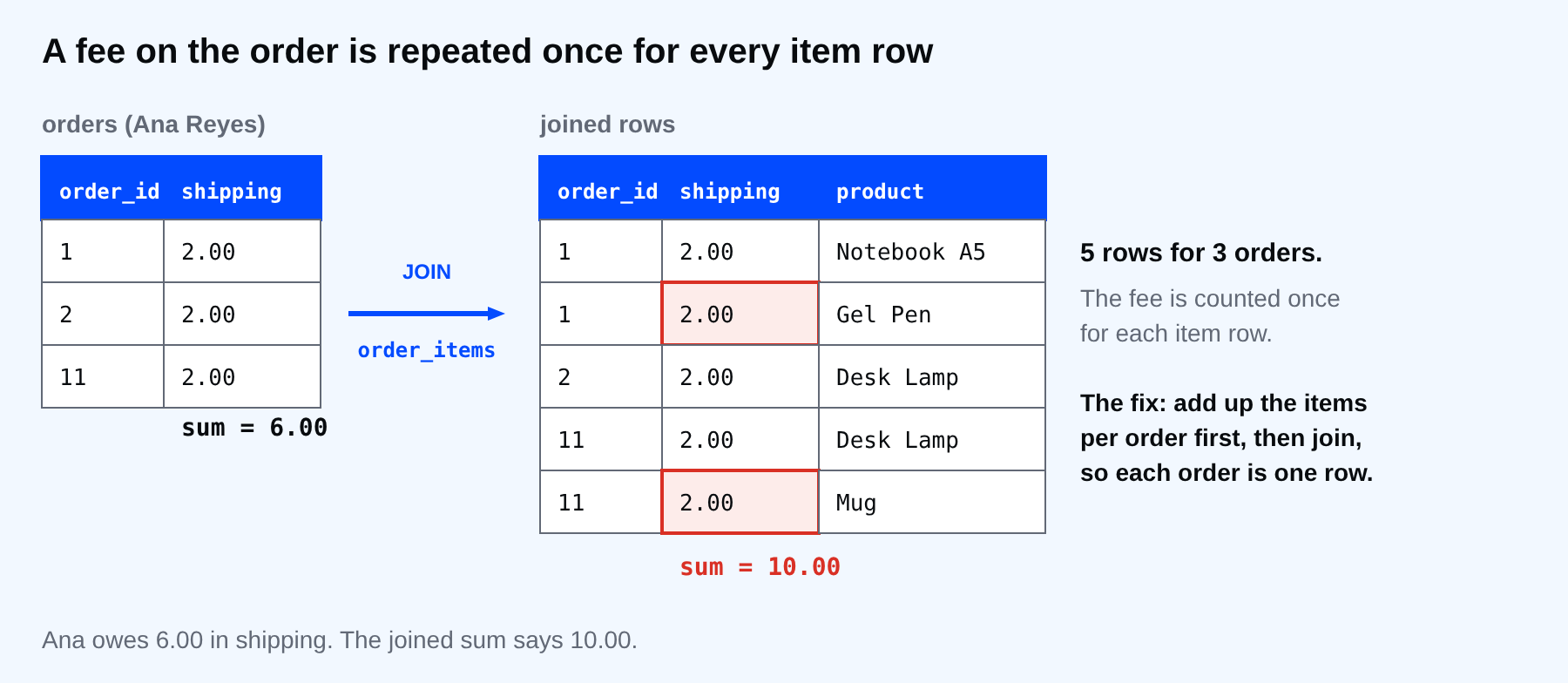
Count the rows to see it. The two numbers should match if there is one row per order.
SELECT count(*) AS joined_rows, count(DISTINCT o.order_id) AS orders
FROM customers AS c
JOIN orders AS o ON o.customer_id = c.customer_id
JOIN order_items AS i ON i.order_id = o.order_id
WHERE c.name = 'Ana Reyes';
 joined_rows | orders
-------------+--------
           5 |      3
(1 row)
Five rows for three orders. That gap is the double counting.
⚠ Warning: Do not fix this with sum(DISTINCT o.shipping). It would collapse every fee of 2.00 into one and return 2.00, and it hides the problem instead of removing it. DISTINCT works on values, and many orders can legitimately have the same value.
The fix: aggregate first, then join
Collapse the many side to one row per order before you join it. A subquery in FROM does that. The outer query then joins one row per order, so the shipping fee is counted once.
SELECT c.name,
       sum(t.items_total) AS items_total,
       sum(o.shipping)    AS shipping_total
FROM customers AS c
JOIN orders AS o ON o.customer_id = c.customer_id
JOIN (
  SELECT i.order_id, sum(i.quantity * p.price) AS items_total
  FROM order_items AS i
  JOIN products AS p ON p.product_id = i.product_id
  GROUP BY i.order_id
) AS t ON t.order_id = o.order_id
WHERE c.name IN ('Ana Reyes', 'Ben Cruz')
GROUP BY c.name
ORDER BY c.name;
   name    | items_total | shipping_total
-----------+-------------+----------------
 Ana Reyes |       55.75 |           6.00
 Ben Cruz  |       63.55 |           4.00
(2 rows)
Now shipping is 6.00 and 4.00. The items total did not change, which is the second check: when you fix a fan-out, the numbers that were right must stay right.
To keep every customer, including the ones with no orders, make the joins LEFT JOINs and turn the missing sums into zero.
SELECT c.name,
       count(o.order_id)               AS orders,
       coalesce(sum(t.items_total), 0) AS items_total,
       coalesce(sum(o.shipping), 0)    AS shipping_total
FROM customers AS c
LEFT JOIN orders AS o ON o.customer_id = c.customer_id
LEFT JOIN (
  SELECT i.order_id, sum(i.quantity * p.price) AS items_total
  FROM order_items AS i
  JOIN products AS p ON p.product_id = i.product_id
  GROUP BY i.order_id
) AS t ON t.order_id = o.order_id
GROUP BY c.name
ORDER BY c.name;
    name    | orders | items_total | shipping_total
------------+--------+-------------+----------------
 Ana Reyes  |      3 |       55.75 |           6.00
 Ben Cruz   |      2 |       63.55 |           4.00
 Carla Diaz |      3 |       52.47 |           6.00
 Dan Lim    |      0 |           0 |              0
 Ella Tan   |      2 |       37.25 |           4.00
 Finn Go    |      1 |       22.99 |           2.00
 Gina Ortiz |      0 |           0 |              0
 Hugo Sy    |      1 |       45.75 |           2.00
(8 rows)
Eight customers, and Dan Lim and Gina Ortiz are there with zeros. count(o.order_id) counts orders, because a count of a column skips the NULLs that the LEFT JOIN made.
A habit that catches it
Before you trust a multi-table report, write down the grain: what one row of the result means. Here the grain of the inner query is one order. If a joined table has more rows per key than the grain allows, aggregate it first.
Common mistakes
- Summing a column from the one side after joining the many side.
- Using DISTINCT to make the number look right.
- Fixing the total but not checking the numbers that were already correct.
- Using an INNER JOIN and losing the customers with no orders without noticing.
- Forgetting that
count(*)counts joined rows, not orders.
💡 Tip: Keep count(*) and count(DISTINCT key) in the same SELECT while you build a report. When they differ, something fans out. Remove the check only after you know why.
If you skip this, a report can overstate its totals by a factor that depends on how many items people happened to buy. When did you last compare a joined total with a number you got another way?
About
Join customers, orders and items, see how a total on the one side is counted once per row on the many side, and fix it by aggregating first. After this, a three-table report adds up to a number you can prove.
Comments (0)
Sign in to commentNo comments yet.