

Window Functions: ROW_NUMBER, RANK and Running Totals
Number, rank and total rows without collapsing them into groups, using PARTITION BY, ORDER BY and the window frame. After this, you can add a rank, a running total or the previous row to a result in one pass.
Skip ahead: If you already use OVER and PARTITION BY and only want the frame trap, skip to "Running totals and the window frame", then continue.
GROUP BY answers "how much per customer" by collapsing the rows. That is the problem when you want the rows and the answer together: each order with its customer's total beside it, each order with its rank, each order with the one before it. People solve this with a self-join or with a subquery per row, and both are slow and hard to read. A window function does it in one pass. It calculates over a set of related rows and keeps every row in the result.
The shape is always a function, then OVER (...). Inside the parentheses you say which rows belong together (PARTITION BY), how they are ordered (ORDER BY), and, if you need it, which part of the group to look at (the frame). Window functions are standard SQL.
Set up: one total per order
The lessons so far added item prices on the fly. Save that as a view, a named query you can select from like a table, so the examples stay short.
CREATE VIEW order_totals AS
SELECT o.order_id, o.customer_id, o.order_date, o.status,
       sum(i.quantity * p.price) AS total
FROM orders AS o
JOIN order_items AS i ON i.order_id = o.order_id
JOIN products AS p ON p.product_id = i.product_id
GROUP BY o.order_id;
CREATE VIEW
A total next to every row
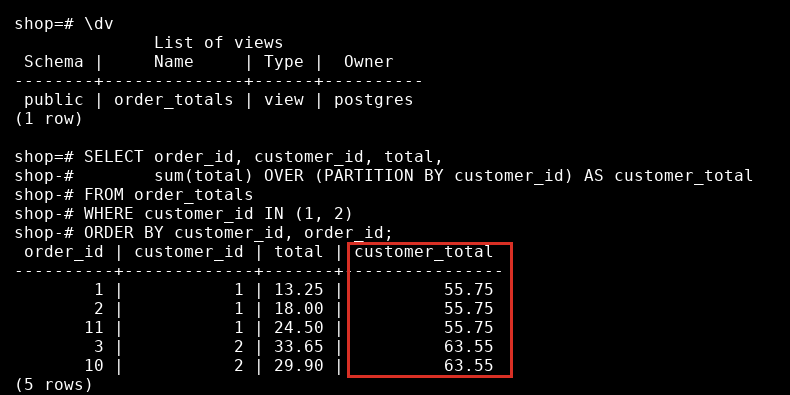
Put a customer's total next to each of their orders. PARTITION BY customer_id makes one group per customer, and the rows stay.
SELECT order_id, customer_id, total,
       sum(total) OVER (PARTITION BY customer_id) AS customer_total
FROM order_totals
WHERE customer_id IN (1, 2)
ORDER BY customer_id, order_id;
 order_id | customer_id | total | customer_total
----------+-------------+-------+----------------
        1 |           1 | 13.25 |          55.75
        2 |           1 | 18.00 |          55.75
       11 |           1 | 24.50 |          55.75
        3 |           2 | 33.65 |          63.55
       10 |           2 | 29.90 |          63.55
(5 rows)
Five rows, not two. With GROUP BY you would get one per customer. Now the share of the customer's total is one more column: total / sum(total) OVER (PARTITION BY customer_id).
ROW_NUMBER, RANK and DENSE_RANK
All three number the rows in a window, and they differ when two rows tie. Count the orders per customer and rank the customers.
SELECT c.name,
       count(o.order_id) AS orders,
       row_number() OVER (ORDER BY count(o.order_id) DESC, c.name) AS row_number,
       rank()       OVER (ORDER BY count(o.order_id) DESC)         AS rank,
       dense_rank() OVER (ORDER BY count(o.order_id) DESC)         AS dense_rank
FROM customers AS c
LEFT JOIN orders AS o ON o.customer_id = c.customer_id
GROUP BY c.customer_id, c.name
ORDER BY row_number;
    name    | orders | row_number | rank | dense_rank
------------+--------+------------+------+------------
 Ana Reyes  |      3 |          1 |    1 |          1
 Carla Diaz |      3 |          2 |    1 |          1
 Ben Cruz   |      2 |          3 |    3 |          2
 Ella Tan   |      2 |          4 |    3 |          2
 Finn Go    |      1 |          5 |    5 |          3
 Hugo Sy    |      1 |          6 |    5 |          3
 Dan Lim    |      0 |          7 |    7 |          4
 Gina Ortiz |      0 |          8 |    7 |          4
(8 rows)
Ana and Carla both have 3 orders. rank gives them both 1 and then skips to 3. dense_rank gives them both 1 and goes on to 2. row_number never ties, so it must break the tie some way, here by name. Without the tie-breaker the order between Ana and Carla would be up to the database, and your result could change between runs. If you use row_number to pick one row, always make the order unique.
Windows are evaluated after GROUP BY, which is why count(...) works inside OVER here.
Running totals and the window frame
Add an ORDER BY inside OVER and an aggregate becomes cumulative: each row sees the rows up to itself. A running total of non-cancelled orders:
SELECT order_id, order_date, total,
       sum(total) OVER (ORDER BY order_date, order_id) AS running_total
FROM order_totals
WHERE status <> 'cancelled'
ORDER BY order_date, order_id
LIMIT 5;
 order_id | order_date | total | running_total
----------+------------+-------+---------------
        1 | 2026-08-01 | 13.25 |         13.25
        3 | 2026-08-03 | 33.65 |         46.90
        7 | 2026-08-11 | 24.75 |         71.65
        2 | 2026-08-15 | 18.00 |         89.65
        5 | 2026-08-20 | 23.97 |        113.62
(5 rows)
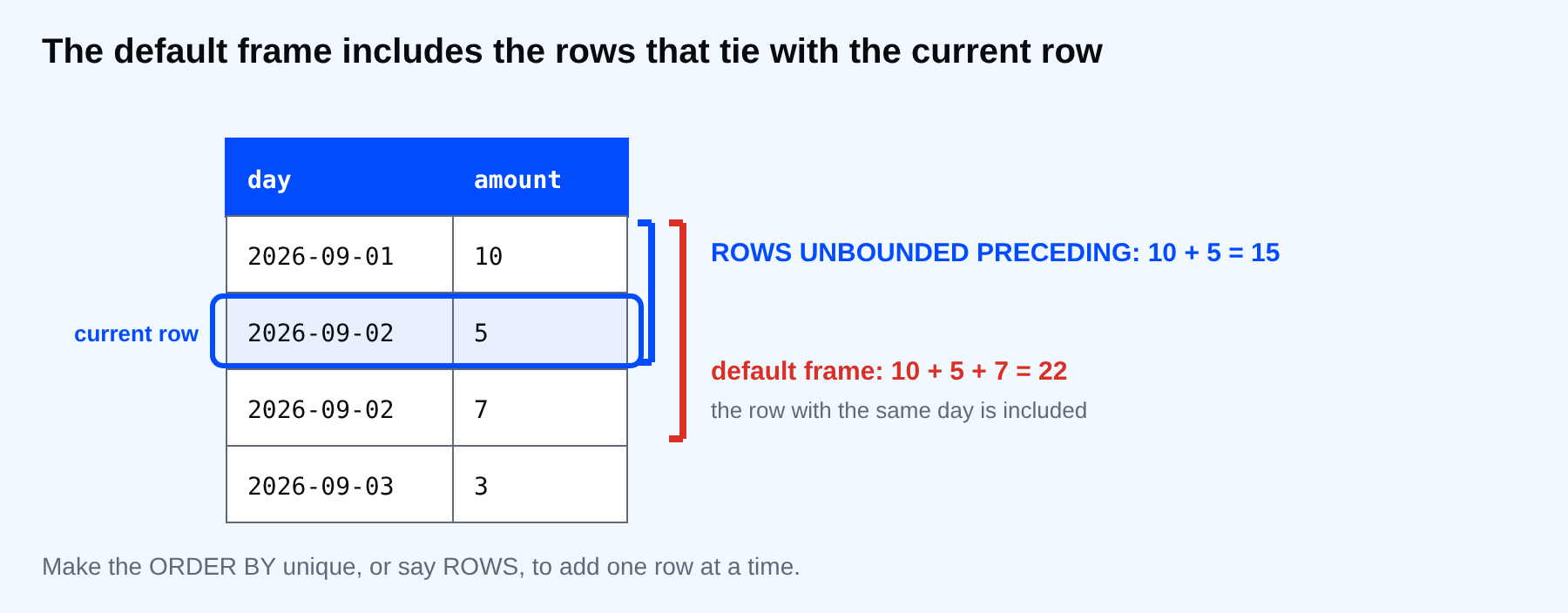
The part that surprises people is what "up to itself" means. The default frame is RANGE BETWEEN UNBOUNDED PRECEDING AND CURRENT ROW. It includes the current row and every row that ties with it on the ORDER BY value, the peers. Two sales on the same day share one running total.
SELECT day, amount,
       sum(amount) OVER (ORDER BY day)                         AS default_frame,
       sum(amount) OVER (ORDER BY day, amount ROWS UNBOUNDED PRECEDING) AS rows_frame
FROM (VALUES ('2026-09-01'::date, 10), ('2026-09-02', 5), ('2026-09-02', 7), ('2026-09-03', 3)) AS t(day, amount)
ORDER BY day, amount;
    day     | amount | default_frame | rows_frame
------------+--------+---------------+------------
 2026-09-01 |     10 |            10 |         10
 2026-09-02 |      5 |            22 |         15
 2026-09-02 |      7 |            22 |         22
 2026-09-03 |      3 |            25 |         25
(4 rows)
On 2 September the default frame shows 22 on both rows, because 5 and 7 are peers and both are included. The ROWS frame counts physical rows and gives 15 and 22. For a running total that grows one row at a time, say ROWS UNBOUNDED PRECEDING, or make the ORDER BY unique like the first example did.
⚠ Warning: A running total with a non-unique ORDER BY and the default frame can look like it skips steps. It is not wrong by the rules. It is wrong for what you meant.
Looking at the row before
lag returns a value from an earlier row in the window, and lead from a later one. The days between a customer's orders:
SELECT customer_id, order_id, order_date,
       order_date - lag(order_date) OVER (PARTITION BY customer_id ORDER BY order_date) AS days_since_previous
FROM orders
WHERE customer_id IN (1, 3)
ORDER BY customer_id, order_date;
 customer_id | order_id | order_date | days_since_previous
-------------+----------+------------+---------------------
           1 |        1 | 2026-08-01 |
           1 |        2 | 2026-08-15 |                  14
           1 |       11 | 2026-09-20 |                  36
           3 |        4 | 2026-08-05 |
           3 |        5 | 2026-08-20 |                  15
           3 |        6 | 2026-09-02 |                  13
(6 rows)
The first order of each customer has nothing before it, so the value is NULL. lag takes an optional offset and a default: lag(order_date, 1, order_date) returns the row's own date instead of NULL.
You cannot filter on a window function
Windows are computed after WHERE, so WHERE cannot see them.
SELECT order_id FROM order_totals WHERE row_number() OVER (ORDER BY total) = 1;
ERROR:  window functions are not allowed in WHERE
LINE 1: SELECT order_id FROM order_totals WHERE row_number() OVER (O...
                                                ^
Compute it in a subquery or a CTE, then filter outside.
WITH ranked AS (
  SELECT order_id, total, row_number() OVER (ORDER BY total DESC) AS rn
  FROM order_totals
)
SELECT order_id, total FROM ranked WHERE rn = 1;
 order_id | total
----------+-------
       12 | 45.75
(1 row)
This is the pattern behind "latest row per group" and "top N per group", and the tutorials on this site build on it.
Common mistakes
- Using
row_numberto pick a row without a unique ORDER BY. - Expecting RANK to give consecutive numbers.
- Forgetting that the default frame includes ties.
- Trying to use a window function in WHERE or HAVING.
- Writing OVER () and expecting a per-group result. Without PARTITION BY the window is the whole result.
💡 Tip: Say what you want out loud first: "for each customer, in date order, the sum so far". The words map to PARTITION BY, ORDER BY and the aggregate.
If you skip this, you will keep writing a self-join for every running total, and you will not notice when a tie in the data makes it wrong. Where in your reports does a rank depend on a tie that happens to be broken the same way today?
About
Number, rank and total rows without collapsing them into groups, using PARTITION BY, ORDER BY and the window frame. After this, you can add a rank, a running total or the previous row to a result in one pass.
Comments (0)
Sign in to commentNo comments yet.