

UNION, INTERSECT and EXCEPT
Combine, overlap and subtract query results, and see how UNION removes rows and how NULL behaves in set operations. After this, you can answer questions like who bought in both months with one readable query.
Skip ahead: If you only need the difference between UNION and UNION ALL, skip to "UNION and UNION ALL", then continue.
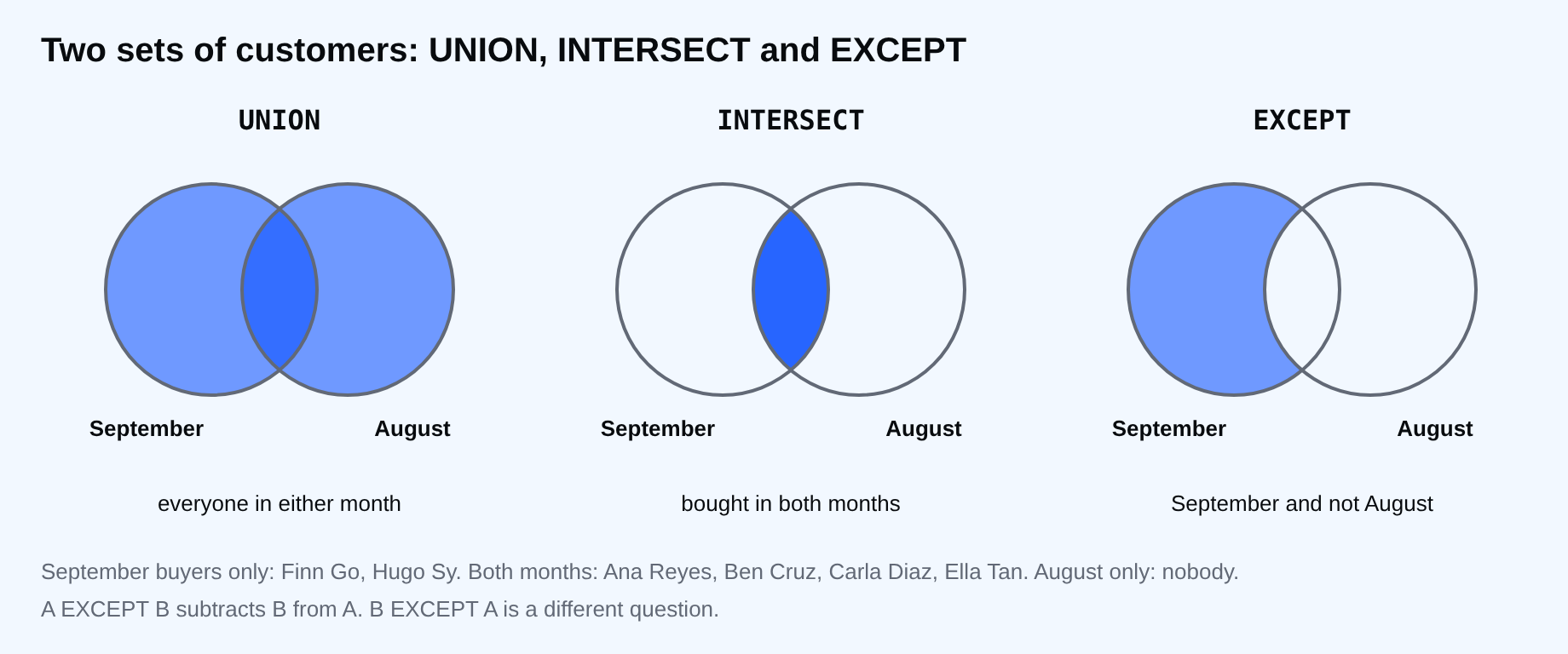
A join puts tables side by side. Set operations put results on top of each other, and they answer a different kind of question. Who bought in both months? Who bought in August and not in September? What is in the current table plus the archive? These are questions about sets of rows, and UNION, INTERSECT and EXCEPT are the direct way to ask them.
The rule is simple. The queries must return the same number of columns with compatible types. The column names come from the first query. Everything else is about how duplicates and NULL are treated, which is where people get caught.
Two sets to work with
August buyers and September buyers, as one query each.
SELECT DISTINCT c.name
FROM customers AS c
JOIN orders AS o ON o.customer_id = c.customer_id
WHERE o.order_date >= '2026-08-01' AND o.order_date < '2026-09-01'
ORDER BY c.name;
    name
------------
 Ana Reyes
 Ben Cruz
 Carla Diaz
 Ella Tan
(4 rows)
SELECT DISTINCT c.name
FROM customers AS c
JOIN orders AS o ON o.customer_id = c.customer_id
WHERE o.order_date >= '2026-09-01' AND o.order_date < '2026-10-01'
ORDER BY c.name;
    name
------------
 Ana Reyes
 Ben Cruz
 Carla Diaz
 Ella Tan
 Finn Go
 Hugo Sy
(6 rows)
The date range uses >= the first day and < the first day of the next month. That works for dates and for timestamps, and you never have to write the last day of the month.
INTERSECT and EXCEPT
Who bought in both months? Put INTERSECT between the two queries.
SELECT c.name FROM customers AS c JOIN orders AS o ON o.customer_id = c.customer_id
WHERE o.order_date >= '2026-08-01' AND o.order_date < '2026-09-01'
INTERSECT
SELECT c.name FROM customers AS c JOIN orders AS o ON o.customer_id = c.customer_id
WHERE o.order_date >= '2026-09-01' AND o.order_date < '2026-10-01'
ORDER BY name;
    name
------------
 Ana Reyes
 Ben Cruz
 Carla Diaz
 Ella Tan
(4 rows)
Who bought in September and not in August? Use EXCEPT, and remember that the order of the two queries matters. A EXCEPT B is not B EXCEPT A.
SELECT c.name FROM customers AS c JOIN orders AS o ON o.customer_id = c.customer_id
WHERE o.order_date >= '2026-09-01' AND o.order_date < '2026-10-01'
EXCEPT
SELECT c.name FROM customers AS c JOIN orders AS o ON o.customer_id = c.customer_id
WHERE o.order_date >= '2026-08-01' AND o.order_date < '2026-09-01'
ORDER BY name;
  name
---------
 Finn Go
 Hugo Sy
(2 rows)
These are the new customers of September. Both operators also remove duplicates, so you did not need the DISTINCT. Oracle calls EXCEPT by another name, MINUS, so other databases differ here.
UNION and UNION ALL
UNION stacks two results and removes duplicate rows. UNION ALL stacks them and keeps everything. Make an archive table to see the difference.
CREATE TABLE orders_archive (customer_id integer, order_date date, status text);
INSERT INTO orders_archive VALUES
  (1, '2026-07-10', 'shipped'),
  (3, '2026-07-22', 'shipped'),
  (2, '2026-08-03', 'shipped');
CREATE TABLE
INSERT 0 3
The last archive row is also in orders, as order 3. Count the combined rows both ways.
SELECT count(*) AS union_all_rows FROM (
  SELECT customer_id, order_date, status FROM orders
  UNION ALL
  SELECT customer_id, order_date, status FROM orders_archive
) AS s;
 union_all_rows
----------------
             15
(1 row)
SELECT count(*) AS union_rows FROM (
  SELECT customer_id, order_date, status FROM orders
  UNION
  SELECT customer_id, order_date, status FROM orders_archive
) AS s;
 union_rows
------------
         14
(1 row)
Fifteen and fourteen. UNION found the repeated row and dropped it. That is useful when the duplicate is a mistake. It is wrong when two rows are real and happen to look the same, such as two identical sales on one day. UNION also has to compare every row, which costs time on big results. If you know there are no duplicates, or you want them, use UNION ALL.
⚠ Warning: A plain UNION can silently remove legitimate rows. If you are adding up something, a UNION that looks like UNION ALL will lose money. Choose UNION ALL by default, and UNION only when you want the de-duplication.
NULL in a set operation
In a WHERE clause, NULL is never equal to NULL. In a set operation, two NULLs count as the same value.
SELECT city FROM customers
INTERSECT
SELECT city FROM customers WHERE customer_id IN (4, 7)
ORDER BY city;
 city
------

(1 row)
Dan Lim and Gina Ortiz have no city, and the NULL is in the overlap. That is also how DISTINCT and GROUP BY treat NULL: one group.
Which one runs first
INTERSECT binds tighter than UNION and EXCEPT. Without parentheses the next two queries differ.
SELECT 1 AS n UNION SELECT 2 INTERSECT SELECT 2 ORDER BY n;
 n
---
 1
 2
(2 rows)
(SELECT 1 AS n UNION SELECT 2) INTERSECT SELECT 2 ORDER BY n;
 n
---
 2
(1 row)
The first is 1 UNION (2 INTERSECT 2). Use parentheses whenever you mix operators, so the next reader does not have to remember the rule. ORDER BY goes once, at the end, and sorts the whole result.
If the two queries have a different number of columns, the error is plain.
SELECT name, city FROM customers UNION SELECT name FROM products;
ERROR:  each UNION query must have the same number of columns
LINE 1: SELECT name, city FROM customers UNION SELECT name FROM prod...
                                                      ^
Common mistakes
- Using UNION when you meant UNION ALL, and losing rows that look alike.
- Swapping the two queries around EXCEPT.
- Mixing operators without parentheses.
- Putting ORDER BY in the first query instead of at the end.
- Assuming the columns match by name. They match by position.
💡 Tip: When in doubt, run each query alone, then combine. The row counts must add up: UNION ALL is the sum, and INTERSECT and EXCEPT are never larger than the first query.
If you skip this, you will answer "who is in both" with a join and a pile of DISTINCT, and it will work until the data changes shape. Which question did you last answer with a join that was really a set question?
About
Combine, overlap and subtract query results, and see how UNION removes rows and how NULL behaves in set operations. After this, you can answer questions like who bought in both months with one readable query.
Comments (0)
Sign in to commentNo comments yet.