

Reading tsc Errors Without Panicking
Read a tsc error as file, position, code and message, handle long messages, and find where an error really comes from. After this, a screen of errors is a list you can work through.
Skip ahead: If you can already tell the file, position, code and message apart in a tsc error, and know why you fix the first one first, skip to "Where the error points", then continue.
A screen full of red is the moment people close the terminal. Most of it is the same few shapes, and the compiler tells you more than it seems to. Read it in a fixed order and it stops being frightening.
The anatomy of one error
const quantity: number = "2";
anatomy.ts(1,7): error TS2322: Type 'string' is not assignable to type 'number'.
Take it apart left to right.
- File and position.
anatomy.ts(1,7)is file, line 1, column 7. That column is wherequantitystarts, which is the variable that was given the wrong value. - error. The compiler found a problem.
- TS2322. The error code. It is the same every time this kind of mistake happens, so you can search for it.
- The message. What it saw, in plain words.
In a real terminal tsc usually prints a prettier version. It shows the same four parts, plus the line of code with a squiggle under the problem.
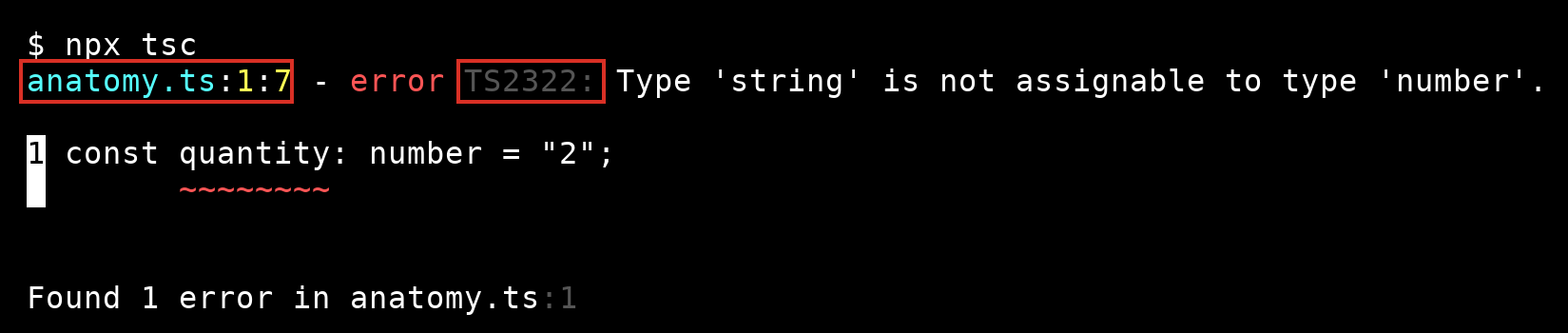
If you are piping output into a file or a build log, the plain form from the example above is what you get.
Long messages: read the first and last lines
Some errors have several lines. Each indented line goes one level deeper into the cause.
type Customer = { name: string; city: string };
type Order = {
  id: number;
  customer: Customer;
  lines: { sku: string; qty: number }[];
};

function save(order: Order): void {
  console.log(order.id);
}

const draft = {
  id: 1,
  customer: { name: "Ana" },
  lines: [{ sku: "NB-1", qty: "2" }],
};

save(draft);
nested.ts(18,6): error TS2345: Argument of type '{ id: number; customer: { name: string; }; lines: { sku: string; qty: string; }[]; }' is not assignable to parameter of type 'Order'.
  Types of property 'customer' are incompatible.
    Property 'city' is missing in type '{ name: string; }' but required in type 'Customer'.
The first line says the whole object does not fit Order. The last line is the actual reason: city is missing from the customer. The lines in between show the path from one to the other. When a message is long, read the top to know where, and the bottom to know why.
Notice that it reported only one problem. The qty written as a string is also wrong, but the compiler stops at the first mismatch it finds in an object. Fix city, run tsc again, and the qty error will appear. A short list of errors is not always the whole list.
Where the error points
The squiggle is where the compiler noticed. That is not always where you went wrong.
function discountFor(total: number) {
  return total > 100 ? 0.1 : "none";
}

const percent = discountFor(150) * 100;
where.ts(5,17): error TS2362: The left-hand side of an arithmetic operation must be of type 'any', 'number', 'bigint' or an enum type.
The error is on the last line, but the mistake is in the function above. It returns a number in one case and a string in the other, and no return type said which one you meant. With a return type of number, the error moves to the "none", where the real decision is.
function discountFor(total: number): number {
  return total > 100 ? 0.1 : "none";
}

const percent = discountFor(150) * 100;
where.ts(2,30): error TS2322: Type 'string' is not assignable to type 'number'.
This is the best argument for writing return types. The error lands on the line that is wrong.
A habit for a long list
- Scroll to the first error. Later errors are often caused by it.
- Read the message, not just the code.
- Open the file at that line and column.
- Fix one thing, then run
tscagain.
⚠ Warning: Do not add // @ts-ignore or cast with as just to make the list shorter. You are hiding the message, not fixing the cause. Even when the error looks wrong, ask first what the compiler can see that you cannot.
💡 Tip: Searching the error code with a few words from the message, for example TS2322 not assignable, finds the right page faster than pasting the whole line.
Common mistakes
- Reading the last error first. Start with the first.
- Fixing three errors at once and not knowing which change worked.
- Assuming the line number is the line to edit. It may be where the bad value was used, not where it was made.
- Treating a compiler error as a crash. Nothing ran. It is the compiler warning you early.
If you skip this, every error will look like a wall, and you will turn off the checks to make it quiet. When did you last read a compiler message to the end before searching for it?
About
Read a tsc error as file, position, code and message, handle long messages, and find where an error really comes from. After this, a screen of errors is a list you can work through.
Comments (0)
Sign in to commentNo comments yet.