

What TypeScript Adds on Top of JavaScript
What TypeScript adds to JavaScript, how a .ts file becomes the .js file that runs, and what types do not check. After this, you can say what the compiler will and will not catch.
Skip ahead: If you already know that TypeScript is compiled to plain JavaScript and that its types disappear before the code runs, skip to "What types do not do", then continue.
You already write JavaScript. This course adds one thing to it: a way to say what kind of data each variable and function expects, and a compiler that checks those claims before the code runs. That is all TypeScript is. It does not replace JavaScript, and it does not make it faster. It catches a certain kind of mistake early.
It helps if you finished JavaScript for Beginners first. I will not re-explain variables, functions or objects here.
The mistake it catches
Here is a plain JavaScript function. It works when you give it numbers.
function add(a, b) {
  return a + b;
}

console.log(add(5, 3));
console.log(add("5", 3));
8
53
The second call is wrong, and JavaScript does not care. The string and the number get glued together, and you get "53" instead of 8. Nothing crashes. The bad value just travels on to the next line, and you find it later, usually in a total on an invoice.
Now the same function with types.
function add(a: number, b: number): number {
  return a + b;
}

console.log(add(5, 3));
console.log(add("5", 3));
add.ts(6,17): error TS2345: Argument of type 'string' is not assignable to parameter of type 'number'.
a: number says the first argument must be a number. The compiler reads the call on the last line, sees a string, and refuses. You find out at your desk, not in production.
How it reaches the browser
Browsers and Node run JavaScript. They do not run TypeScript. So you write a .ts file, the TypeScript compiler (tsc) checks it, and it writes a .js file with the types removed. That .js file is what runs.
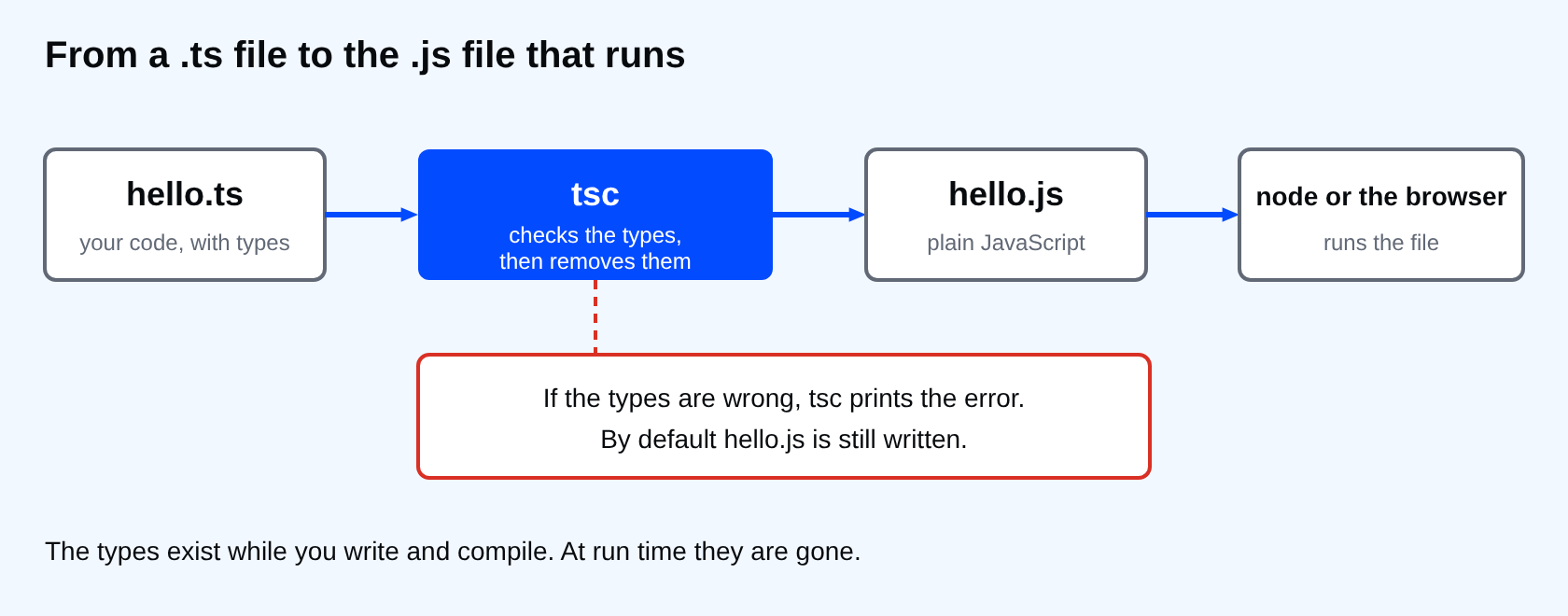
Two things follow from this. The output is ordinary JavaScript, so everything you learned still applies. And the types exist only while you write and compile. At run time they are gone.
What types do not do
This is the part people get wrong. A type is a promise you make to the compiler. The compiler believes you. It does not check the data your program receives later.
const raw = '{"name":"Ana"}';
const user = JSON.parse(raw) as { name: string; age: number };

try {
  console.log(user.age.toFixed(0));
} catch (e) {
  console.log((e as Error).message);
}
Cannot read properties of undefined (reading 'toFixed')
That compiles without a single error. I told the compiler the object has an age, and it took my word for it. The data had no age, so the program failed at run time anyway. Data from fetch, from a form, from a file or from JSON.parse is not checked by TypeScript. Checking incoming data is a separate job, and this course does not cover it. For now, remember that a type is a claim, and a wrong claim is worse than no claim.
⚠ Warning: Do not use as to silence an error you do not understand. You are telling the compiler to stop checking that line, and the bug is still there.
Should you use it?
It depends on the code. For a 20-line script that only you run, TypeScript may be more setup than it is worth. I could be wrong about where your line is. For code that other people touch, or that you will reopen in six months, the types work as documentation that cannot go out of date, because the compiler complains when it does.
💡 Tip: Think of the compiler as a reviewer that reads every call site in seconds. It will not catch logic mistakes, only mismatched data.
Common mistakes
- Expecting TypeScript to run in the browser without a build step.
- Believing a type checks incoming data at run time. It does not.
- Adding types everywhere on day one and giving up when the errors pile up. Start small, which the next lessons do.
If you skip this idea, you will write types that look safe and are not, and you will trust them more than you should. When the next bug shows up, will you know whether the compiler could have seen it?
About
What TypeScript adds to JavaScript, how a .ts file becomes the .js file that runs, and what types do not check. After this, you can say what the compiler will and will not catch.
Comments (0)
Sign in to commentNo comments yet.