

tsconfig.json: target, module and strict
Create a tsconfig.json, read target, module and strict, and stop the compiler from writing files on errors. After this, you know which line decides what your output looks like.
Skip ahead: If you already keep a tsconfig.json and know what target, module and strict do, skip to "strict is the one that matters", then continue.
Until now you ran tsc hello.ts with its default settings. Real projects keep their settings in a file called tsconfig.json, and a lot of confusing errors come from not knowing what is in it. This lesson covers the three settings you will meet first.
Make the file
Start in a fresh project folder.
npx tsc --init
Created a new tsconfig.json

You can learn more at https://aka.ms/tsconfig
The generated file is long and mostly comments. Look for the three lines this lesson is about. The grep commands here work on macOS and Linux. On Windows, open the file in your editor instead.
grep -E '"(module|target|strict)"' tsconfig.json
    "module": "nodenext",
    "target": "esnext",
    "strict": true,
⚠ Warning: Once a tsconfig.json exists, tsc hello.ts stops working. TypeScript 7 refuses to run a file by name while a config is present, because the config would be ignored.
npx tsc hello.ts
error TS5112: tsconfig.json is present but will not be loaded if files are specified on commandline. Use '--ignoreConfig' to skip this error.
Run plain npx tsc instead and it compiles the whole project.
A small config you can read
The generated file turns on stricter options than this course needs, so here is a smaller one. Save it as tsconfig.json.
{
  "compilerOptions": {
    "target": "es2022",
    "module": "nodenext",
    "strict": true,
    "rootDir": "src",
    "outDir": "dist",
    "noEmitOnError": true
  },
  "include": ["src"]
}
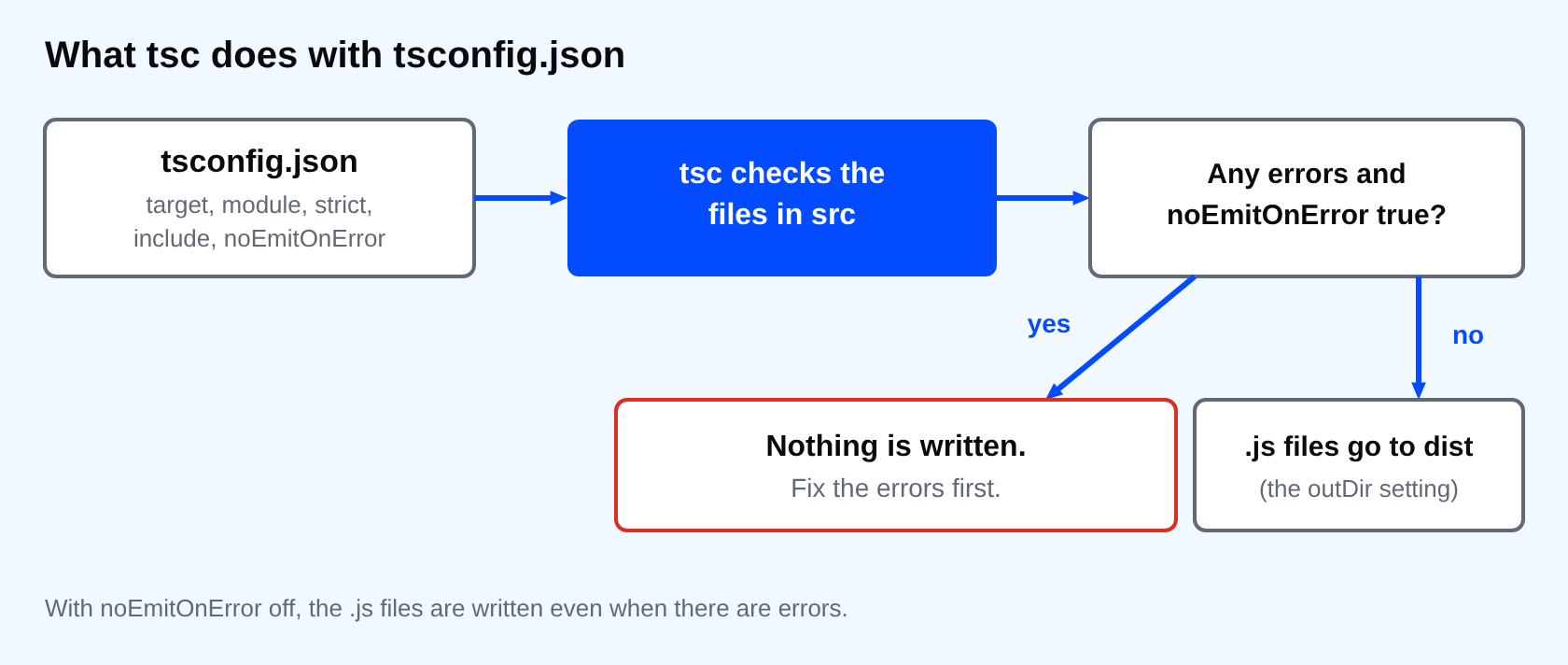
targetis the JavaScript version of the output.moduleis the import and export format of the output.strictis the group of checks that makes TypeScript worth using.rootDirandoutDirsay where your.tsfiles are and where the.jsfiles go.includelists the folders to compile.noEmitOnErroris the answer to lesson 2: with it on, no.jsis written while there are errors.
target
target decides which newer syntax the compiler rewrites for older engines.
function rateFor(discount?: number): number {
  return discount ?? 0.12;
}

console.log(rateFor());
npx tsc --target es2015 --outDir out15
npx tsc --target es2022 --outDir out22
grep -h "return" out15/index.js out22/index.js
    return discount !== null && discount !== void 0 ? discount : 0.12;
    return discount ?? 0.12;
With es2015 the ?? operator is rewritten into an older form. With es2022 it is left alone. Pick a target your Node version or your browsers can run natively. For Node 24, es2022 is safe. Old targets such as es5 are gone in TypeScript 7, and asking for one is an error.
module
module controls how import and export appear in the output. For code that runs in Node, nodenext follows Node's own rules: the type field in package.json decides whether a file becomes CommonJS or an ES module. If a bundler handles your output, the bundler's documentation tells you what to set. Do not change it until something forces you to.
strict is the one that matters
strict is not one check. It is a switch for a group, including the null checks and the implicit any errors you have already seen.
const note: string = null;
console.log(note);
npx tsc --noEmit --strict false
npx tsc --noEmit --strict true
src/index.ts(1,7): error TS2322: Type 'null' is not assignable to type 'string'.
The first run is clean. The second reports the null. The code has not changed, only how much the compiler is allowed to complain. A project with strict off can look healthy and still crash on null.
💡 Tip: Start every new project with strict on. Turning it on later, in an existing project, is the hard part. A tutorial in this course covers that.
What the generated file adds
tsc --init also sets noUncheckedIndexedAccess, exactOptionalPropertyTypes and verbatimModuleSyntax. That is why a project made with --init rejects code that a plain tsc file.ts accepts. The first makes prices[5] from lesson 4 a number | undefined. The second is stricter about optional properties. The third conflicts with export in a CommonJS project, and gives an error like TS1287: A top-level 'export' modifier cannot be used on value declarations in a CommonJS module. If you meet that, either set "type": "module" in package.json or remove that option.
Common mistakes
- Editing
tsconfig.jsonand forgetting to runtscagain. - Running
tsc file.tswith a config present. - Turning
strictoff to make errors disappear.
If you skip this, you will copy a tsconfig.json from somewhere and not know which line causes the next error. Can you point to the line in your own config that decides what your output looks like?
About
Create a tsconfig.json, read target, module and strict, and stop the compiler from writing files on errors. After this, you know which line decides what your output looks like.
Comments (0)
Sign in to commentNo comments yet.