

JavaScript Closures in Real Code
What a closure actually keeps, how to use it for private state and factories, and the loop bug it used to cause. After this, you can read code that returns functions without guessing what they can see.
Skip ahead: If you can already explain why a function returned from another function still sees the outer variables, skip to "The loop bug".
A closure is a function plus the variables it could see when it was created. It keeps those variables alive, even after the outer function has returned. That's the whole idea. People make it sound mysterious, but you've been using closures since your first event listener. The reason to learn them properly at this level is that they decide what your code can see, what it keeps in memory, and what other code can change.
What a closure keeps
function makeGreeter(greeting) {
  return function (name) {
    return `${greeting}, ${name}!`;
  };
}

const hello = makeGreeter("Hello");
const hi = makeGreeter("Hi");
console.log(hello("Ana"));
console.log(hi("Ben"));
Hello, Ana!
Hi, Ben!
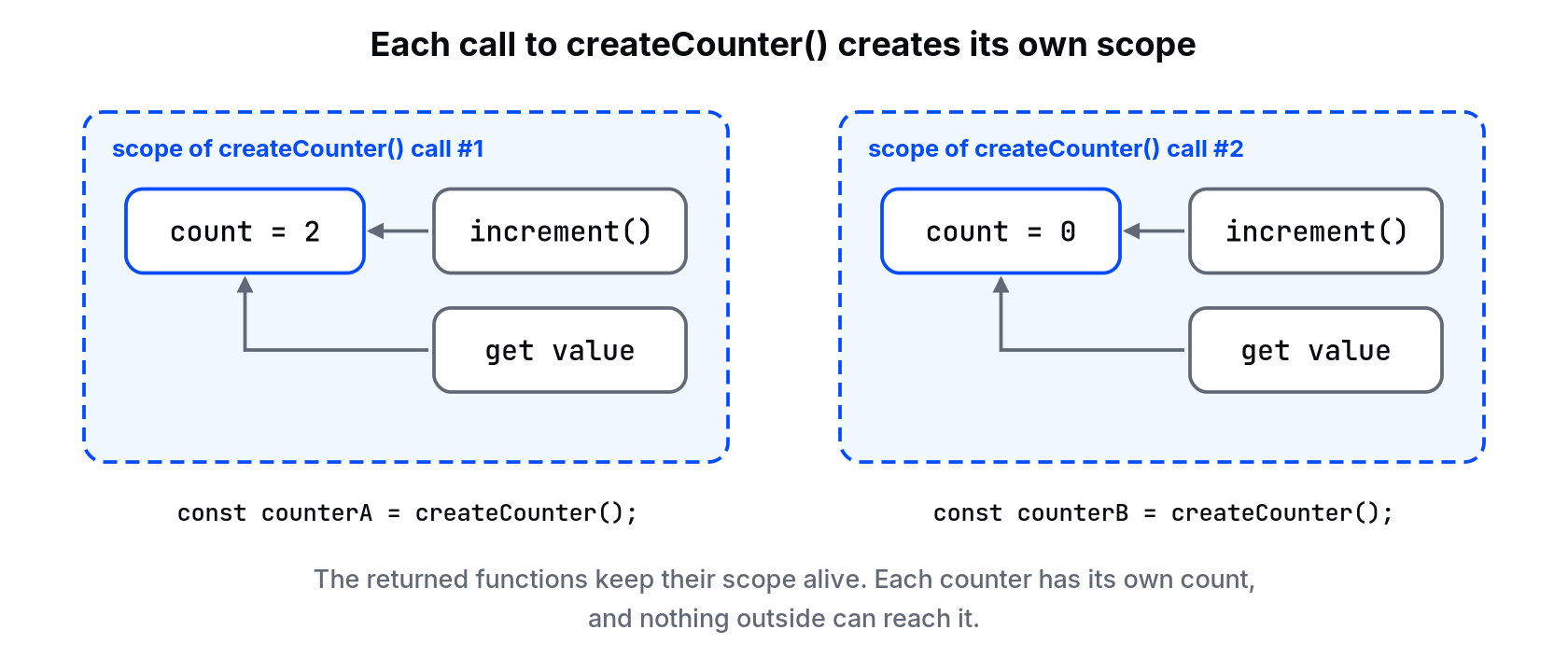
makeGreeter finished running before hello("Ana") was called. Its greeting variable should be gone. It isn't, because the inner function still refers to it. Each call to makeGreeter creates a new scope, so hello and hi each keep their own greeting. The diagram shows the same thing with a counter factory, createCounter(), whose returned functions share one private count per call.
⚠ Warning: A closure keeps a reference to the variable, not a copy of its value. If the variable changes later, the closure sees the new value.
let rate = 0.12;
const withTax = amount => amount * (1 + rate);
rate = 0.2;
console.log(withTax(100));
120
Private state
Anything a closure keeps is invisible from outside. Nobody can reach in and change it, because there is no property to change. That's useful when a value must only change through rules you control.
function createCart() {
  const items = [];
  return {
    add(name, price) {
      if (price <= 0) throw new Error(`Invalid price for ${name}: ${price}`);
      items.push({ name, price });
    },
    total() {
      return items.reduce((sum, item) => sum + item.price, 0);
    },
  };
}

const cart = createCart();
cart.add("Mouse", 450);
cart.add("Keyboard", 1200);
console.log(cart.total());
console.log(cart.items);
try {
  cart.add("Cable", -50);
} catch (error) {
  console.log(error.message);
}
1650
undefined
Invalid price for Cable: -50
cart.items is undefined. The array exists, but only add and total can touch it. A class with a #items private field does the same job. Use whichever the codebase already uses. I lean toward classes when there are many methods, and closures for small factories like this one.
Functions that build functions
Closures let you set something up once and reuse it. A common real use is a function that only runs once, or one that remembers previous results:
function once(fn) {
  let done = false;
  let result;
  return (...args) => {
    if (!done) {
      done = true;
      result = fn(...args);
    }
    return result;
  };
}

const connect = once(() => {
  console.log("connecting...");
  return "connection #1";
});
console.log(connect());
console.log(connect());
connecting...
connection #1
connection #1
done and result live in the closure. Every call to connect shares them, and nothing else can reset them.
The loop bug
This was a famous bug with var:
const handlers = [];
for (var i = 0; i < 3; i++) {
  handlers.push(() => i);
}
console.log(handlers.map(h => h()));

const fixed = [];
for (let j = 0; j < 3; j++) {
  fixed.push(() => j);
}
console.log(fixed.map(h => h()));
[ 3, 3, 3 ]
[ 0, 1, 2 ]
With var, there is one i for the whole loop, and all three closures see its final value, 3. With let, each loop round gets its own j. If you see old code wrapping a loop body in (function (i) { ... })(i), that's the pre-let workaround for exactly this.
What closures cost
A closure keeps everything it refers to alive. Usually that's a few small variables and doesn't matter. It matters when a closure refers to something big, like a large array or a DOM element, and the closure itself never goes away, for example because it's an event listener that's never removed. That's one of the most common memory leaks in JavaScript, and the last lesson of this course shows how to find it.
Common mistakes
- Expecting a closure to keep the old value of a variable that changed later.
- Using
varin a loop that creates callbacks. - Creating a new closure on every render or every request and attaching it somewhere that's never cleaned up.
- Calling it "private" and then returning the internal array itself.
return itemshands out the real array, so anyone can push to it. Return a copy ([...items]) instead.
What happens if you skip this
You'll read code that returns functions and guess what they can see. Then a value changes "on its own", and the cause is a closure holding a variable you thought was gone.
If createCart returned { items, add, total }, what could other code now do that it couldn't before?
About
What a closure actually keeps, how to use it for private state and factories, and the loop bug it used to cause. After this, you can read code that returns functions without guessing what they can see.
Comments (0)
Sign in to commentNo comments yet.