

Streams in Node.js: Reading Big Files a Piece at a Time
Read, transform and write a file in chunks with streams and pipeline, read a big file line by line, and know what backpressure protects you from. After this, a 2 GB log file is just another file.
Skip ahead: If you only need to read a big text file line by line, skip to "Line by line with readline".
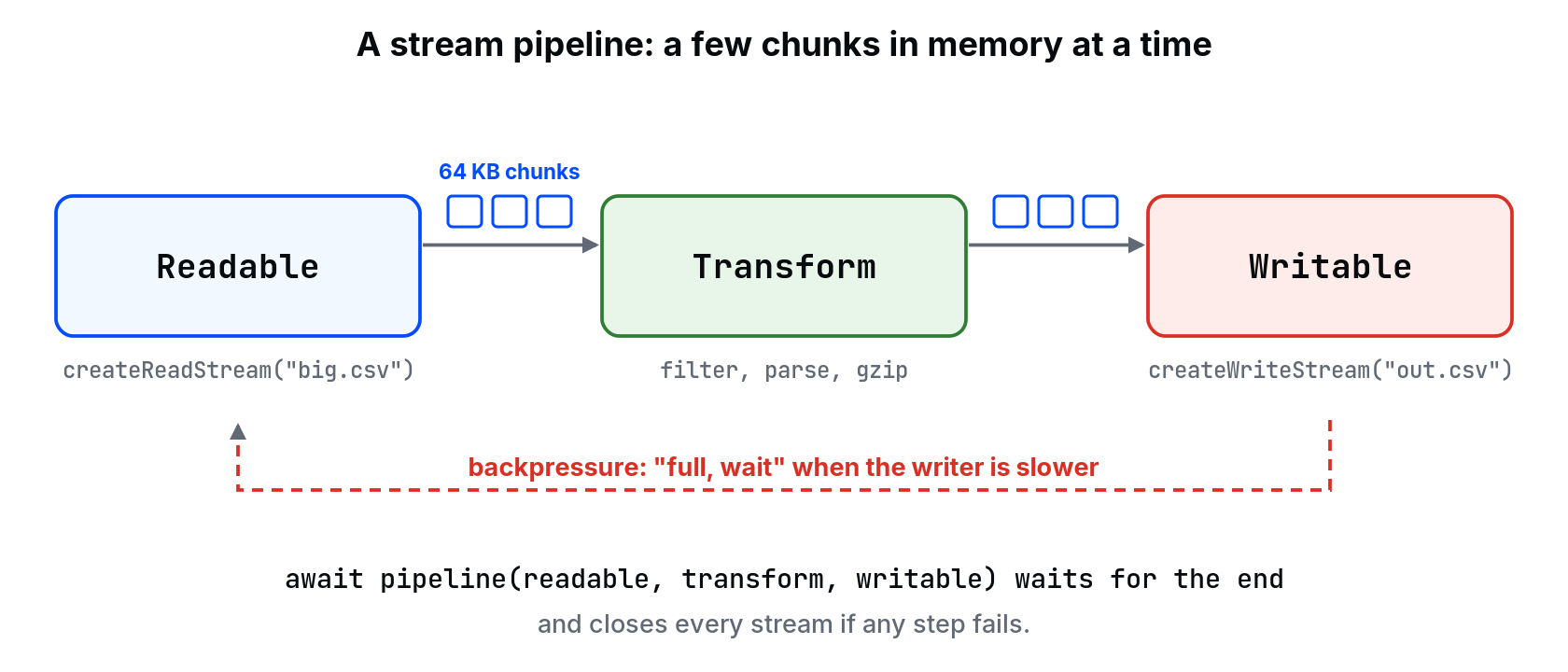
fs.readFile loads the whole file into memory. For a 5 MB config file, nobody cares. For a 3 GB export, Node either runs out of memory or gives you an error, because a single string in Node can't be that big. Streams read and write a file in chunks, usually 64 KB at a time, so memory use stays about the same whether the file is 3 MB or 3 GB.
Four kinds of stream
- Readable: a source you read from (
fs.createReadStream, an HTTP request body). - Writable: a target you write to (
fs.createWriteStream, an HTTP response). - Transform: reads chunks, changes them, passes them on (gzip, your own filter).
- Duplex: both ends at once (a network socket). You'll rarely write one.
Copy and compress with pipeline
import { createReadStream, createWriteStream, writeFileSync, statSync, rmSync, mkdtempSync } from "node:fs";
import { createGzip } from "node:zlib";
import { pipeline } from "node:stream/promises";
import { tmpdir } from "node:os";
import { join } from "node:path";

const dir = mkdtempSync(join(tmpdir(), "streams-"));
const source = join(dir, "access.log");
writeFileSync(source, "GET /courses 200\n".repeat(200_000));

await pipeline(
  createReadStream(source),
  createGzip(),
  createWriteStream(source + ".gz"),
);

console.log("original:", statSync(source).size, "bytes");
console.log("compressed smaller:", statSync(source + ".gz").size < statSync(source).size);
rmSync(dir, { recursive: true });
original: 3400000 bytes
compressed smaller: true
pipeline connects the streams, waits for the end, and, more importantly, cleans up all of them if any one fails. The older .pipe() doesn't: if the write side errors, the read side stays open. Use pipeline from node:stream/promises.
Backpressure
Reading from disk is usually faster than writing to a slow network or gzip. If the reader kept going regardless, the unwritten chunks would pile up in memory, and you'd be back to loading the whole file. Backpressure is the writable side saying "full, wait". pipeline and for await handle it for you. If you call writable.write() yourself, check its return value: false means stop and wait for the "drain" event.
Line by line with readline
Chunks don't line up with lines. A 64 KB chunk ends wherever it ends, often in the middle of a row. readline reassembles them into whole lines:
import { createReadStream, writeFileSync, rmSync, mkdtempSync } from "node:fs";
import { createInterface } from "node:readline";
import { tmpdir } from "node:os";
import { join } from "node:path";

const dir = mkdtempSync(join(tmpdir(), "lines-"));
const file = join(dir, "orders.csv");
let csv = "id,status,total\n";
for (let i = 1; i <= 100_000; i++) csv += `${i},${i % 10 === 0 ? "refunded" : "paid"},${(i % 7) * 100}\n`;
writeFileSync(file, csv);

const lines = createInterface({ input: createReadStream(file), crlfDelay: Infinity });
let paid = 0;
let refunded = 0;
let header = true;
for await (const line of lines) {
  if (header) { header = false; continue; }
  const [, status, total] = line.split(",");
  if (status === "paid") paid += Number(total);
  else refunded += Number(total);
}
console.log({ paid, refunded });
rmSync(dir, { recursive: true });
{ paid: 26999600, refunded: 3000400 }
for await over the interface gives one line at a time, with backpressure handled. crlfDelay: Infinity treats Windows \r\n line endings as one line break.
⚠ Warning: line.split(",") only works for simple CSV. A quoted field like "Manila, PH" contains a comma and breaks it. For real CSV from other systems, use a streaming parser such as csv-parse, and keep the same for await loop.
Your own transform
A transform gets each chunk and pushes what it wants downstream. With objectMode, chunks can be objects or whole lines instead of bytes. An async generator also works as a step in pipeline, which is often simpler:
await pipeline(
  createReadStream("orders.csv"),
  async function* (source) {
    for await (const chunk of source) yield chunk.toString().toUpperCase();
  },
  createWriteStream("orders-upper.csv"),
);
Common mistakes
fs.readFileorfs.readFileSyncon files whose size you don't control..pipe()without error handling, leaving file handles open after a failure.- Splitting chunks on
\nyourself and losing the line that was cut between two chunks. - Calling
write()in a loop and ignoring its return value. - Collecting every row into an array inside the stream, which brings back the memory problem the stream was solving.
What happens if you skip this
Your import works on the sample file. The first real export is 10 times bigger, the process dies with "JavaScript heap out of memory", and the fix at 2 a.m. is "add more RAM" until next month's file.
If the same readline loop pushed every line into an array and summed the array at the end, would memory still stay flat? What did the stream save you from?
About
Read, transform and write a file in chunks with streams and pipeline, read a big file line by line, and know what backpressure protects you from. After this, a 2 GB log file is just another file.
Comments (0)
Sign in to commentNo comments yet.