

The Event Loop: Microtasks, Macrotasks and Why setTimeout(0) Isn't Zero
The call stack, the microtask queue and the task queue, in the order JavaScript actually uses them, with outputs you can predict. After this, you can explain why a line printed when it did.
Skip ahead: If you can already predict the order of a mix of setTimeout, .then and await, skip to "Long tasks block everything".
JavaScript runs one piece of code at a time, on one thread. Everything that "happens later" waits in a queue until the current code is finished. There are two queues that matter, and one of them always goes first. Once you know that, the order of your logs stops being a guess.
The three parts
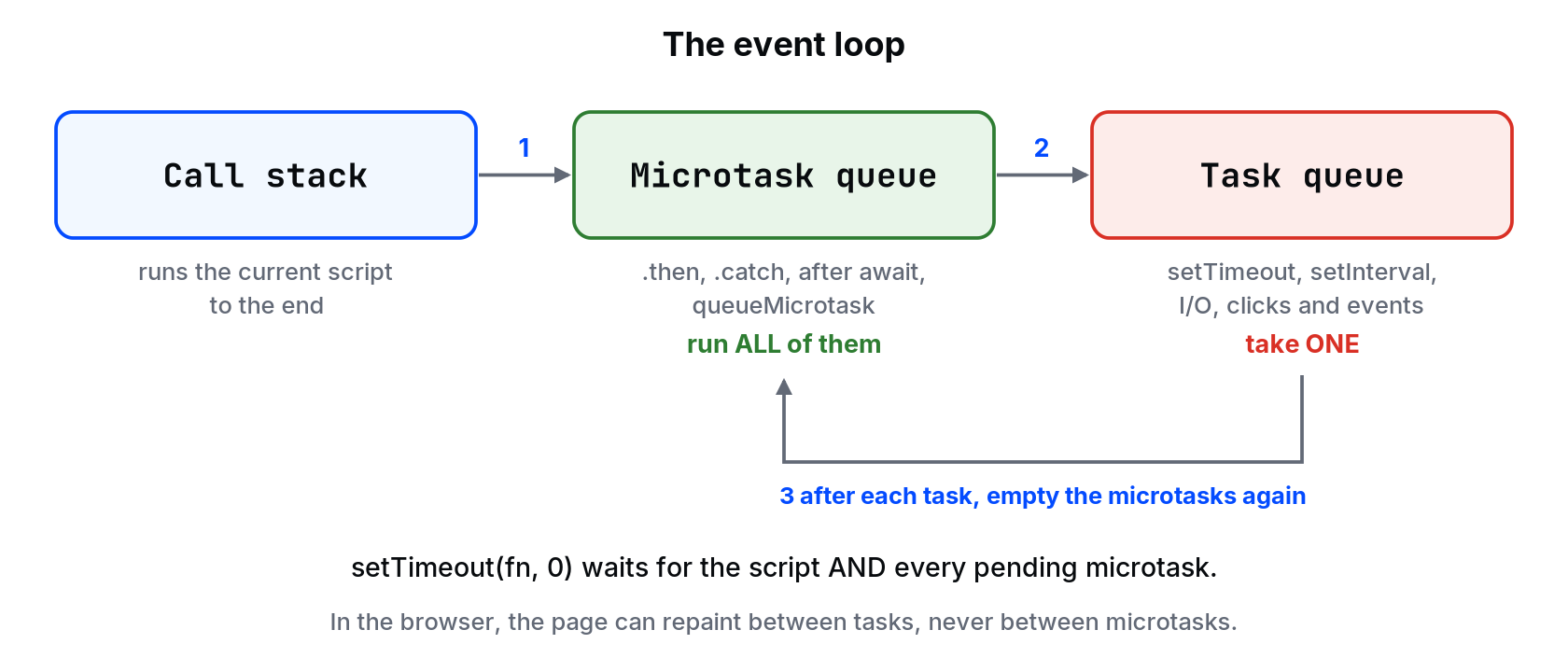
- Call stack: the code running right now. Nothing else runs until it's empty.
- Microtask queue: promise callbacks (
.then,.catch, the code after anawait) andqueueMicrotask. - Task queue (often called the macrotask queue):
setTimeout,setInterval, finished I/O, user events like clicks.
The loop:
- Run the current script to the end.
- Run every microtask, including microtasks added while doing this.
- Take one task from the task queue and run it.
- Back to step 2.
In the browser, the page can repaint between tasks. Not between microtasks.
Predict this
console.log("A");
setTimeout(() => console.log("B"), 0);
Promise.resolve().then(() => console.log("C"));
queueMicrotask(() => console.log("D"));
console.log("E");
A
E
C
D
B
A and E are the script. C and D are microtasks, in the order they were queued. B is a task, so it waits until the microtask queue is empty. That's why setTimeout(fn, 0) isn't zero. It means "after the current script and after all pending promise callbacks". In browsers, nested timers are also clamped to at least 4 ms after a few levels, so it's even less "zero" than it looks.
await is a microtask too
Everything after an await runs later, as a microtask, even if the value you're awaiting is already there:
async function save() {
  console.log("1 save starts");
  await null;
  console.log("4 save continues");
}

console.log("0 before");
save();
console.log("2 after save()");
Promise.resolve().then(() => console.log("5 then"));
console.log("3 end of script");
0 before
1 save starts
2 after save()
3 end of script
4 save continues
5 then
The part of save before await runs right away, like a normal function. The rest is queued. That's why "it runs synchronously until the first await" is the useful way to think about async functions.
Long tasks block everything
Because there's one thread, a slow loop blocks timers, clicks and repainting. In the browser, the page freezes. In Node, the server stops answering every other request.
const start = Date.now();
setTimeout(() => console.log(`timer ran after ${Date.now() - start >= 200 ? "at least 200" : "less than 200"} ms`), 0);
while (Date.now() - start < 200) {
  // busy for 200 ms
}
console.log("loop done");
loop done
timer ran after at least 200 ms
The timer asked for 0 ms and got at least 200, because nothing can run while the loop holds the stack.
The fixes depend on the job:
- Make the work smaller (better algorithm, fewer items). Do this first.
- Split it into chunks and yield between them with
setTimeoutorawait scheduler.yield()(browsers that support it), so clicks can get in. - Move it off the main thread: a Web Worker in the browser,
worker_threadsin Node.
⚠ Warning: Microtasks can starve the loop. A promise chain that keeps queueing more microtasks never lets a task run, so timers and clicks wait forever. A recursive queueMicrotask loop freezes a page just like a while (true).
Node has two extra queues
Node adds process.nextTick, which runs before promise microtasks, and setImmediate, which runs in a separate phase after I/O. You'll see them in older libraries.
setTimeout(() => console.log("timeout"), 0);
setImmediate(() => console.log("immediate"));
Promise.resolve().then(() => console.log("promise"));
process.nextTick(() => console.log("nextTick"));
nextTick
promise
...
nextTick and promise always come first. The order of timeout and immediate from the main script isn't guaranteed, so don't write code that depends on it. Inside an I/O callback, setImmediate always runs first.
Common mistakes
- Using
setTimeout(fn, 0)to "wait for" data. It waits for the queue, not for your data. - Long synchronous loops in a request handler or click handler.
- Assuming code after
awaitruns immediately because the value was already available. - Depending on the order of
setTimeout(0)andsetImmediate.
What happens if you skip this
You'll fix ordering bugs by moving lines around until the output looks right. Then a slower machine or one more await changes the order, and the bug is back with no obvious cause.
If you added await null; before console.log("1 save starts"), which numbers would change places?
About
The call stack, the microtask queue and the task queue, in the order JavaScript actually uses them, with outputs you can predict. After this, you can explain why a line printed when it did.
Comments (0)
Sign in to commentNo comments yet.