

Python If Statements: Making Your Code Decide
Use if, elif and else so your code can choose what to do. Covers combined conditions, truthy and falsy values and the one-line form, plus the mistakes that make a condition quietly do the wrong thing.
Python If Statements: Making Your Code Decide
An if statement lets your program choose. If a condition is true, run this block. Otherwise, run that one, or nothing. Without it, every program does the exact same thing every time, which is not much of a program.
Skip ahead: If you are comfortable with if, elif, else, and indentation, continue to "Python Loops: For, While, and When to Stop."
Why this matters
Most business rules are if statements in disguise. Members get a discount. Orders above a limit need approval. Late payments get a reminder. If you can write clear conditions, you can turn rules from a meeting into working code. If you write them carelessly, the code makes the wrong decision quietly, every time.
The basic form
temperature = 36

if temperature > 35:
    print("Too hot. Stay inside.")
print("This line always runs.")
Two things to notice. The line with if ends with a colon. And the code that belongs to the if is indented, four spaces by convention. The indentation is not decoration. In Python, it is how the interpreter knows which lines are inside the if and which are not.
⚠ Warning: Do not mix tabs and spaces for indentation. It can look identical on screen and still fail with TabError or IndentationError. Set your editor to insert four spaces when you press Tab. Most code editors do this for Python by default.
else and elif
score = 78

if score >= 90:
    grade = "A"
elif score >= 80:
    grade = "B"
elif score >= 70:
    grade = "C"
else:
    grade = "Needs improvement"

print(f"Score {score}: {grade}")
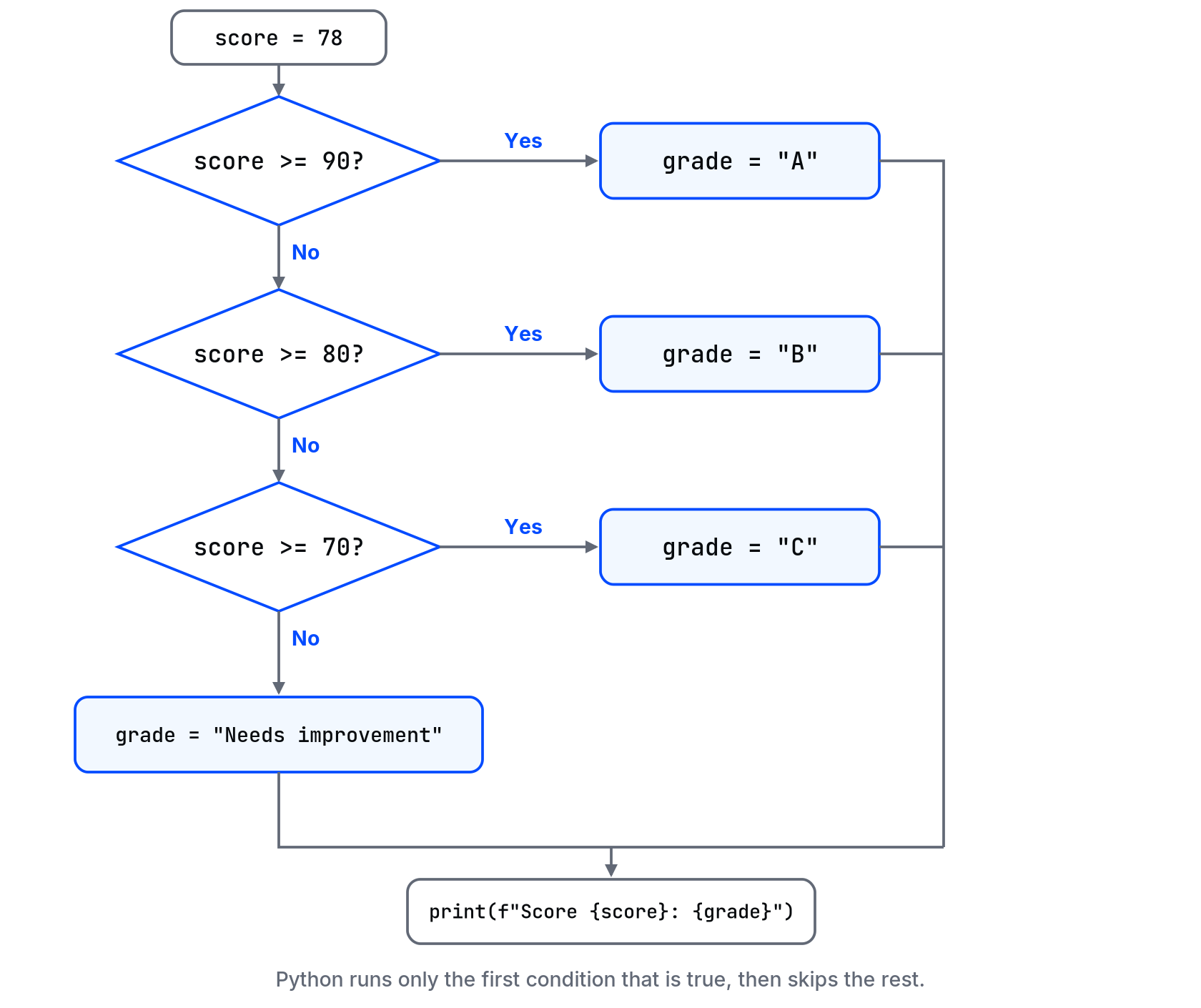
Python checks the conditions from top to bottom and runs only the first one that is true. Then it skips the rest. That is why the order matters. If you put score >= 70 first, a score of 95 would get a "C", because 95 is also greater than 70.
Combining conditions
age = 17
with_parent = True

if age >= 18 or with_parent:
    print("Allowed in")
else:
    print("Not allowed")
Use and when everything must be true, or when one is enough. If a condition becomes hard to read, give the pieces names first:
subtotal = 1500
is_member = False
has_coupon = True

qualifies = subtotal >= 1000 and (is_member or has_coupon)
if qualifies:
    print("Discount applied")
Truthy and falsy values
Python treats some values as false in a condition even though they are not False: 0, an empty string "", an empty list [], and None. Everything else counts as true.
name = ""
if name:
    print(f"Hello, {name}")
else:
    print("You did not enter a name.")
This is handy for checking empty input. But be careful with numbers: if 0 is a valid value, if quantity: treats it as "nothing entered". In that case, write if quantity is not None: instead.
The one-line form
age = 20
status = "adult" if age >= 18 else "minor"
print(status)
Good for simple two-way choices. Anything longer, use the normal form. Saving one line is not worth a line nobody can read.
Common mistakes
- Missing colon.
if x > 5without:is aSyntaxError. - Wrong order of elif. Broad conditions before specific ones swallow the specific cases.
- Using
=instead of==. Python stops you, but read the error, it tells you. - Comparing text with different case.
"Yes" == "yes"isFalse. Clean input with.lower()first.
💡 Tip: Test every branch, not just the one you expect. For the grading example, try 95, 85, 75, and 50. If you only test 78, three of your four branches have never run.
What happens if you skip this step
A condition can work for your example and still fail at a boundary. The program may run without crashing while applying the wrong discount or rejecting a valid input. Test values below, at and above each cutoff, and check that every branch produces the intended result before relying on it.
Quick check: in the grading example, what grade does a score of exactly 80 get, and why?
About
Use if, elif and else so your code can choose what to do. Covers combined conditions, truthy and falsy values and the one-line form, plus the mistakes that make a condition quietly do the wrong thing.
Comments (0)
Sign in to commentNo comments yet.