

Getting Input and Printing Output in Python
Print output, build readable text with f-strings, and read what the user types with input(). By the end, you can clean up that input and build a small tip calculator.
Getting Input and Printing Output in Python
A program that only works with values you typed into the code is not very useful. At some point it needs to ask the user something and show them a result. In Python, that is input() and print(). Simple tools. A couple of traps.
Skip ahead: If you already use f-strings and you know that input() always returns text, continue to the next section, "Making Decisions and Repeating Work."
Why this matters
Output is how you see what your program is doing. Input is where bad data comes in. Getting both right early means your programs are easier to check and harder to break. And honestly, print() is still the debugging tool I reach for first. It is not fancy. It works.
Printing
print("Hello")
print("Total:", 125)          # items separated by a space
print("a", "b", "c", sep="-") # a-b-c
print("Loading", end="...")   # no new line at the end
print("done")
The sep and end options control what goes between items and at the end. You will not need them often, but now you know they exist.
f-strings: the readable way to build text
Put an f before the quotes, and anything inside { } is replaced with its value:
name = "Ana"
total = 1125.5
print(f"{name}, your total is {total}")
print(f"Rounded: {total:.2f}")   # 2 decimal places: 1125.50
print(f"Next year: {2026 + 1}")  # expressions work too
You will see older styles in tutorials, like "Hello " + name or "%s" % name. They still work. But f-strings are easier to read and do not fail when the value is a number, so use them by default.
Getting input
input() shows a message, waits for the user to type something and press Enter, and gives you what they typed:
name = input("What is your name? ")
print(f"Hello, {name}!")
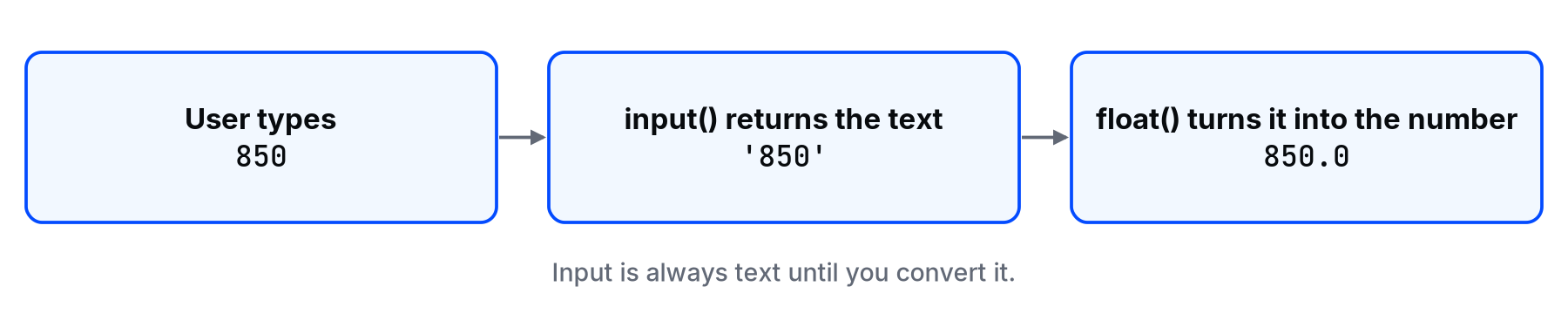
⚠ Warning: input() always returns a string, even when the user types a number. If you need a number, convert it with int() or float(). Skipping this is the single most common beginner bug with input.
age_text = input("How old are you? ")
age = int(age_text)
print(f"Next year you will be {age + 1}.")
Without int(), age + 1 raises a TypeError, because you cannot add a number to text. With int(), it works, as long as the user actually types a whole number.
Cleaning what the user types
Users add spaces, use capital letters, and press Enter by accident. Clean the input before you use it:
answer = input("Continue? (yes/no) ").strip().lower()
print(answer == "yes")
strip() removes spaces at the start and end. lower() makes it lowercase. So " YES " becomes "yes", and the comparison works.
A real-world example: a small tip calculator
bill = float(input("Bill amount: "))
percent = int(input("Tip percent: "))

tip = bill * percent / 100
total = bill + tip

print(f"Tip: {tip:.2f}")
print(f"Total to pay: {total:.2f}")
Type 850 and 10, and it prints a tip of 85.00 and a total of 935.00. Type "ten" instead of 10 and it crashes with a ValueError. That is not a reason to panic. It is the reason the lesson on try and except exists.
Common mistakes
- Forgetting to convert.
input()plus math withoutint()/float()is aTypeErrorwaiting to happen. - Forgetting the
f."Total: {total}"without thefprints the braces literally. - No space at the end of the prompt.
input("Name:")makes the user type right against the colon. Add a space. - Trusting the input. Users type anything. Plan for it.
💡 Tip: When debugging, print with labels: print(f"{bill=}") prints bill=850.0. The = inside the braces shows the name and the value together (Python 3.8 and later).
What happens if you skip this step
Your program works perfectly while you test it with the numbers you expect. Then someone else uses it, types a space or a word, and it crashes in front of them. Input is where the outside world gets into your code. Treat it that way.
Quick check: if a user types 5, what is input() * 2?
About
Print output, build readable text with f-strings, and read what the user types with input(). By the end, you can clean up that input and build a small tip calculator.
Comments (0)
Sign in to commentNo comments yet.