
Reading Python Error Messages Instead of Panicking
Read a traceback from the bottom up, recognise the errors you'll meet most, and follow a simple process to fix them. An error message is not the computer yelling at you. It's telling you where to look.
Reading Python Error Messages Instead of Panicking
An error message is Python telling you exactly what went wrong and where. It is not an insult and it is not random. Most beginners see a wall of red text, panic, and start changing things at random. Do not do that. Read it. Usually the answer is right there.
Skip ahead: If you already read tracebacks from the bottom up and know what NameError, TypeError, ValueError, and IndexError mean, continue to "Python Try and Except: Handling Errors Properly."
Why this matters
You will see errors every day you write code. Experienced programmers too. The difference is not that they make fewer mistakes. It is that they read the message, find the line, and fix it in a minute. Reading errors is a skill, and it is probably the skill that saves the most time in this whole tutorial.
The shape of a traceback
Save this as broken.py and run it:
def average(numbers):
    return sum(numbers) / len(numbers)

scores = []
print(average(scores))
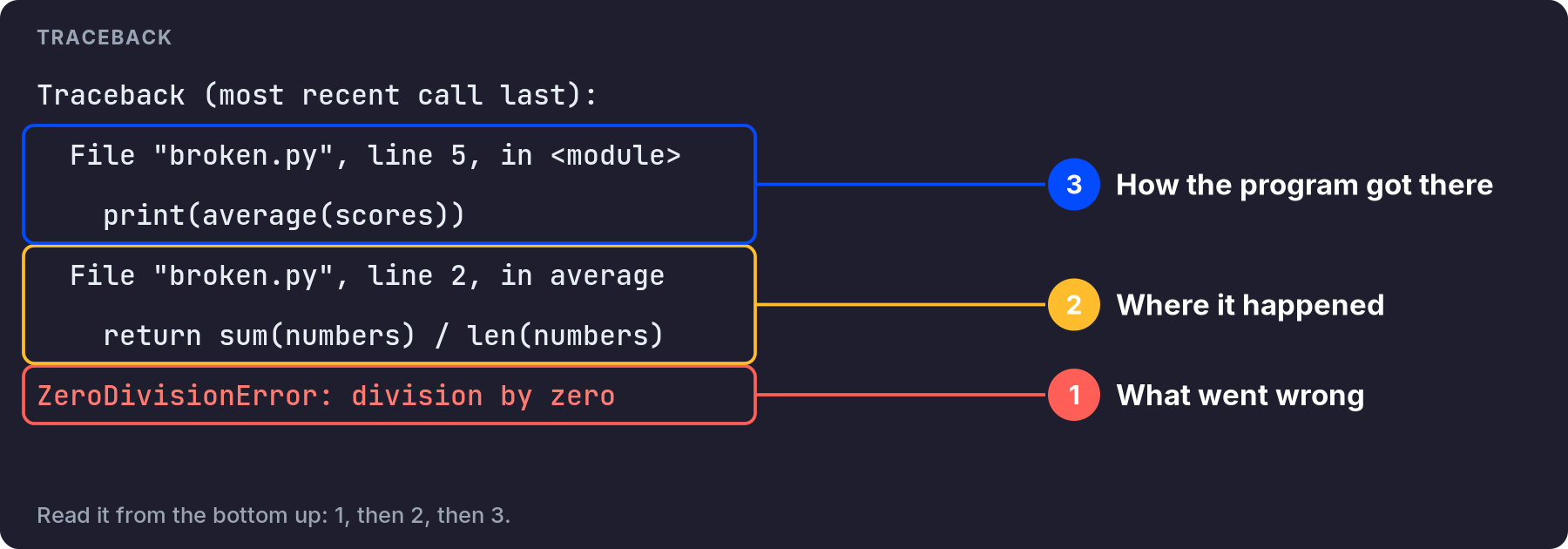
Python prints a traceback like this. Your file path will differ, and newer Python versions also underline the exact failing part with ^ marks:
Traceback (most recent call last):
  File "broken.py", line 5, in <module>
    print(average(scores))
  File "broken.py", line 2, in average
    return sum(numbers) / len(numbers)
ZeroDivisionError: division by zero
Read it in this order:
- The last line first.
ZeroDivisionError: division by zero. That is what happened. - The line just above it. Line 2, inside
average. That is where it happened. - Then go up. Line 5 called
average. That is how you got there.
So: the list was empty, len() was 0, and you cannot divide by zero. The fix is not in line 2 alone. The question is what should happen with no scores. Maybe return 0, maybe show a message. That is a decision, not a typo.
The errors you will meet most
- SyntaxError: Python cannot even read the code. Missing colon, missing bracket, unclosed quote. Python points near the problem, but the real mistake is sometimes on the line before.
- IndentationError: the spaces at the start of a line do not match what Python expects.
- NameError: you used a name Python does not know. Usually a typo, or the variable was never created.
- TypeError: you used a value of the wrong type, like adding text to a number.
- ValueError: right type, wrong value, like
int("abc"). - IndexError / KeyError: the list position or dictionary key does not exist.
- ZeroDivisionError: dividing by zero.
Here are three of them in one place, so you can see the messages yourself:
tests = [
    lambda: int("abc"),
    lambda: [1, 2, 3][5],
    lambda: {"name": "Ana"}["age"],
]

for test in tests:
    try:
        test()
    except Exception as error:
        print(type(error).__name__, "->", error)
You will not normally write code like this. It just shows the error name and message side by side: ValueError, IndexError, KeyError.
A simple process when you get an error
- Read the last line. Say out loud what kind of error it is.
- Go to the file and line number just above it.
- Print the values used on that line, with their types.
- Fix one thing. Run again. If the error changed, that is progress, not failure.
- Still stuck? Search the exact last line of the message, without your own variable names.
⚠ Warning: Do not change several things at once hoping one of them works. If it starts working, you will not know which change fixed it, and the other changes may have created a new bug that shows up later.
A real-world example
You get NameError: name 'totl' is not defined. You do not need to understand anything deep. It is a typo. Python even shows the name it did not recognize. Newer Python versions often add a hint like "Did you mean: 'total'?". That is the whole fix. Thirty seconds, if you read it. An hour, if you start rewriting the function.
Common mistakes
- Reading from the top. The top of a long traceback is usually the least useful part.
- Ignoring the line number. It is right there.
- Pasting the whole error into a search with your file paths. Search the error type and message only.
- Assuming the error is where you were editing. Often it is, sometimes it is not. Trust the traceback.
💡 Tip: When asking someone for help, send the full traceback as text, the code around the line it points to, and what you expected to happen. You will usually get a useful answer the first time. "It does not work" gets you nothing.
What happens if you skip this step
Every error becomes a guessing game. You copy fixes from the internet that solve different problems, and your code slowly fills with changes nobody understands, including you. Reading the message is faster. It is also the honest way to learn: the error tells you exactly which part you did not understand yet.
Quick check: in a traceback, which line tells you what kind of error happened?
About
Read a traceback from the bottom up, recognise the errors you'll meet most, and follow a simple process to fix them. An error message is not the computer yelling at you. It's telling you where to look.
Comments (0)
Sign in to commentNo comments yet.