

GROUP BY and HAVING
Get one result row per group and filter groups with HAVING, and learn when a condition belongs in WHERE instead. After this, a how-many-for-each question is one query.
Skip ahead: If you already group with GROUP BY and know why a filter on a count goes in HAVING and not in WHERE, skip to "WHERE or HAVING", then continue.
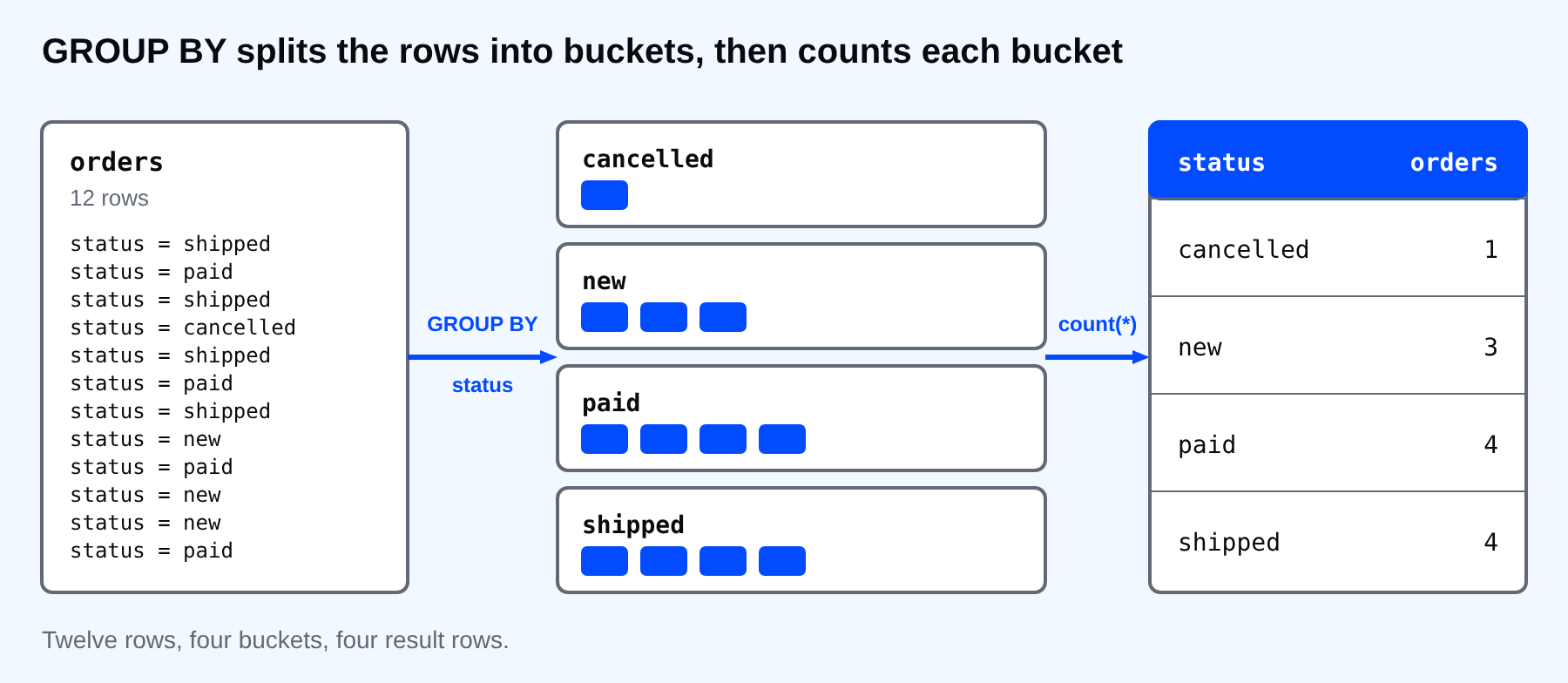
A single total is useful once. Most questions are "how many for each": orders for each status, products for each category, orders for each customer. GROUP BY answers all of them. It splits the rows into buckets, one bucket per distinct value, and runs the aggregate once per bucket.
One row per group
Count the orders by status.
SELECT status, count(*) AS orders
FROM orders
GROUP BY status
ORDER BY status;
  status   | orders
-----------+--------
 cancelled |      1
 new       |      3
 paid      |      4
 shipped   |      4
(4 rows)
Twelve orders went into four buckets, and each bucket produced one row. The columns you SELECT must be the grouping column or an aggregate. That is the rule that the previous lesson's error was about.
Group by more than one column to get a bucket for each combination, and use any aggregate you like.
SELECT category, count(*) AS products, round(avg(price), 2) AS average_price
FROM products
GROUP BY category
ORDER BY category;
  category   | products | average_price
-------------+----------+---------------
 bags        |        2 |         22.33
 electronics |        3 |          9.83
 home        |        2 |         12.25
 stationery  |        3 |          2.25
(4 rows)
NULL is a group of its own. The two customers without a city land in one bucket instead of vanishing.
SELECT city, count(*) AS customers
FROM customers
GROUP BY city
ORDER BY city;
  city  | customers
--------+-----------
 Cebu   |         2
 Davao  |         1
 Manila |         3
        |         2
(4 rows)
The blank city is those two customers, and PostgreSQL sorts that bucket last.
The mistake the database catches
Select a column that is neither grouped nor aggregated, and PostgreSQL stops you.
SELECT customer_id, status, count(*) FROM orders GROUP BY customer_id;
ERROR:  column "orders.status" must appear in the GROUP BY clause or be used in an aggregate function
LINE 1: SELECT customer_id, status, count(*) FROM orders GROUP BY cu...
                            ^
A customer can have orders in several statuses, so which one should the single result row show? The database refuses to guess. Add status to the GROUP BY if you want a row for each pair, or remove it. MySQL used to let this through and pick a value for you, which is why a query copied from an old answer can run in one database and fail in PostgreSQL.
WHERE or HAVING
You now have two places to filter, and they happen at different moments. WHERE filters rows before they are grouped. HAVING filters groups after the aggregate is computed.
Find customers with at least three orders. The condition is about a count, so it belongs in HAVING.
SELECT customer_id, count(*) AS orders
FROM orders
GROUP BY customer_id
HAVING count(*) >= 3
ORDER BY customer_id;
 customer_id | orders
-------------+--------
           1 |      3
           3 |      3
(2 rows)
Put the same condition in WHERE and the database tells you why it cannot work. The count does not exist yet when WHERE runs.
SELECT customer_id, count(*) AS orders
FROM orders
WHERE count(*) >= 3
GROUP BY customer_id;
ERROR:  aggregate functions are not allowed in WHERE
LINE 3: WHERE count(*) >= 3
              ^
Use both when a question has both kinds of condition. Count each customer's orders, ignoring cancelled ones, and keep customers with at least three.
SELECT customer_id, count(*) AS orders
FROM orders
WHERE status <> 'cancelled'
GROUP BY customer_id
HAVING count(*) >= 3
ORDER BY customer_id;
 customer_id | orders
-------------+--------
           1 |      3
(1 row)
Customer 3 dropped out. She had three orders, but one was cancelled, so she has two, and two is not enough. The full read order is now FROM, WHERE, GROUP BY, HAVING, SELECT, ORDER BY and LIMIT. A row-level condition in HAVING works but wastes effort, because the database groups rows it could have thrown away first. Keep row filters in WHERE.
You are seeing customer ids because the names live in another table. Section 5 joins them so the result can show "Ana Reyes" instead of 1.
⚠ Warning: The same word in different clauses means different things. count(*) in SELECT is a column in the result. count(*) in HAVING is a condition on each group. Do not copy it into WHERE.
Common mistakes
- Selecting a column that is not in GROUP BY and not aggregated.
- Putting an aggregate in WHERE.
- Putting a row condition in HAVING when WHERE would do.
- Grouping by something too fine, like a timestamp, and getting a group per row.
- Forgetting that NULL forms its own group.
💡 Tip: To see what GROUP BY is doing, first run the query without it and without aggregates, and look at the raw rows. Then add GROUP BY and the aggregate and watch the rows collapse.
If you skip this, you will pull rows into a spreadsheet to count them by hand, which is the thing the database was built to do. What is one "how many for each" question about your own data that you have been answering by hand?
About
Get one result row per group and filter groups with HAVING, and learn when a condition belongs in WHERE instead. After this, a how-many-for-each question is one query.
Comments (0)
Sign in to commentNo comments yet.