
SELECT, WHERE, ORDER BY and LIMIT
Pick columns, filter rows, sort the result and cut it short, and learn the order the database reads a query in. After this, you can answer most simple questions about a table and read the common errors.
Skip ahead: If you already write SELECT with WHERE, ORDER BY and LIMIT without looking anything up, skip to "The order the database reads a query", then continue.
Nearly every query you will ever write is a SELECT. It reads rows from a table and returns the ones you ask for, in the shape you ask for. Four clauses do most of the work: SELECT picks columns, WHERE picks rows, ORDER BY sorts them and LIMIT cuts the list short. Learn those four well and you can answer most questions a shop owner asks.
SELECT: pick the columns
SELECT * returns every column. It is fine for a first look and a bad habit in anything you keep. Name the columns you need.
SELECT name, city FROM customers;
    name    |  city
------------+--------
 Ana Reyes  | Manila
 Ben Cruz   | Cebu
 Carla Diaz | Manila
 Dan Lim    |
 Ella Tan   | Davao
 Finn Go    | Cebu
 Gina Ortiz |
 Hugo Sy    | Manila
(8 rows)
AS renames a column in the result. It does not change the table.
SELECT name AS customer, joined AS member_since FROM customers LIMIT 2;
 customer  | member_since
-----------+--------------
 Ana Reyes | 2026-01-12
 Ben Cruz  | 2026-02-03
(2 rows)
Keywords like SELECT and FROM are not case sensitive. Write them in capitals so the shape of a query stands out. Unquoted names such as customers are folded to lower case by PostgreSQL, so Customers and customers mean the same table.
WHERE: pick the rows
WHERE keeps the rows for which the condition is true. Text goes in single quotes.
SELECT name, joined FROM customers WHERE city = 'Manila';
    name    |   joined
------------+------------
 Ana Reyes  | 2026-01-12
 Carla Diaz | 2026-02-20
 Hugo Sy    | 2026-07-04
(3 rows)
Combine conditions with AND and OR. Numbers need no quotes.
SELECT name, price FROM products WHERE category = 'electronics' AND price < 10;
    name     | price
-------------+-------
 USB Cable   |  4.99
 Phone Stand |  9.00
(2 rows)
AND binds tighter than OR, like multiplication before addition. That catches people out.
SELECT name, category, price FROM products
WHERE category = 'bags' OR category = 'home' AND price < 10;
     name      | category | price
---------------+----------+-------
 Mug           | home     |  6.50
 Backpack      | bags     | 29.90
 Laptop Sleeve | bags     | 14.75
(3 rows)
You asked for bags or cheap home items, and you got both bags. The Desk Lamp is gone because it costs 18.00. If that is what you meant, fine. If you meant "bags or home, and either must be under 10", add parentheses: WHERE (category = 'bags' OR category = 'home') AND price < 10. When a condition mixes AND with OR, write the parentheses even if you do not need them.
Three shortcuts save typing. IN checks a list, BETWEEN checks a range with both ends included, and LIKE matches a pattern where % stands for any run of characters.
SELECT name, price FROM products WHERE price BETWEEN 5 AND 15;
     name      | price
---------------+-------
 Mug           |  6.50
 Laptop Sleeve | 14.75
 Phone Stand   |  9.00
(3 rows)
SELECT name, category FROM products WHERE category IN ('home', 'bags');
     name      | category
---------------+----------
 Desk Lamp     | home
 Mug           | home
 Backpack      | bags
 Laptop Sleeve | bags
(4 rows)
LIKE is case sensitive in PostgreSQL. "Gel Pen" starts with a capital G, so a pattern with a small g finds nothing.
SELECT name FROM products WHERE name LIKE 'g%';
 name
------
(0 rows)
SELECT name FROM products WHERE name ILIKE 'g%';
  name
---------
 Gel Pen
(1 row)
ILIKE is the case-insensitive version, and it is PostgreSQL-specific. Other databases differ: MySQL, for example, compares text case-insensitively by default, so the same LIKE would find the pen there.
ORDER BY and LIMIT
Without ORDER BY, the database returns rows in whatever order is convenient. That order can change after an update or a vacuum. If the order matters, say so.
SELECT name, price FROM products ORDER BY price DESC LIMIT 3;
      name      | price
----------------+-------
 Backpack       | 29.90
 Desk Lamp      | 18.00
 Wireless Mouse | 15.50
(3 rows)
DESC is high to low, ASC (the default) is low to high. Sort by more than one column by listing them: the second breaks ties in the first.
SELECT category, name, price FROM products
ORDER BY category, price DESC
LIMIT 5;
  category   |      name      | price
-------------+----------------+-------
 bags        | Backpack       | 29.90
 bags        | Laptop Sleeve  | 14.75
 electronics | Wireless Mouse | 15.50
 electronics | Phone Stand    |  9.00
 electronics | USB Cable      |  4.99
(5 rows)
LIMIT stops after n rows. OFFSET skips rows first, so LIMIT 3 OFFSET 3 is "the second page of three". LIMIT is not in the SQL standard, which writes FETCH FIRST 3 ROWS ONLY. PostgreSQL accepts both. SQL Server uses TOP, so other databases differ here. Only trust a LIMIT when there is an ORDER BY with a unique tie-breaker, or page 2 can repeat rows from page 1.
The order the database reads a query
You write SELECT first, but the database reads FROM first. Then WHERE, then the SELECT list, then ORDER BY, then LIMIT.
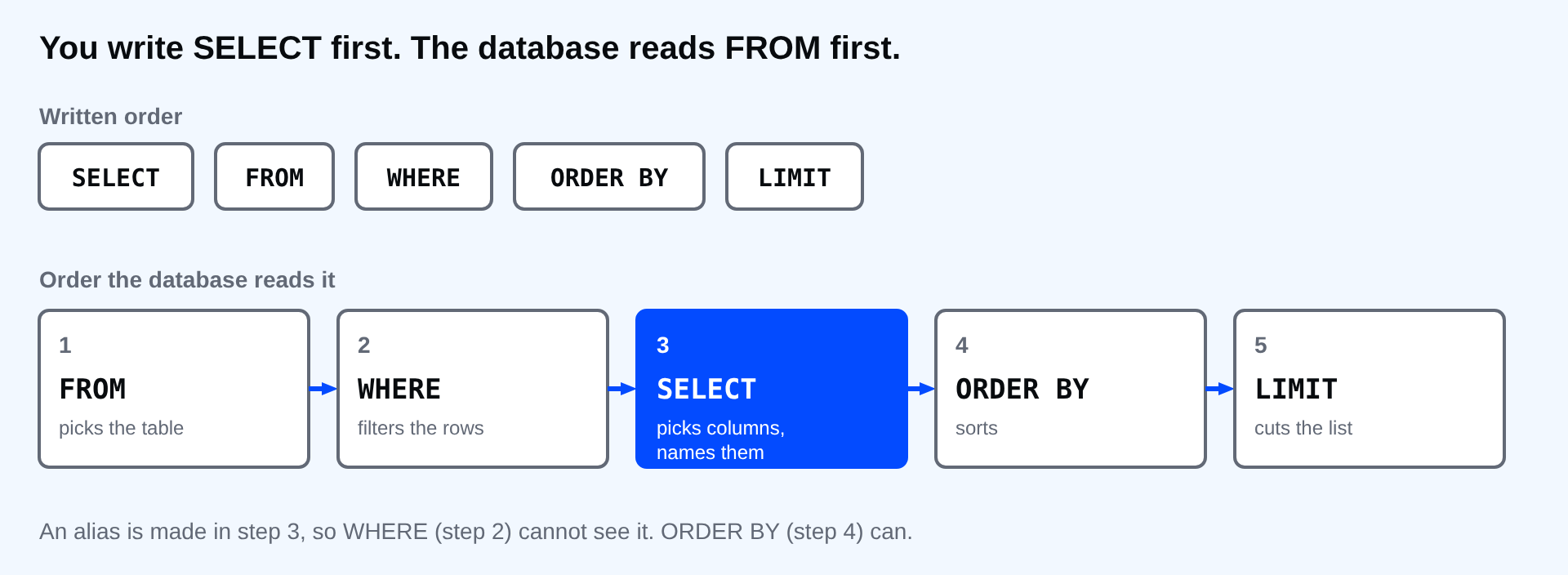
That order explains the error people hit most. An alias is made in the SELECT step, which is after WHERE. WHERE cannot see it yet.
SELECT name AS customer FROM customers WHERE customer = 'Ana Reyes';
ERROR:  column "customer" does not exist
LINE 1: SELECT name AS customer FROM customers WHERE customer = 'Ana...
                                                     ^
HINT:  Perhaps you meant to reference the column "customers.customer_id".
PostgreSQL says the column does not exist, points a caret at it and offers a guess. Use the real column in WHERE: WHERE name = 'Ana Reyes'. ORDER BY comes after SELECT, so it can use the alias.
The second most common error is the wrong quotes. Double quotes mean a column or table name, single quotes mean text.
SELECT name FROM customers WHERE city = "Cebu";
ERROR:  column "Cebu" does not exist
LINE 1: SELECT name FROM customers WHERE city = "Cebu";
                                                ^

The red box marks the error line. The caret under the word shows where PostgreSQL stopped reading.
⚠ Warning: Treat "column does not exist" for a word you meant as text as a quote problem first. Changing the table or adding a column is almost never the fix.
Common mistakes
- Using SELECT * in a saved query, then breaking it when somebody adds a column.
- Mixing AND and OR without parentheses.
- Using an alias in WHERE.
- Writing "Cebu" with double quotes.
- Paging with LIMIT and OFFSET and no ORDER BY.
💡 Tip: Build a query one clause at a time. Run SELECT * FROM products; first, add the WHERE and run it again, then the ORDER BY. When something breaks, you know which clause did it.
If you skip this, you will copy queries without knowing which clause does what, and the first time a result looks wrong you will not know where to look. Which of your own questions about the shop could you answer with just these four clauses?
About
Pick columns, filter rows, sort the result and cut it short, and learn the order the database reads a query in. After this, you can answer most simple questions about a table and read the common errors.
Comments (0)
Sign in to commentNo comments yet.