
Primary Keys, Foreign Keys and Why Tables Are Split
See what goes wrong with one wide table, then use primary keys, foreign keys and a bridge table to store each fact once. After this, you can read the shop's four tables and say how they connect.
Skip ahead: If you already know what a primary key and a foreign key are and why a shop splits customers from orders, skip to "A foreign key is a promise", then continue.
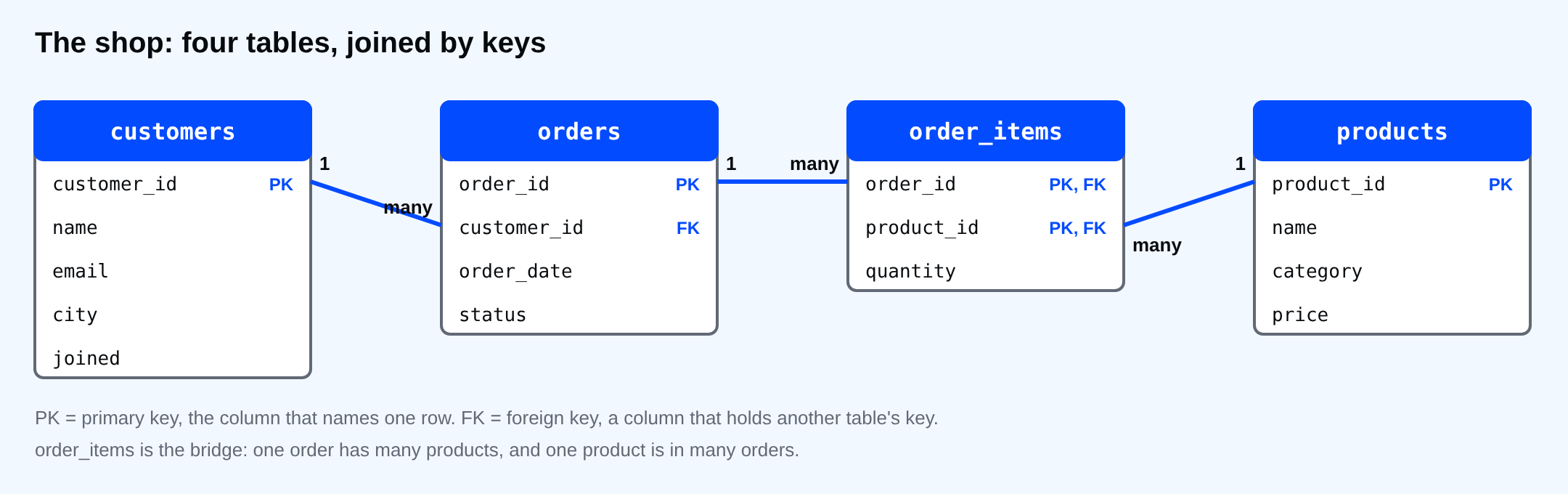
Look at the four shop tables again and ask why there are four. A shop owner might say: put it all on one sheet, one row per order, with the customer's name and city on every row. That feels simpler. It works until the data changes, and data always changes.
The problem with one big table
Here is that one-sheet version for a customer with three orders. It is a small scratch table, and the temporary kind disappears when you close the session.
CREATE TEMP TABLE orders_flat (
  order_id      integer,
  customer_name text,
  customer_city text
);
INSERT INTO orders_flat VALUES
  (1,  'Ana Reyes', 'Manila'),
  (2,  'Ana Reyes', 'Manila'),
  (11, 'Ana Reyes', 'Manila');
CREATE TABLE
INSERT 0 3
Ana moves to Cebu. Whoever updates the sheet fixes one row, because the other two are on a different screen.
UPDATE orders_flat SET customer_city = 'Cebu' WHERE order_id = 2;
SELECT customer_name, customer_city, count(*) AS orders
FROM orders_flat
GROUP BY customer_name, customer_city
ORDER BY customer_city;
UPDATE 1
 customer_name | customer_city | orders
---------------+---------------+--------
 Ana Reyes     | Cebu          |      1
 Ana Reyes     | Manila        |      2
(2 rows)
Now Ana lives in two cities, and no query can tell you which is right. The same fact was stored three times, so it could disagree with itself. The fix is not to be more careful. The fix is to store the city once, in a customers row, and have each order point at that row.
Primary key: how a row is named
A primary key is the column that identifies one row, and only that row. It is unique and never NULL. In the shop every table has a number for it: customer_id, product_id, order_id. Once a number is given to a row it stays, even when the name or email changes.
Pick a key that never changes. An email or a name looks unique today, and then somebody changes theirs and every table that copied it is wrong. A plain number has no meaning, which is exactly why it is safe.
order_items has no id of its own. Its key is two columns together, (order_id, product_id), because one product appears at most once in an order. A primary key can be a pair.
INSERT INTO order_items (order_id, product_id, quantity) VALUES (1, 1, 1);
ERROR:  duplicate key value violates unique constraint "order_items_pkey"
DETAIL:  Key (order_id, product_id)=(1, 1) already exists.
Order 1 already has product 1, so a second row for the same pair is refused. If you want more, change the quantity on the existing row.
A foreign key is a promise
A foreign key is a column that holds another table's primary key. orders.customer_id holds a customers.customer_id. The database turns it into a promise it keeps for you: you cannot point at a customer who does not exist.
INSERT INTO orders (customer_id, order_date) VALUES (99, '2026-10-01');
ERROR:  insert or update on table "orders" violates foreign key constraint "orders_customer_id_fkey"
DETAIL:  Key (customer_id)=(99) is not present in table "customers".
There is no customer 99, so the order is refused. This is the guard that keeps orders from floating around with nobody attached. It works in the other direction too, as you saw in Section 3: you cannot delete a customer or an order that something still points at.
\d orders shows the key and the promise side by side.
\d orders
                            Table "public.orders"
   Column    |  Type   | Collation | Nullable |           Default
-------------+---------+-----------+----------+------------------------------
 order_id    | integer |           | not null | generated always as identity
 customer_id | integer |           | not null |
 order_date  | date    |           | not null |
 status      | text    |           | not null | 'new'::text
Indexes:
    "orders_pkey" PRIMARY KEY, btree (order_id)
Foreign-key constraints:
    "orders_customer_id_fkey" FOREIGN KEY (customer_id) REFERENCES customers(customer_id)
Referenced by:
    TABLE "order_items" CONSTRAINT "order_items_order_id_fkey" FOREIGN KEY (order_id) REFERENCES orders(order_id)
The Foreign-key constraints line says orders.customer_id must exist in customers.customer_id. The Referenced by line says order_items points at orders. That is the whole diagram, written as text.
Many orders, many products
One order contains many products, and one product sits in many orders. A column cannot hold a list, so the relation lives in its own table. order_items is that table. Each row says "this order has this much of this product". It is the bridge between orders and products. You will meet this shape every time two kinds of thing relate many-to-many: students and classes, tags and articles, doctors and patients.
Why it matters for queries
Splitting the data makes writing to it safe and reading from it a little more work. To show "Ana Reyes" next to an order, you now have to join orders to customers. The next lesson shows how.
⚠ Warning: Do not add a copy of a customer's name to the orders table "to avoid the join". It brings back the two-cities problem, and you will have to keep every copy in sync forever.
Common mistakes
- Using an email, phone number or name as the primary key.
- Storing the same fact in two tables and updating only one.
- Storing a list of values, like "1,3,7", in one column instead of a bridge table.
- Skipping the foreign key because "the application checks it". A script or a typo in psql does not.
💡 Tip: Sketch tables as boxes and draw a line for every foreign key. If you cannot say which side of a line is "one" and which is "many", the tables are not split correctly yet.
If you skip this, you will build one wide table, and your reports will slowly start to disagree with each other. Which fact in your own data is stored in more than one place right now?
About
See what goes wrong with one wide table, then use primary keys, foreign keys and a bridge table to store each fact once. After this, you can read the shop's four tables and say how they connect.
Comments (0)
Sign in to commentNo comments yet.