
What a Relational Database Is and Why SQL Exists
What a table, a row, a column and a key are, why data is split across tables and why SQL describes the result instead of the steps. After this, you can say what a query asks for before you run it.
Skip ahead: If you already know what a table, a row, a column and a key are, skip to "Why SQL exists", then continue.
Most people meet data in a spreadsheet. One sheet, one file, one person editing at a time. That works until the file has 200,000 rows, two people save over each other, and nobody can say which of the three "final" copies is the right one. A relational database is what you move to when the data matters more than the file it lives in. SQL is the language you use to talk to it.
You do not need to install anything to read this lesson. The next lesson sets up PostgreSQL and loads the small shop used in every example. The queries below are there so you can see the shape of the thing. Run them later, once the shop exists.
Tables, rows and columns
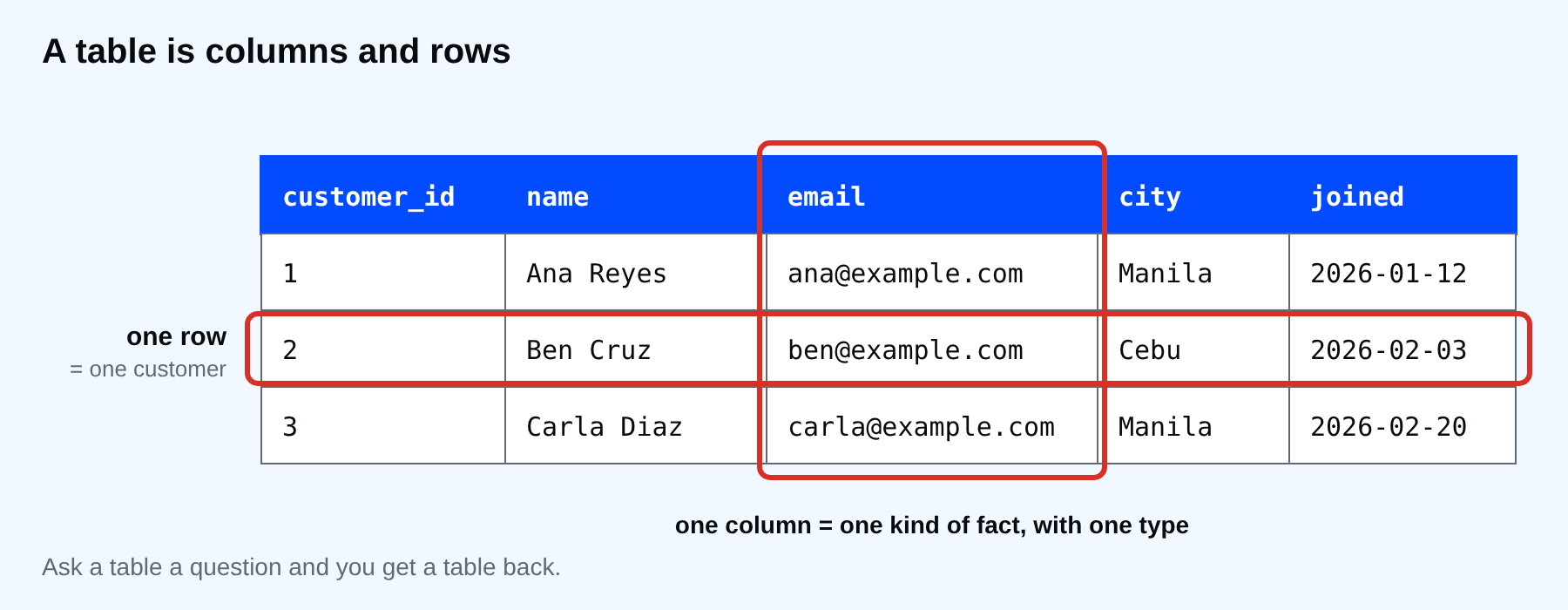
A relational database keeps data in tables. A table is a grid with a fixed list of columns and any number of rows. Every column has a name and a type: the name column holds text, the joined column holds dates. Every row is one thing, here one customer.
SELECT * FROM customers LIMIT 3;
 customer_id |    name    |       email       |  city  |   joined
-------------+------------+-------------------+--------+------------
           1 | Ana Reyes  | ana@example.com   | Manila | 2026-01-12
           2 | Ben Cruz   | ben@example.com   | Cebu   | 2026-02-03
           3 | Carla Diaz | carla@example.com | Manila | 2026-02-20
(3 rows)
SELECT * means "give me every column". FROM customers says which table. LIMIT 3 stops after three rows. The result is itself a grid, which is the point: you ask a table a question and get a table back.
One difference from a spreadsheet matters from day one. A column has one type and the database enforces it. A date column will not accept the word "tomorrow", and a number column will not accept "n/a". The database refuses the bad value when it arrives, not months later when somebody tries to add it up.
Why there is more than one table
Look at the shop. It has customers, products, orders and order_items. Why not one big table with everything on every row?
SELECT order_id, customer_id, order_date, status FROM orders LIMIT 3;
 order_id | customer_id | order_date | status
----------+-------------+------------+---------
        1 |           1 | 2026-08-01 | shipped
        2 |           1 | 2026-08-15 | paid
        3 |           2 | 2026-08-03 | shipped
(3 rows)
An order does not carry the customer's name or city. It carries customer_id, a number that points at one row in customers. Change a customer's city once and every order sees the change. If the city were copied onto every order row, you would have to update it in dozens of places and one of them would eventually be missed.
That is the "relational" part: tables describe one kind of thing each, and keys connect them. A key is a column, or a set of columns, that identifies a row. Section 5 covers keys and joins properly. For now, remember the rule: one fact lives in one place.
Why SQL exists
Before SQL, getting an answer out of a database meant writing a program that looped over records and picked the right ones. SQL turned that around. You describe what you want, and the database works out how to get it.
SELECT name, city FROM customers WHERE city = 'Cebu';
   name   | city
----------+------
 Ben Cruz | Cebu
 Finn Go  | Cebu
(2 rows)
You did not say "open the table, read the first row, compare the city, remember the match". You said which columns, from where, under which condition. The database decides whether to scan the whole table or use an index. The same query keeps working when the table grows from 8 rows to 8 million, and the database may choose a different plan on its own.
SQL has been a standard since the 1980s, and nearly every relational database speaks it: PostgreSQL, MySQL, SQL Server, Oracle, SQLite. They share the core and differ at the edges. These lessons teach standard SQL first and point out where PostgreSQL does something of its own. When it does, a short note says other databases differ.
What SQL is not
SQL is not a general programming language. You do not build a web page with it. It reads, changes and combines data in tables, and it does that very well. Most real applications use SQL from inside another language such as Python, JavaScript or PHP. The database does the data work, and the application does the rest.
⚠ Warning: Practise on the scratch database from the next lesson, never on one you care about. A mistyped DELETE or UPDATE on a real database changes real rows, and there is no undo button unless somebody set up backups before you needed them.
Common mistakes
- Treating a database like a bigger spreadsheet, with one wide table and every fact repeated on every row.
- Thinking SQL is "the same everywhere" and copying a query from a MySQL answer into PostgreSQL without reading it.
- Learning the commands by memory instead of learning what a table, a key and a type guarantee.
💡 Tip: When you see a query you do not understand, read it in this order: which tables (FROM), which rows (WHERE), which columns (SELECT). It is not the order they are written in, and Section 2 explains why.
If you skip this, every later lesson turns into memorising commands with no picture of what they act on. Which of your own data would break first if it lived in one big file that two people edit?
About
What a table, a row, a column and a key are, why data is split across tables and why SQL describes the result instead of the steps. After this, you can say what a query asks for before you run it.
Comments (0)
Sign in to commentNo comments yet.