

INNER JOIN and LEFT JOIN
Combine two tables with ON, keep or drop unmatched rows and find rows that have no match. After this, you can show an order next to its customer and list customers with no orders.
Skip ahead: If you already write joins with ON and know when a LEFT JOIN keeps rows an INNER JOIN drops, skip to "LEFT JOIN: keep everything on the left", then continue.
Splitting data across tables is half the job. The other half is putting it back together in a query. A join combines rows from two tables by matching a column in one with a column in the other. You will use two of them every day: INNER JOIN and LEFT JOIN.
INNER JOIN: only the matches
Show each order with the customer's name. orders has the id, customers has the name, and ON says how to match them.
SELECT o.order_id, c.name, o.order_date, o.status
FROM orders AS o
INNER JOIN customers AS c ON c.customer_id = o.customer_id
ORDER BY o.order_id
LIMIT 5;
 order_id |    name    | order_date |  status
----------+------------+------------+-----------
        1 | Ana Reyes  | 2026-08-01 | shipped
        2 | Ana Reyes  | 2026-08-15 | paid
        3 | Ben Cruz   | 2026-08-03 | shipped
        4 | Carla Diaz | 2026-08-05 | cancelled
        5 | Carla Diaz | 2026-08-20 | shipped
(5 rows)
Read it from the top. FROM orders AS o starts with the orders. INNER JOIN customers AS c brings in customers. ON c.customer_id = o.customer_id is the matching rule: put a customer next to every order that carries their id. o and c are short names for the tables, called aliases, so you can say which table a column comes from.
INNER JOIN keeps a row only when both sides match. An order with a missing customer would disappear, and so would a customer with no orders. JOIN on its own means INNER JOIN.
If both tables have a column of the same name, you must say which one you mean.
SELECT customer_id FROM orders JOIN customers ON customers.customer_id = orders.customer_id;
ERROR:  column reference "customer_id" is ambiguous
LINE 1: SELECT customer_id FROM orders JOIN customers ON customers.c...
               ^
Write o.customer_id or c.customer_id. Get in the habit of prefixing every column in a join, even where it is not required. It tells the next reader where each value comes from.
The same pattern connects the items of an order to the products.
SELECT i.order_id, p.name, i.quantity, p.price, i.quantity * p.price AS line_total
FROM order_items AS i
INNER JOIN products AS p ON p.product_id = i.product_id
WHERE i.order_id = 5
ORDER BY p.name;
 order_id |    name     | quantity | price | line_total
----------+-------------+----------+-------+------------
        5 | Phone Stand |        1 |  9.00 |       9.00
        5 | USB Cable   |        3 |  4.99 |      14.97
(2 rows)
Order 5 had three USB cables and a phone stand. The line_total column is a calculation on columns from both tables. You can do that because after the join they are in the same row.
LEFT JOIN: keep everything on the left
Now ask for every customer and their orders, including customers who have not ordered.
SELECT c.name, o.order_id
FROM customers AS c
LEFT JOIN orders AS o ON o.customer_id = c.customer_id
ORDER BY c.customer_id, o.order_id
LIMIT 9;
    name    | order_id
------------+----------
 Ana Reyes  |        1
 Ana Reyes  |        2
 Ana Reyes  |       11
 Ben Cruz   |        3
 Ben Cruz   |       10
 Carla Diaz |        4
 Carla Diaz |        5
 Carla Diaz |        6
 Dan Lim    |
(9 rows)
LEFT JOIN keeps every row from the table on the left (customers). When a customer has orders, they appear once per order. When they have none, the right-hand columns are filled with NULL, which is what you see for Dan Lim below Carla Diaz.
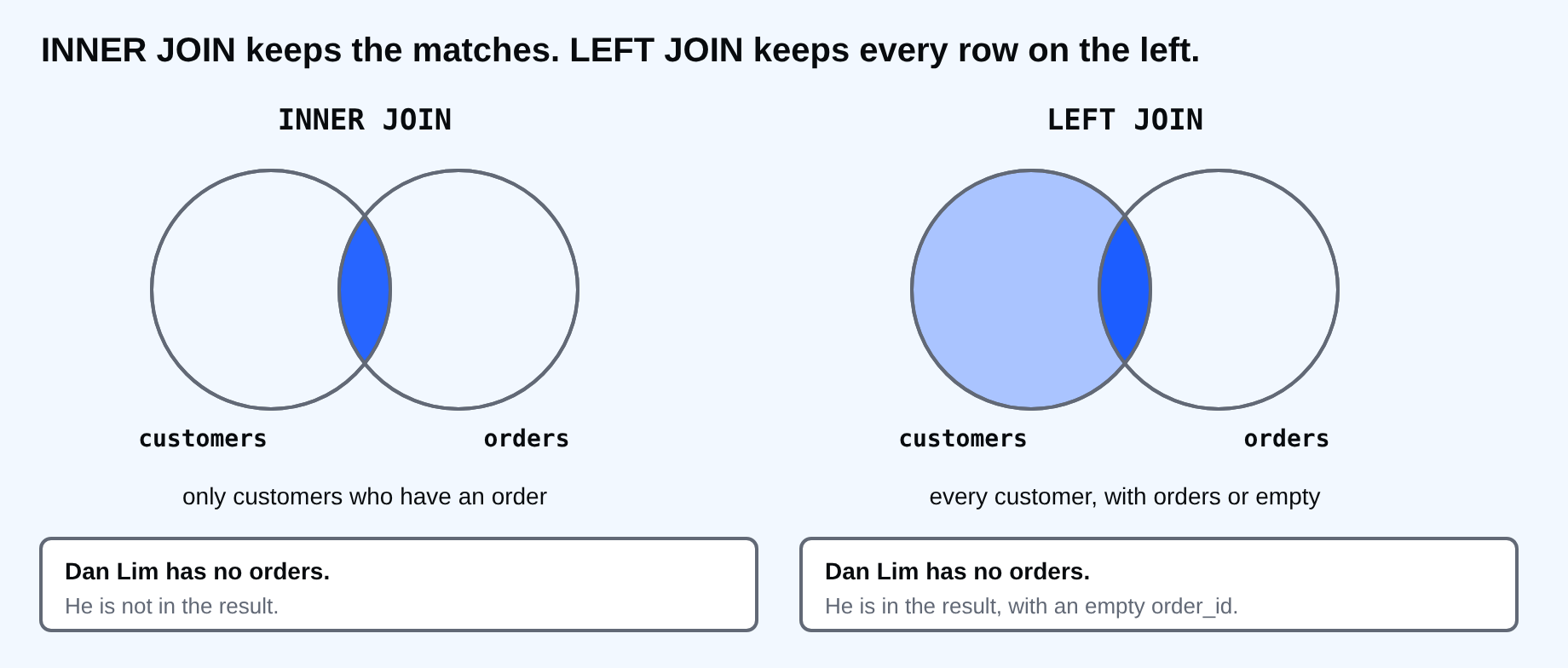
That NULL is useful. It gives you the "who has nothing" question that an INNER JOIN cannot answer. Find the customers with no orders by keeping the rows where the right side is empty.
SELECT c.name
FROM customers AS c
LEFT JOIN orders AS o ON o.customer_id = c.customer_id
WHERE o.order_id IS NULL
ORDER BY c.name;
    name
------------
 Dan Lim
 Gina Ortiz
(2 rows)
Test a column that can never be NULL when a match exists, such as the right table's primary key. The same trick finds products nobody ordered.
SELECT p.name
FROM products AS p
LEFT JOIN order_items AS i ON i.product_id = p.product_id
WHERE i.product_id IS NULL;
     name
--------------
 Sticker Pack
(1 row)
There is also RIGHT JOIN, which is a LEFT JOIN with the tables swapped, and FULL JOIN, which keeps both sides. In practice you can put the table you want to keep on the left and use LEFT JOIN every time. The two are standard SQL and every common database supports them. The older style that joins by listing tables with commas still works, but it is easy to lose the matching rule, and the next lesson shows what happens then.
⚠ Warning: Write the matching rule in ON, not in WHERE. A join with no rule, or the wrong rule, still runs. It returns rows that look real and are wrong.
Common mistakes
- Using INNER JOIN when you wanted to keep rows with no match.
- Forgetting the ON condition, or joining on the wrong column.
- Leaving a column name unqualified when both tables have it.
- Joining on columns of different meaning that happen to be numbers, like
order_idtocustomer_id.
💡 Tip: Read a join out loud: "every order, and the customer whose id matches". If the sentence sounds wrong, the join is wrong.
If you skip this, you will pull two tables into a program and match them with loops, slowly. Which two tables in your own data would you join first, and which of them has to keep all its rows?
About
Combine two tables with ON, keep or drop unmatched rows and find rows that have no match. After this, you can show an order next to its customer and list customers with no orders.
Comments (0)
Sign in to commentNo comments yet.