
Set Up PostgreSQL and Run Your First Query
Start PostgreSQL 18.6 in a Docker container, open psql, run a first query and load the shop database used in every lesson. After this, you have a safe database to practise on and can reset it in a minute.
Skip ahead: If PostgreSQL 18 is already running and you can open psql, skip to "Load the shop", then continue.
You need a PostgreSQL server and a way to type SQL into it. The quickest clean setup is Docker: one command gives you a real PostgreSQL 18.6 server, and one more removes it without a trace. Nothing is installed on your machine, and nothing you break matters. All the examples in this course were run on exactly this image, postgres:18.6.
If you cannot use Docker, install PostgreSQL 18 from postgresql.org for your system and skip to "Open psql". The SQL is the same. Only the way you start the server changes.
Start a PostgreSQL server
Install Docker Desktop (Windows, macOS) or Docker Engine (Linux), then run this in a terminal.
docker run --name shop-pg -e POSTGRES_PASSWORD=learn-sql-only -d postgres:18.6
--name shop-pg gives the container a name you can use later. -e POSTGRES_PASSWORD=... is required: the image refuses to start without one. -d runs it in the background. The first run downloads the image, which takes a minute.
The password only matters for connections from outside the container, and this container publishes no port, so nothing outside can connect. That is deliberate for a scratch server. If you ever run one that others can reach, pick a real password.
Check that it is running.
docker ps --filter name=shop-pg
The status column should say "Up". If the container is not listed, run docker logs shop-pg and read the last lines. The usual causes are a missing password variable or a name that is already used.
Open psql
psql is PostgreSQL's command-line client. It is already inside the image. Open it with docker exec, which runs a command inside a running container.
docker exec -it shop-pg psql -U postgres
You land at a prompt: postgres=#. Everything you type there goes to the server. Two kinds of input exist. SQL ends with a semicolon. Commands that start with a backslash, like \q to quit, belong to psql itself and need no semicolon.
SELECT version();
                                                      version
--------------------------------------------------------------------------------------------------------------------
 PostgreSQL 18.6 (Debian 18.6-1.pgdg13+2) on x86_64-pc-linux-gnu, compiled by gcc (Debian 14.2.0-19) 14.2.0, 64-bit
(1 row)
SELECT 2 + 3 AS five;
 five
------
    5
(1 row)
That is your first query. It has no FROM because it reads no table. AS five names the output column. The (1 row) line is psql's footer. Your first query worked if you got a table with one cell.
💡 Tip: If psql seems to hang after you press Enter, you forgot the semicolon. psql waits for it, and the prompt changes to postgres-# to show a statement is still open. Type ; and press Enter, or press Ctrl+C to throw the half-written statement away.
Load the shop
Every lesson uses the same small invented shop: customers, products, orders and the items inside each order. Save this script as shop.sql in a folder you can reach. You do not need to understand every line yet. Section 3 explains CREATE TABLE and INSERT, and Section 5 explains the keys.
CREATE TABLE customers (
  customer_id integer GENERATED ALWAYS AS IDENTITY PRIMARY KEY,
  name        text NOT NULL,
  email       text NOT NULL UNIQUE,
  city        text,
  joined      date NOT NULL
);

CREATE TABLE products (
  product_id integer GENERATED ALWAYS AS IDENTITY PRIMARY KEY,
  name       text NOT NULL,
  category   text NOT NULL,
  price      numeric(8,2) NOT NULL CHECK (price >= 0)
);

CREATE TABLE orders (
  order_id    integer GENERATED ALWAYS AS IDENTITY PRIMARY KEY,
  customer_id integer NOT NULL REFERENCES customers (customer_id),
  order_date  date NOT NULL,
  status      text NOT NULL DEFAULT 'new'
);

CREATE TABLE order_items (
  order_id   integer NOT NULL REFERENCES orders (order_id),
  product_id integer NOT NULL REFERENCES products (product_id),
  quantity   integer NOT NULL CHECK (quantity > 0),
  PRIMARY KEY (order_id, product_id)
);

INSERT INTO customers (name, email, city, joined) VALUES
  ('Ana Reyes',   'ana@example.com',   'Manila', '2026-01-12'),
  ('Ben Cruz',    'ben@example.com',   'Cebu',   '2026-02-03'),
  ('Carla Diaz',  'carla@example.com', 'Manila', '2026-02-20'),
  ('Dan Lim',     'dan@example.com',   NULL,     '2026-03-15'),
  ('Ella Tan',    'ella@example.com',  'Davao',  '2026-04-01'),
  ('Finn Go',     'finn@example.com',  'Cebu',   '2026-05-09'),
  ('Gina Ortiz',  'gina@example.com',  NULL,     '2026-06-18'),
  ('Hugo Sy',     'hugo@example.com',  'Manila', '2026-07-04');

INSERT INTO products (name, category, price) VALUES
  ('Notebook A5',    'stationery',  3.50),
  ('Gel Pen',        'stationery',  1.25),
  ('Desk Lamp',      'home',       18.00),
  ('Mug',            'home',        6.50),
  ('Backpack',       'bags',       29.90),
  ('Laptop Sleeve',  'bags',       14.75),
  ('USB Cable',      'electronics', 4.99),
  ('Phone Stand',    'electronics', 9.00),
  ('Wireless Mouse', 'electronics', 15.50),
  ('Sticker Pack',   'stationery',  2.00);

INSERT INTO orders (customer_id, order_date, status) VALUES
  (1, '2026-08-01', 'shipped'),
  (1, '2026-08-15', 'paid'),
  (2, '2026-08-03', 'shipped'),
  (3, '2026-08-05', 'cancelled'),
  (3, '2026-08-20', 'shipped'),
  (3, '2026-09-02', 'paid'),
  (5, '2026-08-11', 'shipped'),
  (5, '2026-09-10', 'new'),
  (6, '2026-09-12', 'paid'),
  (2, '2026-09-14', 'new'),
  (1, '2026-09-20', 'new'),
  (8, '2026-09-25', 'paid');

INSERT INTO order_items (order_id, product_id, quantity) VALUES
  (1, 1, 2), (1, 2, 5),
  (2, 3, 1),
  (3, 5, 1), (3, 2, 3),
  (4, 4, 2),
  (5, 7, 3), (5, 8, 1),
  (6, 9, 1),
  (7, 1, 1), (7, 6, 1), (7, 4, 1),
  (8, 2, 10),
  (9, 8, 2), (9, 7, 1),
  (10, 5, 1),
  (11, 3, 1), (11, 4, 1),
  (12, 9, 2), (12, 6, 1);
Quit psql with \q, then create the database and run the script. docker cp copies the file into the container, and -f tells psql to run a file.
docker cp shop.sql shop-pg:/tmp/shop.sql
docker exec -it shop-pg psql -U postgres -c "CREATE DATABASE shop"
docker exec -it shop-pg psql -U postgres -d shop -f /tmp/shop.sql
The last command prints CREATE TABLE four times and INSERT 0 ... four times. Open psql again, this time connected to the shop, and look at what you loaded.
docker exec -it shop-pg psql -U postgres -d shop
\dt
             List of tables
 Schema |    Name     | Type  |  Owner
--------+-------------+-------+----------
 public | customers   | table | postgres
 public | order_items | table | postgres
 public | orders      | table | postgres
 public | products    | table | postgres
(4 rows)
SELECT count(*) AS customers FROM customers;
 customers
-----------
         8
(1 row)
⚠ Warning: If you run the script a second time on the same database, the CREATE TABLE lines fail with "relation already exists". To start over, quit psql, run docker exec -it shop-pg psql -U postgres -c "DROP DATABASE shop", and repeat the steps above. That is also how you undo any mistake in the later lessons.
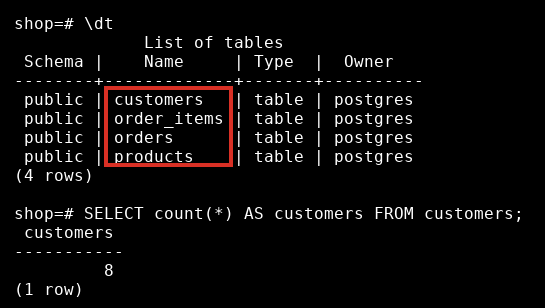
The red box marks the four tables the script created. A real terminal looks like this, with the prompt, your command and the result.
Common mistakes
- Forgetting the semicolon after a SQL statement, then waiting for output that will not come.
- Typing SQL where psql wants a backslash command, or the other way around.
\dthas no semicolon,SELECT 1;needs one. - Starting the container twice with the same name.
docker rm -f shop-pgremoves the old one. - Running the lessons against a PostgreSQL you use for real work. Use the scratch container.
When you finish a study session, docker stop shop-pg pauses the server and keeps your data. docker start shop-pg brings it back. docker rm -f shop-pg deletes it and everything in it.
If you skip this setup, you will read SQL without ever seeing it run, and you will not notice which of your assumptions about it are wrong. What would you check first on a database you have never seen?
About
Start PostgreSQL 18.6 in a Docker container, open psql, run a first query and load the shop database used in every lesson. After this, you have a safe database to practise on and can reset it in a minute.
Comments (0)
Sign in to commentNo comments yet.