
Docker Compose: Two Services With One File
Describe a web app and the service it calls in one compose.yaml, start both with one command and read the result. After this, you can start, check and stop a small stack from a file.
Skip ahead: If you already write Compose files, skip to "Start, check and stop", then go on to the next lesson.
By now you have typed long docker run commands with names, ports, networks and volumes. Two containers means two long commands, a network to create first, and a cleanup list you have to remember. Docker Compose replaces all of that with one YAML file that describes the whole app, and one command to start it. Docker Desktop includes it. The command is docker compose, with a space.
This lesson builds a small app with two services. web is the Python server from lesson 6, changed to fetch a line of text from a second service. quotes is an nginx container that serves that text. If you skip Compose and keep running containers by hand, the first time you forget the network or a port is the time you lose an hour.
The files
Make a new folder with four files. The app first. It reads where to find the quote from an environment variable.
import os
from http.server import BaseHTTPRequestHandler, HTTPServer
from urllib.request import urlopen

QUOTES_URL = os.environ.get("QUOTES_URL", "http://quotes/quote.txt")


class Handler(BaseHTTPRequestHandler):
    def do_GET(self):
        quote = urlopen(QUOTES_URL).read()
        body = b"Quote of the day: " + quote
        self.send_response(200)
        self.send_header("Content-Type", "text/plain")
        self.send_header("Content-Length", str(len(body)))
        self.end_headers()
        self.wfile.write(body)


HTTPServer(("0.0.0.0", 8000), Handler).serve_forever()
The same Dockerfile as before:
FROM python:3.14-alpine
WORKDIR /app
COPY app.py .
EXPOSE 8000
CMD ["python", "app.py"]
The text the second service will serve goes in a folder called quotes, in a file called quote.txt:
Read the logs first.
Now the Compose file. Name it compose.yaml.
name: quote-demo

services:
  web:
    build: .
    ports:
      - "8085:8000"
    environment:
      QUOTES_URL: http://quotes/quote.txt
    depends_on:
      - quotes

  quotes:
    image: nginx:1.30-alpine
    volumes:
      - ./quotes:/usr/share/nginx/html:ro
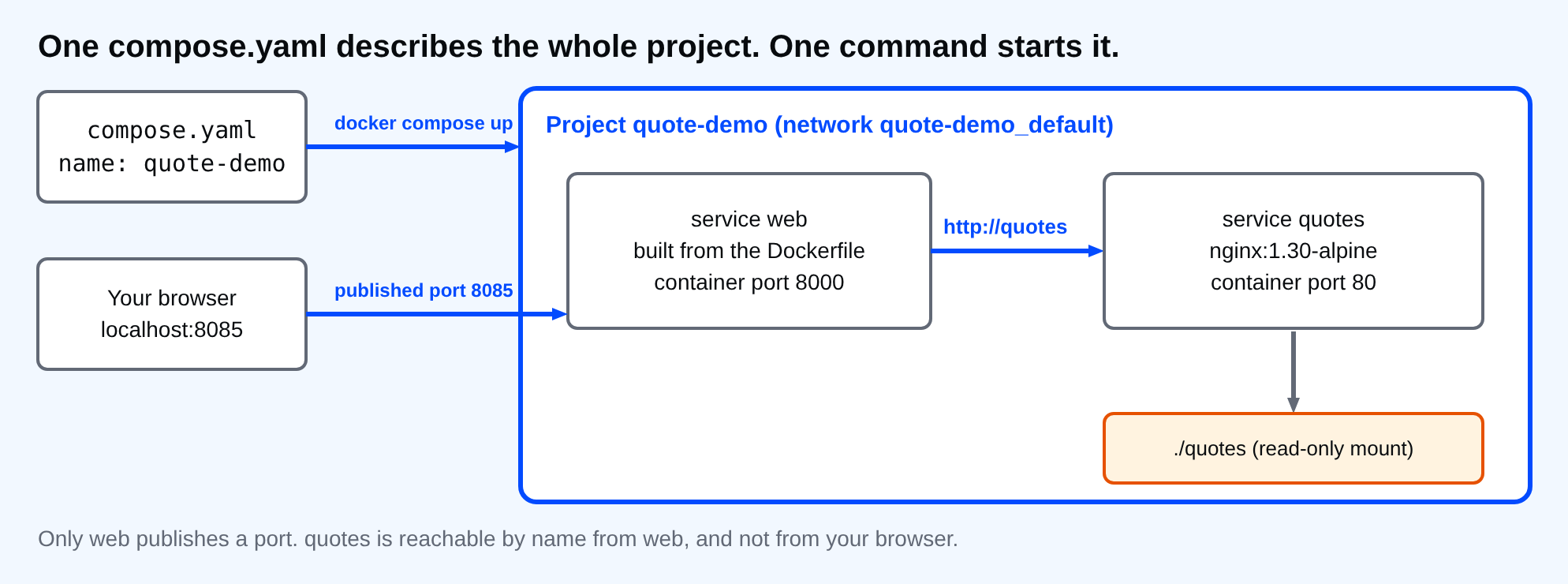
Read it from the top. name is the project name. Compose uses it to name the containers, the network and the built image, so containers become quote-demo-web-1 and quote-demo-quotes-1. Under services each key is one container. web is built from the Dockerfile in this folder (build: .), publishes your port 8085 to its port 8000, and gets the environment variable. quotes uses a ready-made image and mounts the quotes folder read-only, the same bind mount as lesson 7. depends_on makes Compose start quotes before web.
Look at the URL: http://quotes/quote.txt. The host name is the service name. Compose puts both services on one network that it creates, and that network resolves service names, as in lesson 8. You never created a network and you never wrote an IP address.
⚠ Warning: Indentation is the syntax in YAML. Use spaces, never tabs, and keep each level two spaces deeper than its parent. A wrong indent usually gives an error that points at the line, but sometimes it silently moves a setting to the wrong place. Run docker compose config to see how Compose read your file.
Start, check and stop
docker compose up -d --build
Network quote-demo_default Created
Container quote-demo-quotes-1 Started
Container quote-demo-web-1 Started
up creates the network, builds the image if needed, and starts everything. -d runs it in the background. --build forces a build, so a changed app.py is picked up. Compose prints more lines than shown here: the build steps, and on a first run the image download. Wait a second for the app to start, then check the services.
docker compose ps --format "table {{.Service}}\t{{.Image}}\t{{.State}}\t{{.Ports}}"
curl.exe -s http://localhost:8085
SERVICE   IMAGE               STATE     PORTS
quotes    nginx:1.30-alpine   running   80/tcp
web       quote-demo-web      running   0.0.0.0:8085->8000/tcp, [::]:8085->8000/tcp
Quote of the day: Read the logs first.
The answer came from web, which asked quotes over the network by name. Compose commands work on the project in the current folder, so run them from the folder that holds compose.yaml. Logs work per service or for all of them.
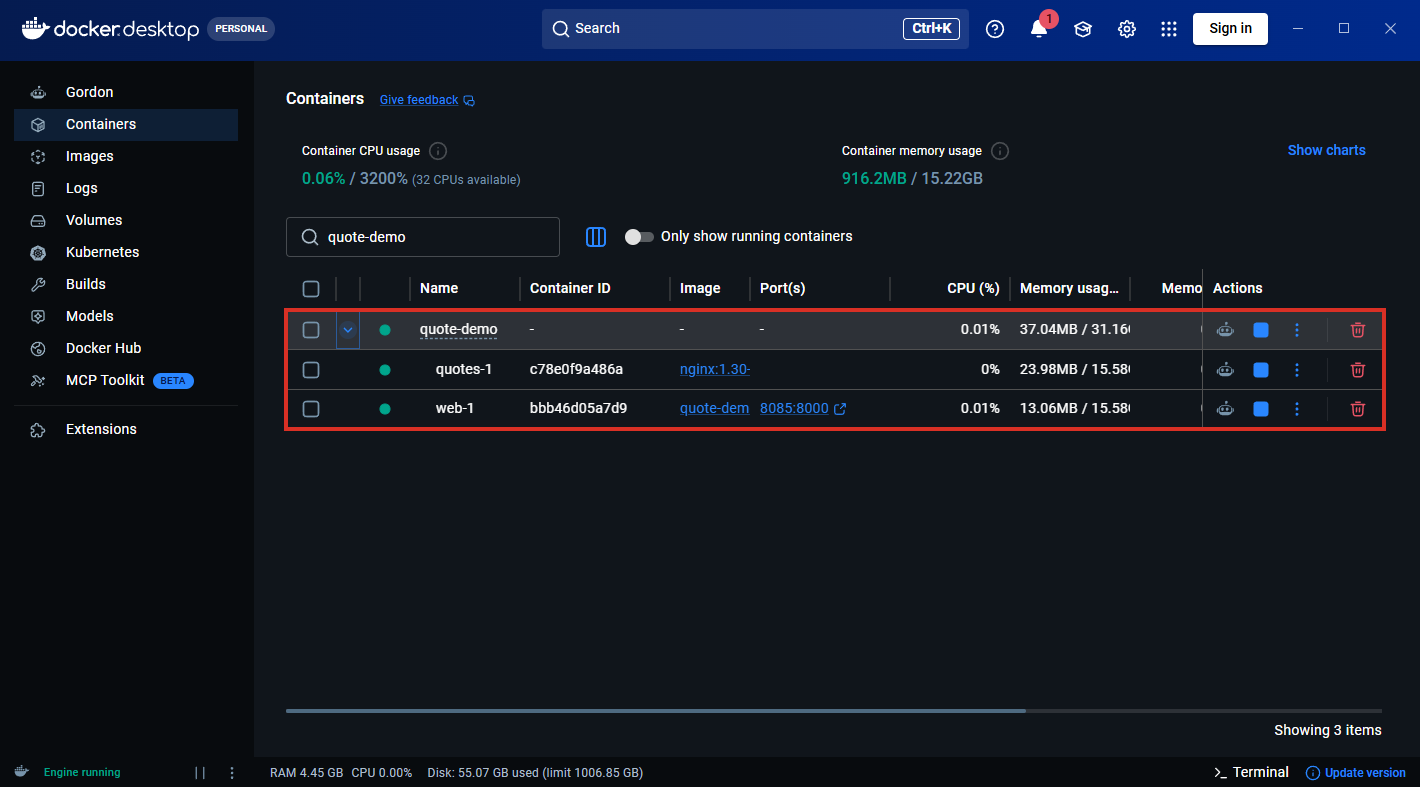
Docker Desktop groups the containers of a Compose project under the project name. Here the quote-demo group holds quotes-1 and web-1, and the published port 8085:8000 sits on the web row.
docker compose logs --no-log-prefix web
"GET / HTTP/1.1" 200 -
To see the dependency from the other side, stop the second service and ask again.
docker compose stop quotes
curl.exe -sS http://localhost:8085
 Container quote-demo-quotes-1 Stopping
 Container quote-demo-quotes-1 Stopped
curl: (52) Empty reply from server
The web server is up, but it has nothing to read from, so it drops the connection. depends_on only controls start order. It does not make web wait until quotes is ready, and it does not restart anything that fails later. A real app should handle that itself. Start it again and finish up.
docker compose start quotes
docker compose down
Container quote-demo-quotes-1 Started
Container quote-demo-web-1 Removed
Container quote-demo-quotes-1 Removed
Network quote-demo_default Removed
down removes the containers and the network. It keeps images and named volumes. Add -v to remove the named volumes too, which deletes their data.
💡 Tip: Linux and macOS: the same files and commands work unchanged, apart from using ./quotes paths, which you already did.
Compose names the network quote-demo_default. Why does web reach quotes without any port being published for it?
About
Describe a web app and the service it calls in one compose.yaml, start both with one command and read the result. After this, you can start, check and stop a small stack from a file.
Comments (0)
Sign in to commentNo comments yet.