
What Docker Is and Why Containers Exist
What an image, a container and the Docker engine are, how a container differs from a virtual machine and why a container starts clean every time. After this, you can say what docker run does before you type it.
Skip ahead: If you already know what an image and a container are, skip to "Why Windows needs a Linux layer", then go on to the next lesson.
Docker exists because of one sentence: "It works on my machine." The usual causes are boring. A different Python version. A library that is installed here and missing there. A setting somebody changed on one laptop and never wrote down. Docker packs an app together with everything it needs, so it starts the same way everywhere.
This lesson has no commands. It gives you the handful of words the rest of the course depends on. If you skip it, the next lessons turn into copy and paste, and you will not know whether "remove the container" also removes your data. (It does, unless you did something about it. Lesson 7 covers that.)
An image is the package, a container is the running copy
An image is a read-only package: a small Linux file system, your app's files, and the command that starts the app. A container is a running copy of an image. It is the same relation as a program file and a running program. You can start ten containers from one image. Delete a container and the image is still there. Delete the image and you can no longer start new containers from it.
Images come from a registry. Docker Hub is the default public one, and it is where nginx, python and postgres come from. You can also build your own image from a Dockerfile, which is a short text file of instructions. Lessons 5 and 6 cover both.
A container is not a small virtual machine
A virtual machine pretends to be a whole computer. It has its own kernel and its own operating system, and it needs a minute or more to boot. A container is an ordinary process on the host, fenced off by two Linux features. Namespaces limit what the process can see: its own files, its own processes, its own network. Control groups limit how much CPU and memory it may use. All containers share the host's kernel. That is why a container starts in about a second, and why ten of them do not need ten operating systems.
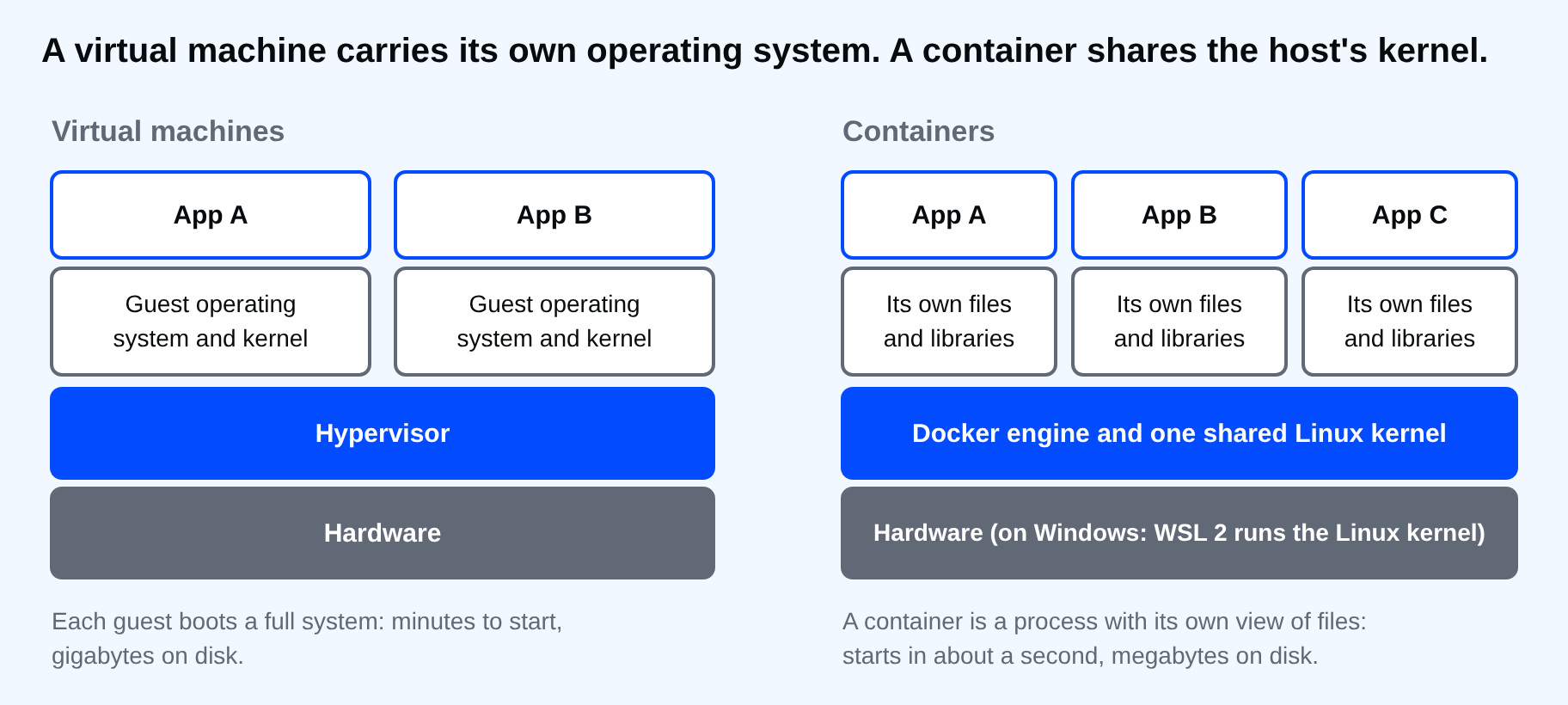
The price of sharing a kernel is that a container can only run software built for that kernel. Linux containers need a Linux kernel. That one fact explains the next section.
Why Windows needs a Linux layer
Docker Desktop on Windows starts a small Linux environment and runs your containers inside it. With the WSL 2 backend, which is what this course uses, that environment is a lightweight virtual machine that Windows manages for you. Your docker commands in PowerShell talk to the Docker engine inside it. You never log in to that machine, and you do not need to.
Windows containers exist as well. They run Windows software, they need a different Docker Desktop installation mode, and they are rare in beginner work. This course covers Linux containers only, and so does nearly every image you will pull.
The words you will see
| Word | What it is |
|---|---|
| Image | The read-only package a container starts from |
| Container | A running (or stopped) copy of an image |
| Registry | A server that stores images, such as Docker Hub |
| Dockerfile | A text file with the steps to build an image |
| Volume | Storage that lives outside any one container |
| Network | A private link that lets containers reach each other |
| Compose | A tool that starts several containers from one YAML file |
Do you need Docker at all?
Check before you install. Docker earns its place when an app needs specific versions of things, when you want a throwaway database for testing, or when someone else has to run what you built. It is a poor fit for a single script that uses only the standard library and runs on your own machine. Docker adds something new to learn, it takes memory for its Linux layer, and one wrong volume setting can cost you data. For that script, a plain install is simpler. That is my opinion, and it depends on the case.
⚠ Warning: A container is not a safe box for unknown software. It shares the host's kernel, so treat an image you do not know like any other program you download. Pull images from sources you can name.
💡 Tip: Remember the pair "image in, container out". When something confuses you later, ask whether you are looking at the package or at the running copy. Most beginner mistakes are one mixed up with the other.
If deleting a container throws away everything inside it, where should your database live?
About
What an image, a container and the Docker engine are, how a container differs from a virtual machine and why a container starts clean every time. After this, you can say what docker run does before you type it.
Comments (0)
Sign in to commentNo comments yet.